- Type
- Lesson plan
- Subject
- Computer Science & Coding
- Ages
- Ages 8-13
- Duration
- about 60 min (suggested)
How can programmers use loops and conditionals to break down complex tasks and solve community problems?
Overview
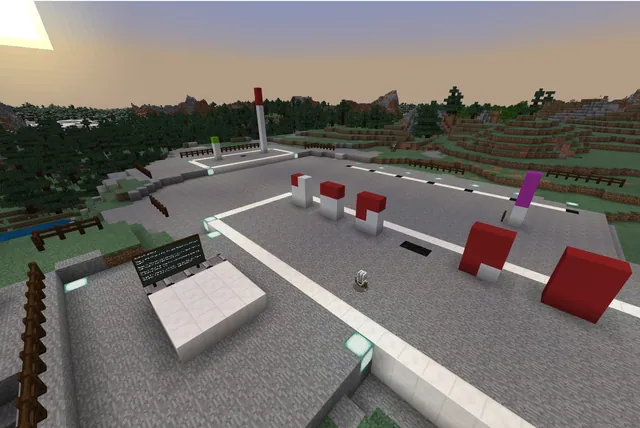
In this computer science lesson, students work as problem solvers to recover a missing town mural made up of nine scattered puzzle pieces. Acting as a sequel to the AI for Good Hour of Code lesson, this experience guides learners to break down complex tasks into clear, executable steps for their in-game Agent.
Students navigate a village setting and interact with non-player characters to trigger coding challenges in any order they like. By pressing C to access Code Builder, learners program the Agent with sequences, loops, while loops, nested loops, and conditionals to gather every puzzle piece and restore the village portrait.
Learning objectives
By the end of this lesson students will be able to:
- Program the Agent using sequences, loops, while loops, nested loops, and conditionals.
- Decompose complex navigation and puzzle tasks into precise step-by-step instructions.
- Iterate on incorrect code solutions using the in-game reset feature.
- Collect and place all nine puzzle pieces into display frames to restore the town mural.
Blocks and items used in this lesson


Key vocabulary
- Decomposition
- Breaking down a complex problem into smaller, manageable parts.
- Loop
- A programming structure that repeats a set of instructions multiple times.
- Nested Loop
- A loop placed inside another loop to repeat multi-layered patterns.
- While Loop
- A loop that continues running instructions as long as a specified condition remains true.
- Conditionals
- Coding statements that execute instructions only when a specific condition is met.
Before class
Lesson sequence
Suggested timing: about 60 minutes in total.
- Briefing10 min
Introduce the scenario: the town mural has been separated into nine puzzle pieces scattered across the village. Review how to open the Code Builder interface by pressing C and explain how to receive instructions by interacting with non-player characters (NPCs).
- Coding the Agent30 min
Students explore the village and speak with NPCs to launch challenges by pressing the START button. Learners can complete the nine tasks in any order, coding the Agent to retrieve puzzle pieces using sequences, conditionals, loops, and nested loops.
- Testing and Iteration10 min
When code does not work as intended, students return to the challenge NPC and press Try again to reset the puzzle. Learners inspect their code blocks, debug their logic, and run the program again.
- Mural Restoration and Reflection10 min
Students take their nine retrieved puzzle pieces to the frames to assemble the complete town mural. Conclude with a class discussion on how breaking problems down into loops helped make coding efficient.
Assessment: success criteria
- Student successfully codes the Agent to solve all nine puzzle challenges.
- Student demonstrates proper implementation of loops, while loops, and conditionals in Code Builder.
- Student uses the Try again feature to debug and iterate on flawed code solutions.
- Student mounts all nine puzzle pieces into the designated frames to reveal the finished town mural.
Differentiation
Guide students to solve one challenge at a time and use the NPC 'Try again' button to test individual movement sequences.
Challenge advanced students to minimize their code length by replacing repetitive sequences with nested loops and while loops.
Knowledge check
5 questions to check understanding after the lesson. Tap an answer to see if it is right; the score appears at the end.
1Which key must students press on the keyboard to open Code Builder?
Answer: B. Pressing the C key on the keyboard launches the Code Builder interface in Minecraft.
2How many puzzle pieces must students collect to restore the town mural?
Answer: A. The town mural was originally constructed from 9 puzzle pieces that are scattered around the village.
3What should a student do if they get stuck or make an error during a coding challenge?
Answer: C. Interacting with the NPC and clicking 'Try again' restarts that specific coding challenge.
4In what order are students required to complete the 9 coding challenges?
Answer: D. Students are permitted to tackle the 9 coding challenges in any order they prefer.
5Which lesson is intended to be completed as Part 1 before this activity?
Answer: B. The source identifies this lesson as a continuation of the AI for Good Hour of Code lesson.
Resources
- Lesson Plan & Solutions
- Lesson worldOpens the world page in Minecraft Education (sign-in with a school account may be needed).
Part of the Code for STEM curriculum
This is lesson 10 of 20 in Code for STEM.
- 3-D Fractions
- Aquarium
- Build a Dam
- Canyon Arch Bridge
- Chicken or the Egg
- Creeper Tower Test
- Energy Transfer
- Forces
- Hour of Code: AI for Good
- Minecraft Code Town
- Molecules
- Number Line Railroad
- Plate Motions
- Road Construction Ahead
- Scale
- Slope
- Surface Area and Perimeter
- Units of Measurement
- Walled Fortress
- Wave Properties
Frequently Asked Questions
Do students have to complete the 9 coding tasks in a fixed sequence?
No. Students can navigate the town freely and tackle the nine challenges in whichever order they prefer.
What happens if a student's Agent code fails to solve a challenge?
The student can talk to the NPC associated with that challenge and click the Try again button to reset the puzzle and edit their code.
What prior knowledge is suggested before starting this lesson?
This activity serves as Part 2 of the Hour of Code sequence, so students should ideally complete the AI for Good Hour of Code lesson beforehand.
Adapted from Minecraft Code Town by Minecraft Education on Minecraft Education, last updated Sep 16, 2023. This classroom version, the timings and the quiz were written by 9Minecraft Education.