How can we design an interactive branching game in Minecraft to help our classmates review what we learned?
Overview
Teaching others is one of the most effective methods for deepening student understanding. In this project, learners reinforce curriculum content by turning test review into an engaging, playable game. Working in pairs or triads, students craft interactive challenges that require them to think critically about subject matter, question design, and cause-and-effect outcomes.Learning objectives
By the end of this lesson students will be able to:
- Identify and write key review questions from recent classroom curriculum.
- Sketch a branching layout that routes players differently based on their answer choices.
- Construct an interactive review world using signs for questions and command blocks for answer consequences.
- Collaborate with peers to test, play, and provide feedback on each other's review worlds.
Blocks and items used in this lesson


Key vocabulary
- Command Block
- A special in-game block that runs coded commands when activated by redstone or player action.
- Branching Path
- A game layout where a player's choice determines the direction, room, or event they experience next.
- Rubric
- A scoring guide set up by the teacher and students to clarify project expectations and requirements.
Before class
Lesson sequence
- Model & Rubric Co-Creation
Introduce the sample model world. Walk students through an example question to show how answering correctly advances the player, while an incorrect choice triggers a different outcome. Work together as a class to co-create the evaluation rubric, agreeing on the minimum number of review questions required.
- Question Design & Storyboarding
Organize students into pairs or groups of three. Teams select curriculum concepts, draft their review questions, and sketch out their game floor plan on paper. Sketches must map out branching routes, detailing what happens to players when they choose correct or incorrect answers.
- World Building & Logic Setup
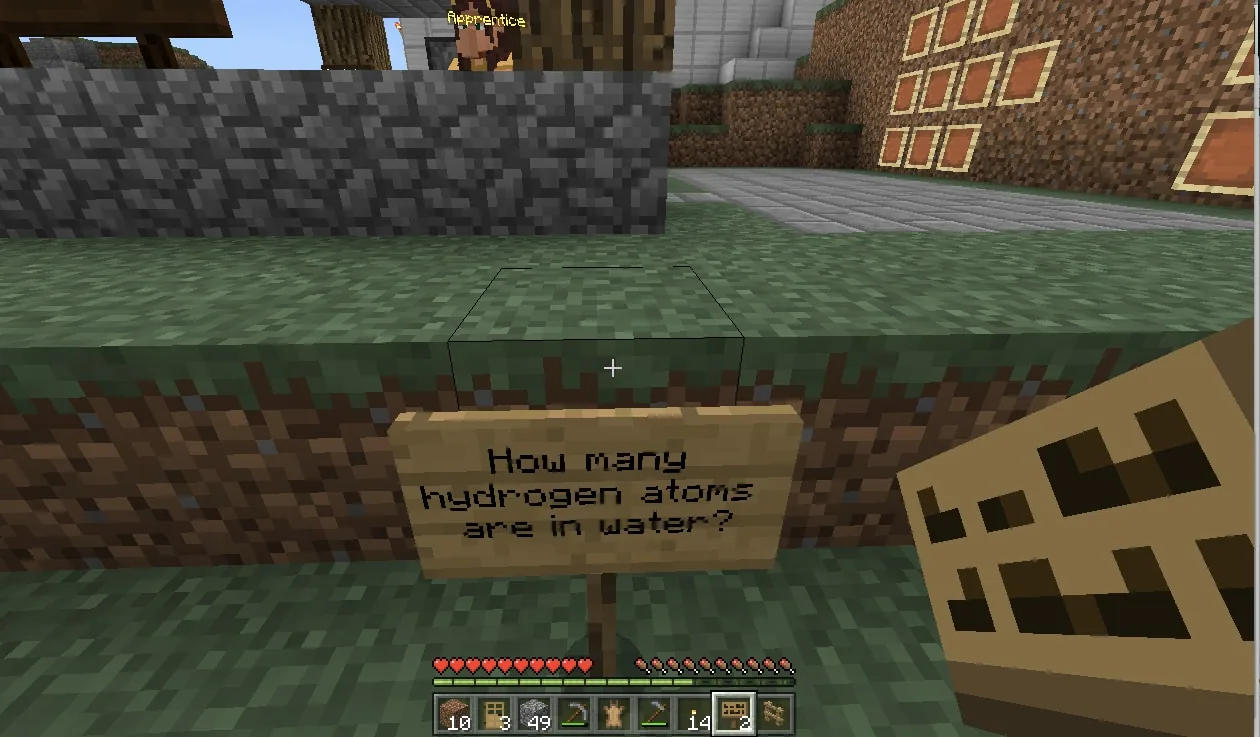
Students enter Minecraft to construct their review environments. Partners place signs to present each question and wire command blocks to execute consequences, teleporting or signaling players depending on the validity of their answers.
- Peer Playtesting & Review
Teams swap worlds to play through another group's review game. Students test the branching logic, answer the academic questions, and verify that the game meets the criteria outlined in the class rubric.
Assessment: success criteria
- The review world includes the minimum number of questions established in the class rubric.
- Questions accurately reflect target concepts from math, science, or reading and writing.
- Signs clearly present questions and command blocks properly trigger branching consequences.
- Students actively collaborate in their assigned groups and complete another team's review world.
Differentiation
Provide pre-written command block text prompts and a simple two-pathway template for groups needing technical help.
Encourage advanced teams to design multi-tier branching paths with unique game challenges for each incorrect response.
Knowledge check
5 questions to check understanding after the lesson. Tap an answer to see if it is right; the score appears at the end.
1What is the primary goal of creating a review world in this lesson?
Answer: A. The lesson focuses on students reinforcing curriculum concepts by designing an interactive review game for classmates.
2Which in-game item is primarily used to display the review questions to players?
Answer: B. The lesson plan specifies using signs to present questions and guide players through the game.
3What makes the review game 'branching'?
Answer: C. Branching paths mean that selecting an answer determines the specific direction or outcome a player experiences.
4What tool in Minecraft is programmed to deliver consequences for right or wrong answers?
Answer: D. Students write and configure command blocks to notify players or route them based on their answers.
5What must students do during the final assessment phase in addition to building?
Answer: B. A core assessment expectation is that students enter and participate in another group's world to review content.
Resources
Frequently Asked Questions
What subjects can this review activity support?
This framework works across multiple subject areas, including Math & Economics, Science, and Reading and Writing, allowing students to review whatever academic content they are currently studying.
Why should students participate in creating the rubric?
Co-creating the rubric helps students take ownership of project expectations, ensuring they understand requirements like the minimum number of questions and branching mechanics before they begin building.
How can teachers support students who are new to command blocks?
Teachers should provide a model world and demonstrate basic command syntax, showing how simple teleportation or message commands activate when a player steps on a plate or presses a button.
Adapted from Crafting Your Review by Mesha Daniel on Minecraft Education, last updated Feb 3, 2018. This classroom version, the timings and the quiz were written by 9Minecraft Education.