- Type
- Lesson plan
- Subject
- History & Social Studies
- Grade
- Early years (Pre-K to Grade 2)Primary (Grades 3-5)Middle school (Grades 6-8)High school (Grades 9-12)
- Ages
- All ages
- Duration
- 1 hour
- Level
- Beginner
How can the landmarks of a city tell the stories of its history, people, and daily life?
Overview
Urban landmarks provide a tangible window into a city's past, culture, and growth. In this lesson, students explore the central business district of Melbourne, Victoria, to understand how iconic architecture, transportation hubs, and public spaces reflect historical events and community identity.
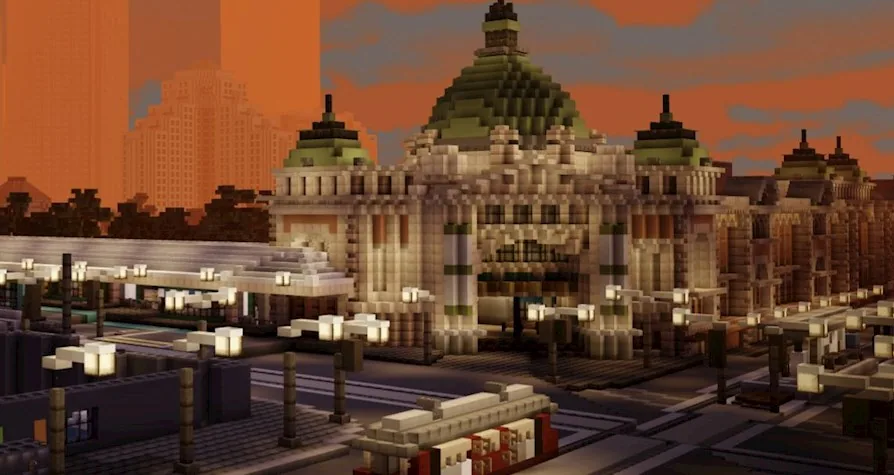
Using Mini Melbourne, a full-scale 3D model of the city, students navigate real-world streetscapes starting from Flinders Street Station. Teams conduct research, record visual evidence, and apply communication tools such as in-game portfolios, non-player characters, or external writing projects to guide others through the city.
Learning objectives
By the end of this lesson students will be able to:
- Identify key historical landmarks across central Melbourne and explain their significance.
- Plan and construct an organized tour or interactive experience starting at Flinders Street Station.
- Summarize factual information gathered from research resources and virtual exploration.
- Collaborate effectively in small groups using in-game documentation tools to present findings.
Blocks and items used in this lesson


Key vocabulary
- Landmark
- A recognizable natural or human-made feature that marks a specific location and often holds historical importance.
- CBD
- Central Business District; the commercial and geographic heart of a city.
- Non-Player Character (NPC)
- An in-game character controlled by the program or teacher that can deliver text clues, dialogue, and resource links.
- Portfolio
- An in-game tool used alongside the camera to store, caption, and export captured photographs.
Before class
Lesson sequence
Suggested timing: about 60 minutes in total.
- Research and Orientation10 min
Introduce modern Melbourne, highlighting its history, public transit network, and prominent public spaces. Have students briefly consult research materials or Google Street View alongside the virtual map, noting Flinders Street Station as the central starting anchor for their work.
- In-World Navigation15 min
Students log into the Mini Melbourne map in small teams and locate Flinders Street Station. They navigate the surrounding streets to locate at least six major sites, buildings, or statues, evaluating transit options such as walking, trams, or trains.
- Task Development25 min
Groups build out their chosen project format using the facts they gathered:
- Tour Guides: Document six landmarks using the camera and portfolio, or program NPCs with factual summaries and resource links for a specific audience.
- Tourist Narratives: Write a day-in-the-life story of a visitor departing Flinders Street Station, supported by in-game photo illustrations or comic panels.
- Scavenger Hunts: Hide clues or set timed challenges using NPCs that provide information or rewards at significant sites.
- Promotional Media: Compile captured images and factual notes to design a tourism brochure or website layout.
- Sharing and Expo10 min
Teams present their tours, narratives, or interactive hunts to classmates. Conclude with a discussion on how physical monuments reflect historical events, considering how these artifacts could be featured in a wider school showcase.
Assessment: success criteria
- The student team incorporates at least six distinct Melbourne landmarks into their chosen project.
- Flinders Street Station is clearly identified and utilized as the primary starting hub.
- Information presented at each stop contains accurate historical or geographic facts derived from research.
- In-game tools, such as the camera, portfolio, or NPCs, are used purposefully to convey information.
Differentiation
Allow students to take photographs with the in-game camera and compile a simple portfolio album with short written captions.
Have students add custom commands to NPCs to distribute rewards during a timed, fifteen-minute scavenger hunt challenge.
Knowledge check
5 questions to check understanding after the lesson. Tap an answer to see if it is right; the score appears at the end.
1What is the recommended starting location for students exploring Mini Melbourne?
Answer: C. Flinders Street Station is centrally located and serves as the primary starting landmark for the activities.
2How is the Mini Melbourne world scaled relative to the real city?
Answer: A. The source specifies that Mini Melbourne is a 1 to 1 scale 3D representation of the CBD.
3How many key sites or landmarks should tour groups plan to highlight?
Answer: C. The source instructs students to research and feature six key sites, buildings, and spaces.
4Which tool can younger students use to assemble a photo-illustrated tour book in the game?
Answer: B. The source states that younger students can record scenes using the camera and portfolio tools.
5What can older students add to non-player characters (NPCs) when designing a scavenger hunt?
Answer: A. Older students may create NPC commands that give rewards when players correctly answer landmark questions.
Part of the Cities and Civics curriculum
This is lesson 11 of 12 in Cities and Civics.
- Egypt Toybox Lesson 1 of 5
- Black Wall Street
- Egypt
- Jamestown
- Kyiv: Craft a City Guidebook
- Mesopotamia
- Peter Is Here: AI for Cultural Heritage
- Rome
- The City Of Florence (Italy)
- The Round City of Baghdad
- Touring Mini Melbourne
- Washington D.C.
Frequently Asked Questions
Can this lesson be adjusted if students do not have time to complete every activity option?
Yes. The tasks are designed so that a class can either progress through them sequentially or divide into small teams where each group selects one specific project track, such as a scavenger hunt or a brochure.
What supplemental tools can students use alongside Minecraft for these tasks?
Students can draw reference information from Google Street View and research documents, while older learners can use comic-making software or website design tools to assemble their final presentations.
Adapted from Touring Mini Melbourne by DET Victoria on Minecraft Education, last updated Jul 14, 2025. This classroom version, the timings and the quiz were written by 9Minecraft Education.