How can we document and preserve the cultural and architectural heritage of a city?
Overview
Documenting and preserving cultural heritage allows communities to understand their shared history and architectural achievements. In this lesson, students explore the capital of Ukraine, investigating notable landmarks within central Kyiv to discover why preserving cultural and historical sites matters in both the physical and digital realms.
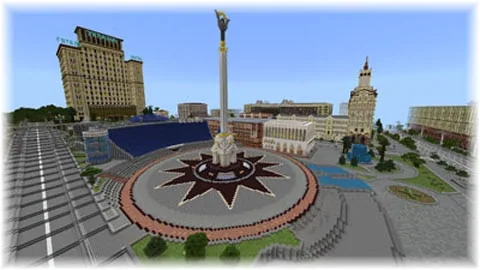
Using a detailed Minecraft world built by creator Yevhenii Korol, students navigate city streets to photograph landmarks with the camera tool. They then conduct external internet research to gather historical facts and compile their discoveries into a digital guidebook using the book and quill, ultimately exporting their work as a PDF.
Learning objectives
By the end of this lesson students will be able to:
- Navigate the digital city centre of Kyiv to identify significant cultural landmarks.
- Photograph at least five cultural or architectural sites using the in-game camera tool.
- Conduct web research to gather accurate historical details about each chosen location.
- Synthesize written notes and photographs into a book and quill to export as a PDF guidebook.
Blocks and items used in this lesson


Key vocabulary
- Cultural heritage
- The legacy of physical monuments, buildings, and traditions passed down through generations.
- Architectural site
- A structure or location recognized for its design, construction, or historical significance.
- Camera Tool
- An in-game item used in Minecraft: Education Edition to capture photos of structures and scenes.
- Book and Quill
- An item that allows players to write pages of text, insert pictures, and compile written documents.
Before class
Lesson sequence
Suggested timing: about 60 minutes in total.
- Warm-up and Context10 min
Introduce Kyiv as the capital of Ukraine. Guide a brief discussion using prep questions: identify where Ukraine and Kyiv are located, discuss what cultural heritage means, and consider why documenting historical sites is important.
- Virtual City Exploration15 min
Students load into the Kyiv world and navigate the city centre. Working individually or collaboratively, students locate and photograph at least five distinct cultural or architectural sites using the camera tool.
- Online Research and Documentation25 min
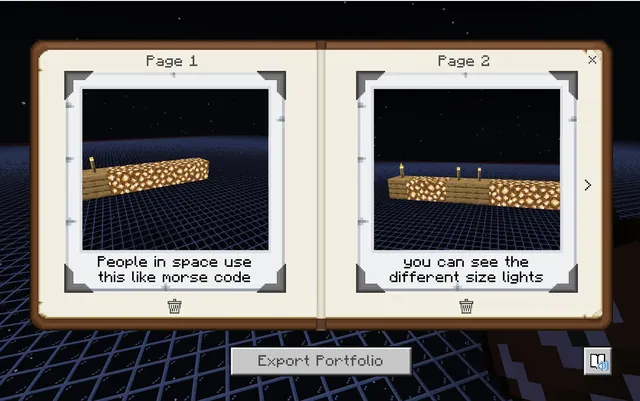
Students research each chosen landmark on the internet to find verified historical and cultural facts. Using the book and quill tool, they insert their photos and write informational descriptions for each site.
- Export and Review10 min
Learners finalize their work, sign the book and quill, and export their finished guidebook as a PDF file to share with the teacher.
Assessment: success criteria
- Student captures clear photographs of at least five distinct architectural or cultural sites in Kyiv.
- Guidebook includes accurate, researched information explaining the significance of each selected site.
- The project is properly compiled in a book and quill and exported as a digital PDF document.
Differentiation
Provide students with a pre-selected list of prominent landmarks in Kyiv to focus their navigation and research efforts.
Challenge students to document additional sites beyond the five required landmarks and include detailed architectural notes.
Knowledge check
5 questions to check understanding after the lesson. Tap an answer to see if it is right; the score appears at the end.
1Which European capital city serves as the setting for this Minecraft lesson?
Answer: B. The lesson specifically focuses on exploring and documenting the city of Kyiv in Ukraine.
2What is the minimum number of cultural or architectural sites students must include?
Answer: C. The student instructions state that learners must photograph and research at least five sites.
3Which in-game tool is used to record text and compile the guidebook?
Answer: A. Students record information and organize their photos using the book and quill tool.
4Who created the downloadable Minecraft world used in this lesson?
Answer: D. The source credits the world build to Kyiv resident Yevhenii Korol.
5In what format should the final guidebook be exported for submission?
Answer: B. Students are instructed to save and export their completed guidebook as a PDF file.
Resources
- Lesson package (.zip)Everything the author attached to this lesson in one download.
- Educator PPTA PowerPoint to use with Students.
- Translated Educator MaterialsTranslated Educator Materials
Part of the Cities and Civics curriculum
This is lesson 5 of 12 in Cities and Civics.
- Egypt Toybox Lesson 1 of 5
- Black Wall Street
- Egypt
- Jamestown
- Kyiv: Craft a City Guidebook
- Mesopotamia
- Peter Is Here: AI for Cultural Heritage
- Rome
- The City Of Florence (Italy)
- The Round City of Baghdad
- Touring Mini Melbourne
- Washington D.C.
Frequently Asked Questions
Do students need an active web connection during this lesson?
Yes. Students must research accurate historical and cultural details on the internet to write descriptions for the landmarks they photograph in the world.
What Minecraft tools are required for students to finish the project?
Students need the camera tool to take pictures of the landmarks and the book and quill to record information and export the final PDF.
Adapted from Kyiv: Craft a City Guidebook by Minecraft Education on Minecraft Education, last updated Jun 10, 2025. This classroom version, the timings and the quiz were written by 9Minecraft Education.