
- Type
- Lesson plan
- Ages
- Ages 6-13
- Duration
- 45 min
- Level
- Beginner
- Includes
- Quiz: 5 questions
Why must speed limits and highway signage respond rapidly to changes in weather?
Overview
Road safety relies on rapid, clear communication to drivers when environmental hazards occur. Developed alongside Lower Thames Crossing engineers, this lesson illustrates why vehicle speed limits must adapt to adverse weather and highlights the multidisciplinary teams working to keep modern roadways safe.
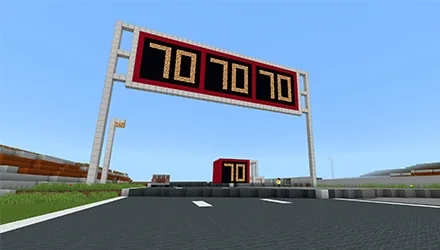
Students enter a digital workspace featuring Highways England offices and an active road development. After gathering career and infrastructure facts from non-player characters, learners open the MakeCode editor to write conditional scripts that adjust overhead gantry speed signs according to sunshine, rain, and thunder.
Learning objectives
By the end of this lesson students will be able to:
- Program variable speed limit signs in MakeCode that react to sunny, rainy, and stormy weather.
- Identify key safety roles and engineering careers associated with major road network operations.
- Explain how block-based programming commands control interactive environment systems in Minecraft.
Blocks and items used in this lesson


Key vocabulary
- Gantry
- An overhead framework spanning a motorway used to show digital signs and speed limits to drivers.
- MakeCode
- A visual coding environment used to build scripts that control actions and elements inside the game.
- Non-Player Character (NPC)
- An in-game character controlled by the computer that offers dialogue, role descriptions, and instructions.
Before class
Lesson sequence
Suggested timing: about 45 minutes in total.
- Office Exploration5 min
Learners spawn inside the Highways England offices. Give them five minutes to speak with the various office NPCs to collect background details. Instruct students to conclude their tour at the blue doorway by talking to the NPC named Adam, cautioning them not to click any teleport options yet.
- Road Scheme Field Visit10 min
Students interact with the Road Signs Game NPC in the corridor and select the Key Stage 2 button to travel to the virtual construction scheme. Starting near the portacabin beside the NPC named Selina, learners take ten minutes to talk to on-site personnel about their career roles before gathering beneath the overhead gantry where the speed signs are clearly visible.
- Weather Sign Programming30 min
Direct students to launch MakeCode by pressing the C key or typing /code into chat. Following the video walkthrough instructions, learners build scripts that set the gantry signs to 70 mph in sunny conditions, 60 mph in rain, and 50 mph during thunderstorms. Fast finishers should delete their code blocks and rebuild the program independently.
Assessment: success criteria
- The student successfully opens MakeCode and creates working scripts for sunny, rainy, and thunderous weather.
- The overhead gantry signs update correctly to 70 mph, 60 mph, and 50 mph based on the weather conditions.
- The student can name at least one career role encountered during the road scheme tour.
Differentiation
Provide a simple written reference table linking sunny weather to 70 mph, rain to 60 mph, and thunder to 50 mph while pausing the tutorial video at key code assemblies.
Have students wipe their coding canvas and reconstruct the entire conditional weather script from memory without referring to the video.
Knowledge check
5 questions to check understanding after the lesson. Tap an answer to see if it is right; the score appears at the end.
1What speed limit should the gantry sign display during rain?
Answer: B. The lesson instructions specify that rain requires a 60 mph limit.
2Which keyboard shortcut opens the MakeCode editor in the game?
Answer: C. Pressing the C key opens the in-game MakeCode interface.
3Which NPC stands beside the blue doorway at the end of the office tour?
Answer: A. Students are told to conclude Part 1 by speaking with Adam near the blue doorway.
4Which button must students choose when talking to the Road Signs Game NPC?
Answer: D. The activity instructions state that students must click the Key Stage 2 button to teleport.
5What speed limit must be coded for stormy thunder conditions?
Answer: B. The programmed speed limit for thunder is 50 mph.
Frequently Asked Questions
What should students do if the C key does not open the coding screen?
Students can open their coding interface manually by pressing the chat key and entering the slash command /code.
What is the recommended extension for students who finish the coding activity early?
Have students clear their workspace and rewrite the weather sign program from scratch to reinforce their understanding of MakeCode blocks.
Adapted from LTC Speed Safety Junior Game by Block Builders on Minecraft Education, last updated Sep 27, 2021. This classroom version, the timings and the quiz were written by 9Minecraft Education.







































