
- Type
- Lesson plan
- Topics
- Art and DesignGeography
- Grade
- Early years (Pre-K to Grade 2)Primary (Grades 3-5)Middle school (Grades 6-8)High school (Grades 9-12)
- Ages
- Ages 6-18
- Duration
- 45 min
- Level
- Beginner
- Includes
- Quiz: 5 questions
How can we design future transport systems and tunnel environments that balance human travel with ecological habitats?
Overview
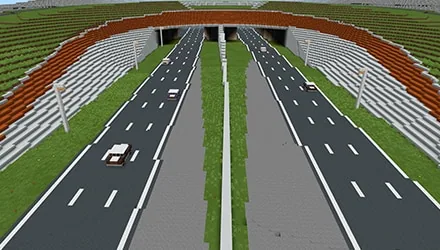
Using the Lower Thames Crossing scheme as a backdrop, students step into the role of design interns to explore major transport and environmental challenges. They think critically about the future of infrastructure by developing creative concepts for upcoming roadways, river crossing methods, and wildlife spaces situated directly above road tunnels.
Students work within a dedicated Minecraft Education world to plan and construct their responses to three prompt boards. Using in-game structure blocks, they align bounding boxes around their creations to export their finished designs as 3D files to their desktop computers.
Learning objectives
By the end of this lesson students will be able to:
- Design creative transport solutions and road concepts suited for travel 50 years in the future.
- Construct a designated wildlife habitat located above a tunnel structure.
- Adjust and utilize a structure block to export completed 3D designs to a desktop.
Blocks and items used in this lesson


Key vocabulary
- Lower Thames Crossing
- A major infrastructure project used as the real-world backdrop for these design challenges.
- Design Intern
- The assigned role students assume while investigating and solving design briefs in the world.
- Structure Block
- A specialized block used to set boundary lines and export 3D models to a computer desktop.
- Ecology
- The relationship between living organisms and their environment, applied here through wildlife habitat design.
Before class
Lesson sequence
Suggested timing: about 45 minutes in total.
- Briefing and Challenge Selection10 min
Students load into the Lower Thames Crossing world, locate the instruction boards at the spawn area, and adopt the role of design interns. They review the three available challenges and choose which topic to address first.
- Creative Building Phase25 min
Learners spend time planning and building their design solutions inside the designated world area, focusing on future roads, river transit 50 years ahead, or tunnel-top wildlife spaces.
- Structure Block 3D Export10 min
Students locate the structure block next to their build zone, right-click to adjust the boundary lines around their structure, and right-click again to export their finished 3D model directly to their desktop.
Assessment: success criteria
- Student designs and constructs a build that directly responds to one of the three challenge questions.
- Student incorporates themes of future transport, river travel, or ecological habitats for wildlife.
- Student configures a structure block to encompass their build and successfully exports the 3D file.
Differentiation
Allow learners who need extra guidance to focus entirely on one prompt, such as creating green space for wildlife, before exploring advanced road concepts.
Challenge advanced students to complete all three design challenges across the site and adjust structure block dimensions to export multiple models.
Knowledge check
5 questions to check understanding after the lesson. Tap an answer to see if it is right; the score appears at the end.
1Which design challenge is featured on the in-game instruction boards?
Answer: B. The source explicitly lists developing the area above the tunnel to create an area for wildlife as one of the guiding challenges.
2What role are students given during this project?
Answer: A. The introduction states that students are given the role of 'design intern'.
3What is the function of the structure block provided in the world?
Answer: C. The source explains that the structure block allows students to save their designs as 3D files on their desktop.
4What action must a student perform on the structure block to adjust the build box or export?
Answer: B. The instructions note that students right-click on the block to adjust the box and right-click to export.
5Where is this game specifically intended to be played according to the lesson details?
Answer: B. The source notes that this game is designed to be used in lunchtime and after-school clubs.
Frequently Asked Questions
How long should students spend on each design challenge?
The timeline is flexible. Teachers running lunchtime or after-school clubs can choose to spend a single 45-minute session, several weeks, or even a full school term on each challenge depending on their schedule.
Can students export objects built outside the structure block boundary lines?
No, the in-game instructions explicitly state that only designs built inside the lines created by the structure block can be exported.
Adapted from LTC Creative Game by Block Builders on Minecraft Education, last updated Jan 11, 2022. This classroom version, the timings and the quiz were written by 9Minecraft Education.












































