
- Type
- Lesson plan
- Topics
- Art and DesignGeography
- Grade
- Early years (Pre-K to Grade 2)Primary (Grades 3-5)Middle school (Grades 6-8)High school (Grades 9-12)
- Ages
- Ages 6-18
- Duration
- 45 min
- Level
- Beginner
- Includes
- Quiz: 5 questions
How can future road systems be designed to balance advanced transport technology with the protection of natural roadside habitats?
Overview
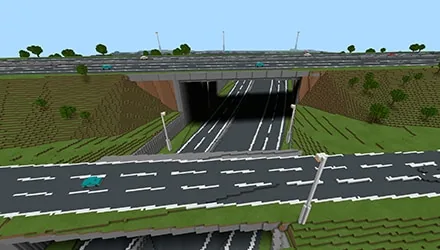
In this project, learners step into the role of design interns exploring the real-world backdrop of the A428 road development scheme. They tackle engineering, technological, and environmental questions centered on future vehicle design, smart motorway infrastructure, and natural habitat preservation along road corridors.Learning objectives
By the end of this lesson students will be able to:
- Design creative road or vehicle concepts tailored to future transit needs.
- Build roadside features that support and encourage local wildlife habitats.
- Configure a structure block to frame and export finished builds as 3D desktop files.
Blocks and items used in this lesson

Key vocabulary
- Structure Block
- An in-game utility block that outlines a specific area to save and export creations as 3D files.
- Non-Player Character (NPC)
- A computer-controlled character that offers dialogue, hints, or instructions to players.
- Habitat
- The natural environment where living organisms find shelter, food, and breeding grounds.
Before class
Lesson sequence
Suggested timing: about 45 minutes in total.
- Office Induction5 min
Students spawn inside the Highways England offices as design interns. Allow them five minutes to walk through the space and speak with NPCs to gather context. Direct everyone to assemble around the large office computer at the back of the room without clicking it until instructed.
- Site Briefing at Blackcat Roundabout10 min
Instruct learners to interact with the computer to teleport to the Blackcat Roundabout along the A428. Have students examine the instruction boards and choose one of the three challenge themes: future vehicles, smart motorway systems, or roadside natural habitats.
- Design and Construction20 min
Students use Creative mode to construct their responses to the selected challenge. Depending on your club schedule, learners may tackle one prompt per session or spend multiple weeks developing detailed systems.
- Exporting 3D Models10 min
Introduce the structure block provided on site. Students right-click the block to resize the outline around their creation, confirm all parts fit inside the bounding box, and export their finished build directly to the desktop as a 3D file.
Assessment: success criteria
- Student build clearly addresses at least one of the three source prompts regarding vehicles, highway tech, or natural habitats.
- The model demonstrates thoughtful planning within Creative mode to solve the chosen infrastructure challenge.
- The creation sits completely inside the structure block boundaries and is successfully exported to the desktop.
Differentiation
Allow students to work in pairs on a single challenge and provide hands-on help resizing the structure block boundaries.
Have students tackle all three prompts over multiple sessions, linking their vehicle, motorway tech, and habitat designs into a unified network.
Knowledge check
5 questions to check understanding after the lesson. Tap an answer to see if it is right; the score appears at the end.
1What role do students take on when participating in this project?
Answer: B. The lesson specifically assigns learners the role of design intern.
2Where do players first spawn when opening the lesson world?
Answer: C. Part 1 of the activity starts with students spawning into the Highways England offices.
3Which station do students gather around to teleport to the road scheme?
Answer: A. Students gather at the large computer at the end of the offices before moving to the A428 scheme.
4What is the role of the structure block included in the world?
Answer: B. Right-clicking the structure block allows students to define bounding lines and export their design as a 3D file.
5Which of these topics is one of the three core design challenges?
Answer: C. The guiding questions ask what students would like to see along motorways to promote natural habitats.
Frequently Asked Questions
How should this lesson be scheduled if 45 minutes is not enough time?
The activity is built flexibly for lunchtime and after-school clubs. You can spread the three challenges across multiple weeks or terms, letting students focus on one theme at a time.
What happens if a student build extends outside the structure block boundary?
Only blocks placed inside the bounding box lines will export. Students should right-click the structure block to expand the box coordinates before exporting their file.
Adapted from A428 Creative Game by Block Builders on Minecraft Education, last updated Sep 27, 2021. This classroom version, the timings and the quiz were written by 9Minecraft Education.












































