
- Type
- Lesson plan
- Topics
- Art and DesignGeography
- Grade
- Early years (Pre-K to Grade 2)Primary (Grades 3-5)Middle school (Grades 6-8)High school (Grades 9-12)
- Ages
- Ages 6-18
- Duration
- 45 min
- Level
- Beginner
- Skills
- Creativity
- Includes
- Quiz: 5 questions
How can creative infrastructure design honor ancient history, support wildlife, and enable sustainable travel?
Overview
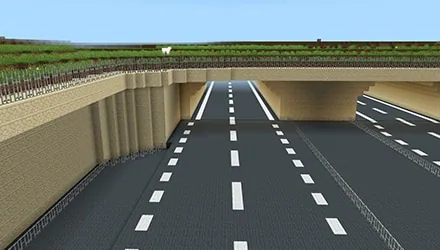
In this project, students explore how major civil engineering schemes must balance modern transport demands with environmental and historical preservation. Set around the iconic A303 corridor near Stonehenge, students consider how thoughtful infrastructure can protect ancient landscapes while serving travelers and local ecosystems.
Using Minecraft Education in creative mode, learners step into the shoes of design interns. Starting from a modern office environment, they teleport to the project site to tackle challenges focused on heritage interpretation, ecological habitats, or sustainable mobility, before exporting their 3D work using structure blocks.
Learning objectives
By the end of this lesson students will be able to:
- Explore the virtual Highways England office and interact with non-player characters to gather project context.
- Design a creative 3D structure that addresses passenger storytelling, wildlife biodiversity, or sustainable transit.
- Configure a structure block to bound and export completed builds as 3D desktop models.
Blocks and items used in this lesson

Key vocabulary
- Structure Block
- A specialized Minecraft block used to set boundaries around builds and export them as 3D models.
- Biodiversity
- The variety of plant and animal species living within a specific natural environment or habitat.
- Sustainable Transport
- Travel methods and vehicles designed to protect the environment and conserve energy resources.
- Non-Player Character (NPC)
- An automated in-game character that provides information, greetings, or instructions when approached.
Before class
Lesson sequence
Suggested timing: about 45 minutes in total.
- Office Induction5 min
Students spawn inside the Highways England offices as design interns. Allow them five minutes to interact with office NPCs to collect information and greetings. Direct students to gather by the large computer screen at the back of the office and wait without clicking it.
- Site Briefing & Challenge Selection5 min
Students interact with the computer to teleport to the A303 Stonehenge Road scheme. Have them read the instruction boards and choose one of three design challenges: historic storytelling for travelers, biodiversity habitats, or future sustainable transit.
- Creative Building Session30 min
Learners enter creative mode to construct their solutions along the designated project corridor. Encourage them to plan their scale and layout carefully based on their selected theme, whether building roadside heritage installations, wildlife corridors, or green transport networks.
- Structure Block Export5 min
Direct students to locate the structure block provided in the world. Have them right-click the block, adjust the bounding box coordinates to encompass their build, and export their finished creation as a 3D file saved to their computer desktop.
Assessment: success criteria
- Student navigates the office spawn area and successfully teleports to the road scheme using the central terminal.
- Student constructs an original 3D build in creative mode that directly addresses one of the three project design challenges.
- Student properly positions the structure block bounding box around their completed design and exports the 3D file.
Differentiation
Pair students together to focus on a single small build, such as an informational milestone or simple bird sanctuary.
Prompt advanced students to design an interconnected system that combines both a wildlife habitat and an innovative future transport concept.
Knowledge check
5 questions to check understanding after the lesson. Tap an answer to see if it is right; the score appears at the end.
1What role are students assigned when they enter the world?
Answer: B. The lesson introduces students specifically as design interns tasked with solving road scheme challenges.
2Where do students first appear when the game loads?
Answer: C. Part 1 of the activity specifies that students spawn into the Highways England offices to meet NPCs.
3Which of these is one of the three core challenges offered to students?
Answer: A. The guiding questions explicitly challenge students to create habitats that increase biodiversity along the scheme.
4How do students export their finished designs from the world to their desktop?
Answer: D. The source states that students right-click the structure block to adjust the bounding box lines and export a 3D file.
5What instruction must students follow at the end of their first five minutes in the office?
Answer: B. Students are instructed to gather at the large computer at the end of the office and wait for the teacher before teleporting.
Frequently Asked Questions
Can this lesson be used across multiple club sessions or terms?
Yes. The project is designed flexibly for lunch or after-school clubs, and students can spend single sessions, multiple weeks, or entire terms completing different design challenges.
What happens if a student build is too large for the structure block?
Students must right-click the structure block and edit the coordinate dimensions so that the boundary box encompasses the entire build, as only objects inside the lines are exported.
Do students need to finish all three challenge prompts during one sitting?
No. Students select one challenge to tackle first and can progress through the remaining challenges in subsequent club meetings.
Adapted from A303 Creative Game by Block Builders on Minecraft Education, last updated Sep 27, 2021. This classroom version, the timings and the quiz were written by 9Minecraft Education.












































