- Type
- Lesson plan
- Ages
- Ages 11-13
- Includes
- Quiz: 5 questionsLesson files
How can spreadsheet formulas and data modeling help us plan and budget a real-world building project?
Overview
In this lesson, students explore the practical power of digital spreadsheets by applying math and modeling to a simulated real-world budget challenge. Instead of simply entering raw values, learners use formulas, cell ranges, and lookup functions to calculate expenses and evaluate their financial planning.
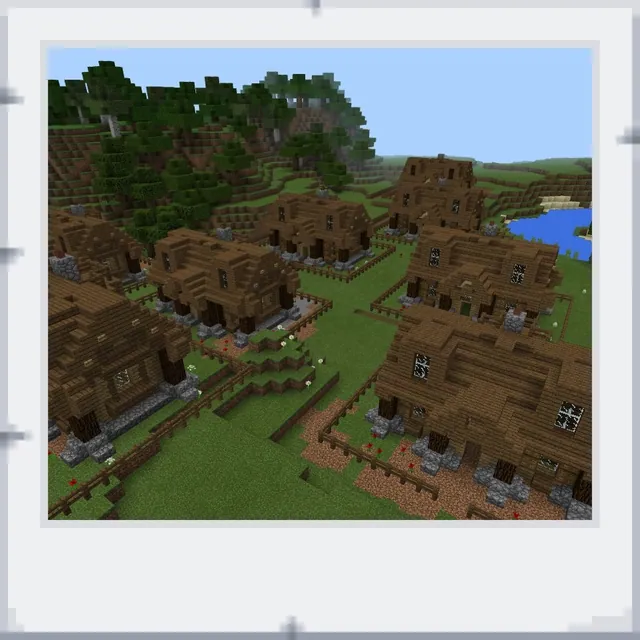
Using Minecraft Education's Town Template, each pupil receives an assigned building plot to construct an 8x8 residence. As they craft both the exterior and interior, they must track their materials against dedicated price lists in an Excel workbook, ensuring their virtual build accurately matches their spreadsheet calculations.
Learning objectives
By the end of this lesson students will be able to:
- Apply spreadsheet formulas, formatting, and lookup functions to calculate building expenses.
- Design and construct an 8x8 house exterior and interior in Minecraft Education based on a price list.
- Model financial scenarios in Excel to determine total project costs and savings requirements.
- Document and submit project workbooks reflecting accurate calculations and construction choices.
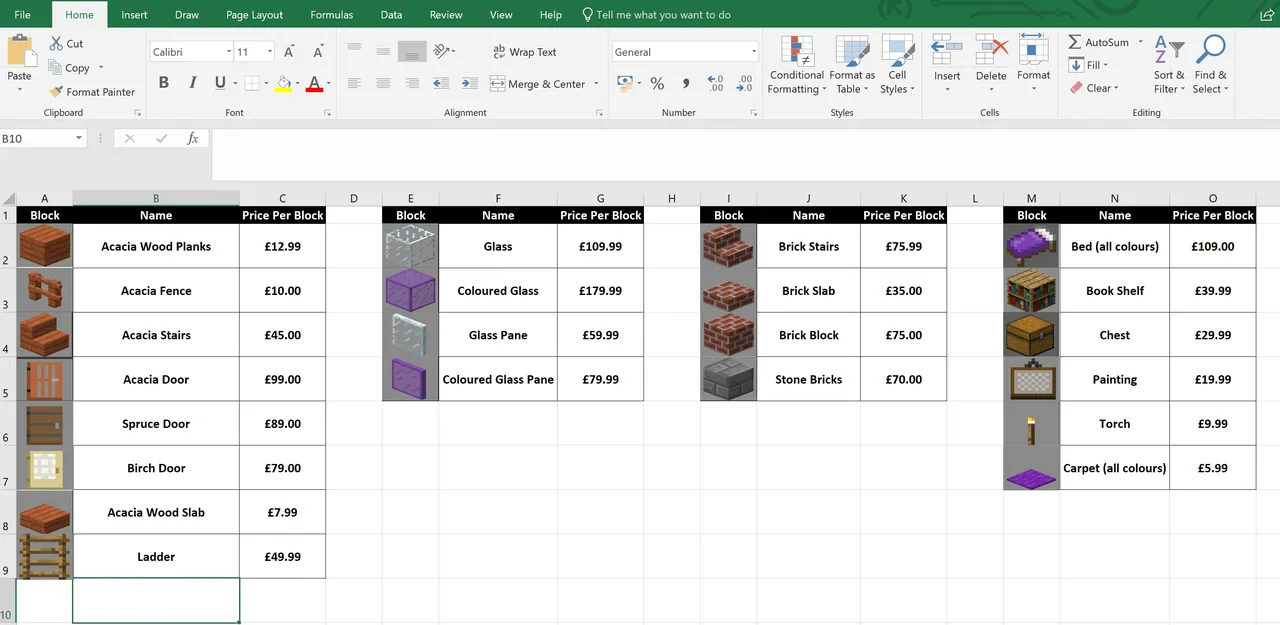
Blocks and items used in this lesson


Key vocabulary
- Cell Range
- A collection or block of selected cells in a spreadsheet identified by their corner references.
- Lookup Function
- A spreadsheet formula that searches for a value in one column and returns a corresponding value from another.
- Spreadsheet Modeling
- Using mathematical formulas and data tables to simulate real-world situations and financial outcomes.
- Formula Duplication
- Copying a calculation across multiple cells so the spreadsheet automatically adjusts the references.
Before class
Lesson sequence
- Introduction & Spreadsheet Concepts
Introduce the project goals and discuss why automated calculations are more reliable than manual entry. Review essential spreadsheet features including cell ranges, cell formatting, duplicating formulas, and how to write lookup functions.
- Plot Assignment & Setup
Have students load into the Town Template, claim a building plot, and place a sign displaying their name outside. Explain the design constraints: the house must have an 8x8 base footprint, though height is unrestricted.
- Exterior Construction & Costing
Students construct their home exterior using only blocks found in the Exterior Price List worksheet. As they place blocks, they record quantities and calculate sub-totals in their Project Work Book using Excel formulas.
- Interior Design & Final Budgeting
Learners furnish the inside of their home using only items authorized on the Interior Price List worksheet. Pupils finalize all workbook sheets, checking formulas, editing lookup commands where needed, and calculating total costs alongside savings needed.
- Review & Submission
Students verify that their virtual structure matches their spreadsheet inventory and submit their completed Project Work Book within the allocated class time.
Assessment: success criteria
- Student builds an 8x8 footprint house in the Town Template with an identifying name sign.
- Student uses only materials authorized in the exterior and interior price lists.
- Student accurately implements formulas, formatting, and lookup functions in the workbook.
- Student calculates total construction expenditures and determines required savings through spreadsheet modeling.
Differentiation
Guide students through writing lookup functions step-by-step and provide pre-formatted cell templates if they struggle with syntax.
Challenge fast finishers to expand their vertical architecture while modeling alternative material choices to minimize overall costs.
Knowledge check
5 questions to check understanding after the lesson. Tap an answer to see if it is right; the score appears at the end.
1What are the footprint dimensions required for the student house build?
Answer: A. The lesson guidelines specify that the house must be built on an 8x8 base with no height restriction.
2What should students place outside their assigned plot in the Town Template?
Answer: C. The lesson plan requires every pupil to place a sign with their name outside their allocated plot.
3Which materials are permitted when constructing the exterior and interior of the home?
Answer: B. Students must restrict their building palette exclusively to materials detailed on the price list worksheets.
4Why should students use formulas instead of typing in calculated numbers directly into Excel?
Answer: D. Formulas enable automated modeling and prevent errors when quantities or costs change.
5What vertical limitation is placed on the house design in this lesson?
Answer: C. While the base must be 8x8, the lesson specifies there is no limit on the height of the house.
Resources
Frequently Asked Questions
Which Minecraft Education world should I load for this activity?
Use the Town Template world included in Minecraft Education, which provides ready-made plots for students to claim and build upon.
How should I assist students who receive errors with lookup formulas in Excel?
Check their formula syntax and cell range references together, as lookup functions often require direct guidance before students can duplicate them across columns reliably.
Adapted from Using Excel to Solve Problems by Paul Watkins on Minecraft Education, last updated May 3, 2018. This classroom version, the timings and the quiz were written by 9Minecraft Education.