
How can a timed obstacle course in Minecraft show what we have learned across our unit?
Overview
The Summative World Template is an assessment tool designed for teachers across subject areas. Rather than requiring educators to write complex command block code, the world comes pre-programmed with interactive non-player characters and custom mechanics. Teachers only need to input their own review questions, letting students demonstrate subject knowledge inside an engaging, gamified environment.
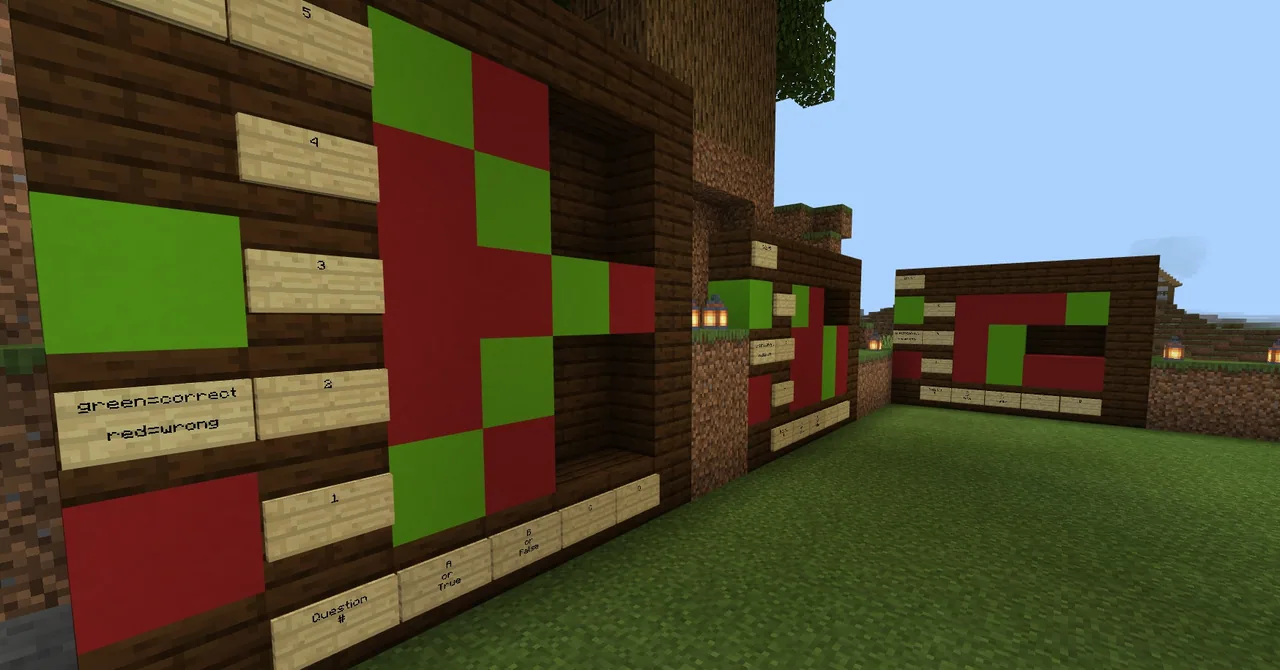
Students navigate across six distinct floating isles, answering prompts presented by NPCs. Correct answers reward the player with increased speed and automatically construct bridges toward subsequent isles, while incorrect choices cause slowness. All student selections are permanently tracked on display boards at the conclusion of the course, providing transparent data for reflection and grading.
Learning objectives
By the end of this lesson students will be able to:
- Recall factual information and concepts from a customized subject area.
- Navigate across six floating isles by evaluating and answering NPC question prompts.
- Inspect recorded responses on the final assessment boards to reflect on learning performance.
Blocks and items used in this lesson


Key vocabulary
- Summative Assessment
- An evaluation administered at the end of an instructional unit to measure cumulative understanding.
- NPC (Non-Player Character)
- An automated in-game character configured to deliver dialogue, questions, and web links.
- WorldBuilder (/wb)
- A command permission setting in Minecraft Education that allows educators to modify world elements and NPC dialogue.
Before class
Lesson sequence
- Briefing and World Distribution
Distribute the customized world file through your school LMS. Explain the rules of the run to students, warning them that walking through the first stone gates activates the running timer.
- Floating Isle Challenge
Students run the course and interact with the NPCs on each of the six isles. Selecting the correct response grants speed and builds the bridge forward, while incorrect responses trigger slowness without generating a bridge.
- Scoreboard Check and Castle Reward
After traversing the final bridge, the timer halts and players are switched into creative mode. Students inspect the boards corresponding to each isle to see their recorded responses, note their completion times, and explore the castle reward area.
- Performance Reflection
Students photograph their assessment boards and compose a written reflection covering their preparation methods, assessment performance, and next steps, utilizing links provided on nearby NPCs if further study is needed.
Assessment: success criteria
- Student successfully reached the final isle and triggered the creative mode reward.
- Student answers are fully recorded across each isle board for teacher review.
- Student submitted a written self-reflection describing preparation habits and performance results.
Differentiation
Teachers can configure the NPCs situated beside each isle assessment board to display review links for learners who require extra help.
Students can access enrichment links provided on final isle NPCs and analyze their completion times to evaluate test-taking efficiency.
Knowledge check
5 questions to check understanding after the lesson. Tap an answer to see if it is right; the score appears at the end.
1What specific action starts the in-game assessment timer?
Answer: B. The timer begins the moment a player passes through the first stone gates.
2What two things happen when a student chooses the correct answer from an NPC?
Answer: B. Correct responses reward the player with speed and construct the bridge to the next isle.
3What penalty occurs when an incorrect answer is selected?
Answer: A. An incorrect answer applies a slowness effect and leaves the bridge unbuilt.
4Which command must a teacher enter to gain permission to edit the pre-programmed NPCs?
Answer: C. The /wb command enables WorldBuilder status, allowing the educator to edit NPC dialogue boxes and boards.
5What occurs once a student successfully crosses the final bridge of the challenge?
Answer: D. Crossing the final bridge stops the timer, switches game mode to creative, and grants access to explore the castle.
Resources
Frequently Asked Questions
Can students click more than one answer option on an NPC?
Yes. The NPCs allow multiple clicks, but all applied effects remain and all chosen answers are recorded on the assessment boards on the final isle.
How do teachers prepare the world for student use after adding questions?
Move your character back to the starting point, enter adventure mode with /gamemode a, run /clear to empty your inventory, save and exit, and then export the file from the world settings.
How does the teacher collect student assessment data?
Teachers can instruct students to take in-game photos of the isle assessment boards on the final isle and submit those images along with their completion time and written reflection.
Adapted from Summative World Template by Ben Spieldenner on Minecraft Education, last updated Nov 5, 2019. This classroom version, the timings and the quiz were written by 9Minecraft Education.








































