- Type
- Lesson plan
- Subject
- MathArt, Music & Design
- Ages
- Ages 3-7
- Duration
- 1 hour
- Level
- Beginner
- Includes
- Quiz: 5 questions
How can solving math and symmetry puzzles help us create pixel art?
Overview
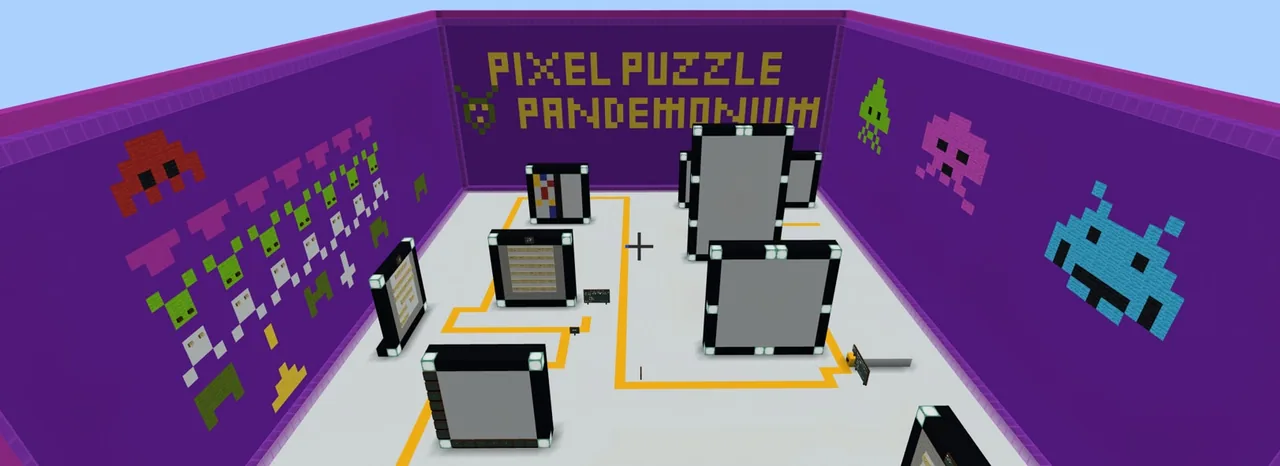
Pixel Pandemonium introduces young learners to basic numeracy and visual design through guided puzzle stations. By answering math problems, reading instructions, and observing spatial patterns, students discover how numbers and symmetry can translate into colorful pixel art imagery.
Inside the Minecraft world, learners navigate along a designated path, consult an in-game guide, and swap puzzle signs for colored wool blocks based on an answer key. They practice building under constraints, explore open-ended creative art, and document each completed station using the in-game camera and portfolio tool.
Learning objectives
By the end of this lesson students will be able to:
- Solve basic addition, multiplication, symmetry, and coordinate challenges at puzzle stations.
- Follow guided instructions to replace problem signs with corresponding colored wool blocks.
- Design original pixel art compositions with and without block limitations.
- Document completed puzzle solutions and artwork using the camera and labeled portfolio.
Blocks and items used in this lesson


Key vocabulary
- Pixel Art
- A digital art style where images are created by placing individual square blocks or colored dots.
- Symmetry
- A visual balance where one side of a design mirrors the other side.
- Coordinates
- Sets of numbers used to pinpoint exact locations in a grid or world space.
- Portfolio
- An in-game book used to store, caption, and export photos of your work.
Before class
Lesson sequence
Suggested timing: about 60 minutes in total.
- Introduction and Orientation10 min
Welcome students to the lesson and direct them to speak with the Pixel Guide NPC at the starting area. Review basic movement controls, inventory access, and how to use the camera and portfolio to record findings.
- Puzzle Station Challenges25 min
Students follow the path through stations featuring addition, multiplication, symmetry, and coordinate puzzles. At each stop, learners solve the problem on the sign, locate the matching wool color using the key, and replace the sign with the correct block.
- Pixel Art Creation15 min
Learners apply their skills to free-building and themed pixel art activities along the trail. Some tasks require students to observe specific block limits, while others offer open space for personal artistic choices.
- Documentation and Export10 min
Students photograph their completed puzzle stations and artwork, write descriptive labels for each photo inside their portfolio, and export the completed document for teacher review.
Assessment: success criteria
- Student accurately solves the math, symmetry, and coordinate tasks across puzzle stations.
- Student builds pixel art following instructions and specified block limits.
- Student creates an original pixel art piece using colored blocks.
- Student successfully captures photos, captions entries in the portfolio, and exports the file.
Differentiation
Allow students to work in pairs or provide a printed reference sheet showing basic addition and multiplication tables.
Challenge students to design a symmetrical pixel art picture with strict block count limits without using the color key.
Knowledge check
5 questions to check understanding after the lesson. Tap an answer to see if it is right; the score appears at the end.
1Which character should students speak to at the start of the lesson?
Answer: B. The source notes that students interact with the Pixel Guide before following the path.
2What do students place in the world to show their answers at puzzle stations?
Answer: A. Learners swap signs showing math sums with colored wool blocks matching the answers.
3Which mathematical concepts are practiced at the puzzle stations?
Answer: C. The source specifies addition, multiplication, symmetry, and coordinates among the station problems.
4How do students record and turn in their finished work?
Answer: D. Students capture pictures with the in-game camera, add labels in the portfolio, and export it for the teacher.
5What restriction is applied to some of the creative pixel art building tasks?
Answer: B. The source explains that some pixel art tasks are built with block limits and others without.
Frequently Asked Questions
What age group is this lesson suitable for?
Pixel Pandemonium is designed for early learners aged 3 to 7 who are developing basic math, literacy, and fine motor controls.
Do students need prior experience with Minecraft Education?
This is a beginner-level lesson, though students should know basic navigation, block placement and breaking, inventory management, and camera tools.
How long does the entire lesson take to complete?
The lesson is structured to take approximately one hour, including puzzle solving, free-building, and portfolio export.
Adapted from Pixel Pandemonium by Barri Mock on Minecraft Education, last updated Jun 17, 2022. This classroom version, the timings and the quiz were written by 9Minecraft Education.