- Type
- Lesson plan
- Ages
- Ages 8-13
- Duration
- about 1.7 hours (suggested)
- Includes
- Quiz: 5 questions
How can we use heraldic symbols and pixel art to communicate our local culture to peers around the world?
Overview
This cross-curricular lesson originates from an international eTwinning school partnership designed to connect classrooms globally. Students explore civic identity and cultural heritage by researching the coats of arms of their own towns or those of partner communities, using heraldic designs to bridge art, history, and communication.
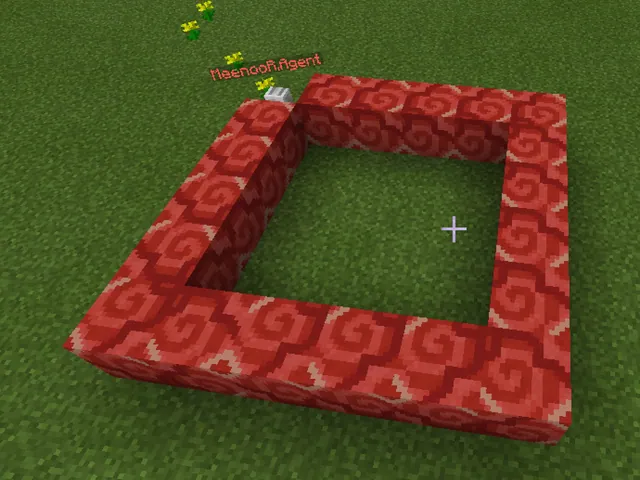
Before launching digital tools, students engage in an unplugged planning phase where they translate their chosen crest onto graph paper. They then take their 2D grid plans into Minecraft, placing blocks to recreate the design as a three-dimensional pixel art sculpture that can be shared with international peers.
Learning objectives
By the end of this lesson students will be able to:
- Research civic or school coats of arms using safe internet browsing strategies.
- Draft a chosen coat of arms onto graph paper to plan spatial proportions and colors.
- Construct a 3D pixel art recreation of the heraldic design inside Minecraft.
- Share finished artwork with classmates and international project partners to build intercultural communication.
Blocks and items used in this lesson


Key vocabulary
- Coat of Arms
- A visual heraldic design representing a person, family, town, or institution.
- Pixel Art
- A digital art form where images are created block by block on a visible grid.
- eTwinning
- A European community platform enabling educators and students to communicate and collaborate on shared projects.
Before class
Lesson sequence
Suggested timing: about 100 minutes in total.
- Web Research and Exploration20 min
Students use safe online searching to investigate the coats of arms belonging to their local town or those of international partner cities. They examine the imagery, colors, and historical shapes found in these heraldic emblems.
- Unplugged Blueprint Drafting25 min
Working on graph paper, learners map out their selected coat of arms square by square. This exercise requires them to scale visual elements into discrete grid units, producing a reliable pixel blueprint before they open the digital environment.
- Minecraft 3D Pixel Construction40 min
Using their graph-paper plans as guides, students enter Minecraft to construct the crests. Learners select colored blocks that match their drafted palette and erect the emblem as a 3D pixel art structure.
- Classroom Sharing and Exchange15 min
Students present their completed pixel art models to their classmates, explaining the background of the symbols they built. Designs are documented to be shared with overseas partner classes.
Assessment: success criteria
- Student navigates the internet safely to locate authentic town or school coats of arms.
- Student accurately drafts a planned pixel template on graph paper prior to building.
- Student reproduces the blueprint faithfully as a 3D pixel art build in Minecraft.
- Student presents and shares the completed digital crest with peers.
Differentiation
Offer a simplified crest outline with fewer colors and larger grid blocks during the graph-paper planning step.
Have students add layered three-dimensional relief to their crest build and document the specific historical meaning of each symbol.
Knowledge check
5 questions to check understanding after the lesson. Tap an answer to see if it is right; the score appears at the end.
1What is the primary purpose of researching coats of arms in this lesson?
Answer: B. The project uses coats of arms to learn about diverse communities and greet international partner students.
2Which unplugged activity do students complete before building in Minecraft?
Answer: A. Students choose a coat of arms and create a draft on graph paper prior to digital construction.
3What style of construction is used to build the crests inside Minecraft?
Answer: C. The lesson specifically directs students to recreate the town crests as 3D pixel art.
4Which international school collaboration network is mentioned in the lesson context?
Answer: D. The lesson is part of an eTwinning project called Link to the World from Europe.
5Which group of subject areas does this lesson primarily integrate?
Answer: B. The source identifies Math & Economics, Art and Design, and History as the core subjects.
Frequently Asked Questions
Is a custom downloadable Minecraft world required for this lesson?
No custom world download is needed. Students can construct their 3D pixel art in any open creative world using standard blocks.
Why is the unplugged graph paper step important?
Drafting on grid paper teaches students to plan spatial proportions and block placement carefully before translating their design into the 3D space.
What age group is this activity suitable for?
The lesson plan is tailored for students aged 8 to 10 and 11 to 13, making it adaptable across upper elementary and middle school classrooms.
Adapted from Coats of Arms by simonetta anelli on Minecraft Education, last updated Jan 18, 2018. This classroom version, the timings and the quiz were written by 9Minecraft Education.