
- Type
- Lesson plan
- Subject
- Computer Science & Coding
- Topics
- Computer Science
- Ages
- Ages 8-13
- Includes
- Quiz: 5 questions
How does a wall-follower algorithm guide an Agent through a maze, and what are its capabilities and limitations?
Overview
In this computer science lesson, students explore the concept of algorithms as defined sequences of steps designed to solve problems. By investigating the traditional wall-follower navigation rule, learners analyze how simple, repeated instructions can guide an entity through an unfamiliar space, while also discovering the conditions under which such algorithms might struggle or fail.
Using Minecraft Education connected to a coding interface like MakeCode, each student programs their Agent to traverse a maze. Learners test their scripts, engage in active debugging, compare the Agent's programmatic pathfinding against the wandering behavior of spawned mobs, and experiment with alternate solutions such as left-hand tracking or lateral movement methods.
Learning objectives
By the end of this lesson students will be able to:
- Explain an algorithm as an ordered sequence of instructions used to solve a specific problem.
- Program and debug an Agent using Code Connection to navigate through a maze using a wall-following method.
- Compare algorithmic movement with the natural behavior of in-game mobs like villagers, cows, and sheep.
- Evaluate alternative problem-solving strategies, such as left-wall following or bypassing maze structures.
Blocks and items used in this lesson


Key vocabulary
- Algorithm
- A clear, ordered sequence of instructions designed to solve a problem or complete a task.
- Debugging
- The process of identifying, reviewing, and correcting errors or unintended behaviors in code.
- Wall Follower
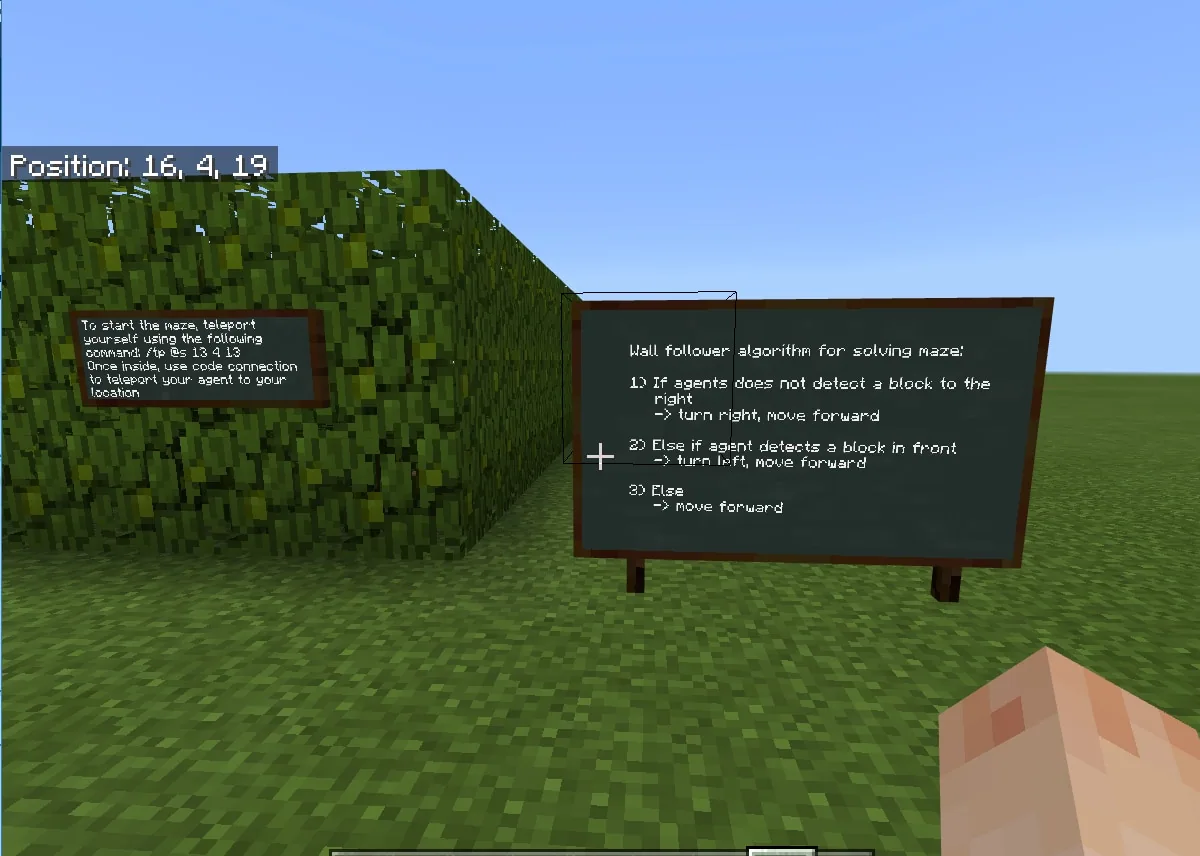
- A navigation rule where an entity moves through a maze by keeping continuous contact with a wall on one side.
Before class
Lesson sequence
- Setup and Reading Instructions
Students launch their individual worlds and establish a link with Code Connection. Outside the maze entrance near the spawn point, learners read the guidance provided on the instruction boards to understand the rules of the wall-follower algorithm before writing any code.
- Coding and Debugging
Learners assemble the wall-follower algorithm in MakeCode outside the maze. Once assembled, they activate the Agent to test its pathfinding. Students identify errors, analyze why the Agent gets stuck or turns incorrectly, and practice debugging until the Agent reaches the exit.
- Mob Comparison Experiment
Students place their functioning Agent at the maze start and spawn a mob, such as a villager, cow, or sheep, at the exact same location. Students observe which entity exits first and discuss whether mob pathfinding constitutes an algorithm.
- Extensions and Critical Reflection
Learners modify their code to implement a left-hand wall follower or explore lateral solutions to reach the goal, such as teleporting, rising three blocks to walk across the top, or clearing blocks in the Agent's path. The class debates whether these bypass methods count as valid algorithmic solutions.
Assessment: success criteria
- Student successfully builds a sequence in Code Connection that directs the Agent through the maze.
- Student demonstrates debugging by diagnosing and correcting issues when the Agent fails to navigate properly.
- Student articulates why the wall-follower algorithm functions and describes conditions where it might fail.
- Student adapts the initial script to use alternative logic or lateral problem-solving methods.
Differentiation
Allow students to assemble and verify their algorithm steps outside the maze boundaries while referencing classroom-displayed instruction boards.
Prompt fast finishers to reprogram the Agent to follow the left wall or design creative workarounds like clearing maze blocks or elevating above the walls.
Knowledge check
5 questions to check understanding after the lesson. Tap an answer to see if it is right; the score appears at the end.
1What is the primary definition of an algorithm used in this lesson?
Answer: B. The lesson defines an algorithm as a sequence of steps designed to solve a problem.
2Why is it practical to project the instruction boards in the classroom?
Answer: A. Granting operator status and worldbuilder mode means students can accidentally destroy in-game instruction boards easily.
3What should a student do when the Agent does not navigate the maze correctly on the first try?
Answer: C. Debugging unexpected results is highlighted as one of the most important skills in computing.
4Which commands must be granted so students can program their Agent?
Answer: C. The source notes students need worldbuilder ability (/ability @a worldbuilder true) and operator status (/op @a) to program the Agent.
5Which lateral problem-solving technique is suggested as a lesson progression?
Answer: A. Moving up 3 blocks to walk over the maze, teleporting, or clearing blocks are listed as possible lateral solutions.
Frequently Asked Questions
Which coding environment is used for this lesson?
The lesson uses Code Connection, with MakeCode serving as the platform for the example solution.
Why do students need operator status and worldbuilder permissions?
These permissions are required for students to program and control the Agent within their Minecraft Education world.
Will the wall-follower algorithm work in every maze layout?
Not necessarily. The lesson encourages students to think critically about maze designs where a wall follower would fail, such as detached island walls, and consider alternative approaches.
Adapted from Wall Follower Algorithm by Philip Golden on Minecraft Education, last updated Feb 16, 2018. This classroom version, the timings and the quiz were written by 9Minecraft Education.










































