- Type
- Lesson plan
- Ages
- Ages 8-13
- Includes
- Quiz: 5 questionsLesson files
How can mathematical circle equations and coding functions work together to construct a rainbow in Minecraft?
Overview
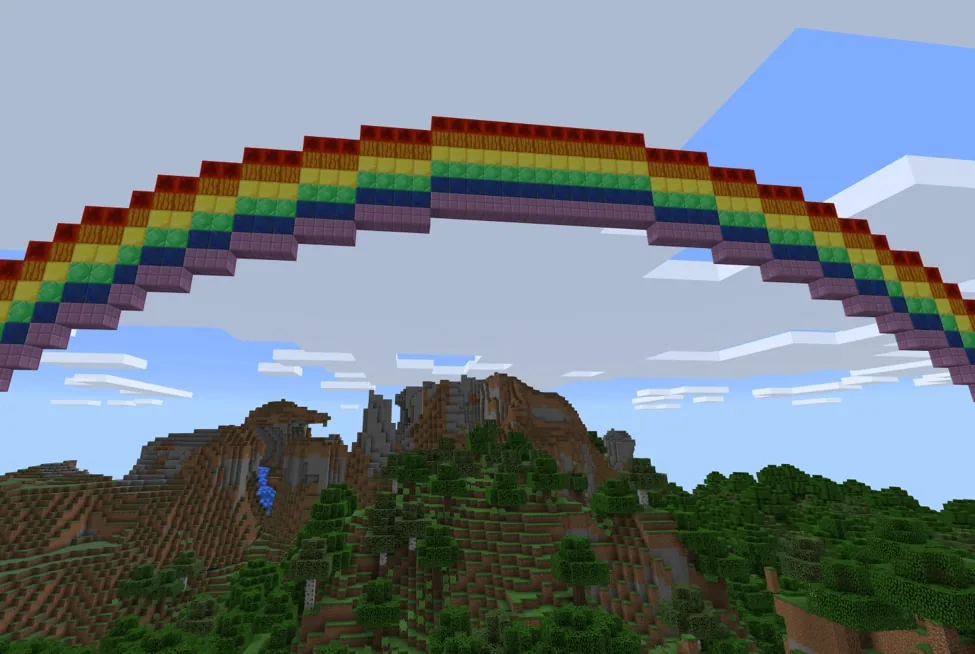
This project integrates geometry, art, and computer science by treating a rainbow as the upper half of a circle. Students explore how mathematical equations generate curves in a coordinate space, observing how an axis of x-values pairs with corresponding heights to produce a smooth arc.Learning objectives
By the end of this lesson students will be able to:
- Apply the circle equation to calculate coordinates for a semicircular rainbow.
- Program bot navigation to plot coordinates and place blocks in a structured sequence.
- Modify the rainbow colors function to expand the color palette.
- Adjust function parameters to resize the rainbow structure.
Blocks and items used in this lesson


Key vocabulary
- Circle Equation
- A mathematical formula used to determine the coordinates of points forming a circular path.
- Radius
- The distance from the center point of a circle to its edge, determining the size of the arc.
- Function
- A named block of reusable code designed to perform a specific job when called.
- Bot
- An in-game coding assistant that navigates and places blocks at specified coordinates.
- Buffer
- A programming tool that collects multiple building commands to execute them simultaneously rather than one by one.
Before class
Lesson sequence
- Circle Math and Coordinates
Introduce the concept of modeling a rainbow as the upper half of a circle. Discuss how the coordinate system tracks x-values from negative radius to positive radius to plot the curved shape.
- Exploring the Bot and Code
Examine the create rainbow function with the class. Explain how the bot resets to the center checkpoint, moves across the calculated x- and y-values, and triggers block placement.
- Building and Adding Colors
Have students run the starter project to place the default red, orange, and yellow bands. Instruct learners to modify the rainbow colors function to add the remaining colors of the rainbow.
- Resizing and Buffer Optimization
Guide students to adjust the radius parameter to build smaller or larger rainbows. Introduce the start bot buffer and run bot buffer blocks so the bot can render the rainbow all at once.
Assessment: success criteria
- The student explains how circle coordinates guide the bot's movement.
- The student edits the rainbow colors function to place additional colored blocks.
- The student modifies the radius parameter to alter the size of the build.
- The student uses buffer blocks to speed up block placement.
Differentiation
Guide students step-by-step through adding single color-and-move commands inside the rainbow colors function before altering the radius.
Have students implement buffer commands to instantly render an expanded, full-spectrum rainbow with a custom radius.
Knowledge check
5 questions to check understanding after the lesson. Tap an answer to see if it is right; the score appears at the end.
1Which geometric shape provides the mathematical equation used to build the rainbow?
Answer: B. The project uses the circle equation to calculate the coordinates for the rainbow arc.
2What radius value is used by default in the starter project?
Answer: D. The lesson notes that the coordinate animation and default function use a radius of 20.
3Which three colors are already programmed into the starter code?
Answer: A. The source specifies that the project starter code already includes red, orange, and yellow.
4How does the bot position itself for each x-value before placing blocks?
Answer: C. The bot returns to the circle center, moves right by the x-value, and moves up by the y-value.
5What happens when you use the bot buffer feature in this project?
Answer: B. A buffer speeds up construction by placing all queued blocks simultaneously.
Resources
Frequently Asked Questions
Do students need to calculate the circle coordinates manually?
No, the create rainbow function calculates the coordinate values automatically based on the given radius parameter.
How do students change the size of their rainbow?
Students can change the number inside the create rainbow block, which adjusts the radius of the circle.
Is a specific custom world file required to complete this lesson?
No custom world download is required; students can work using standard coding features and the builder bot.
Adapted from Rainbow Skies by Minecraft Education on Minecraft Education, last updated Dec 15, 2022. This classroom version, the timings and the quiz were written by 9Minecraft Education.