
- Type
- Lesson plan
- Ages
- Ages 8-18
How can we share our digital work responsibly and translate digital data into physical and virtual grids?
Overview
This lesson explores digital citizenship and communication by challenging students to publish digital content and consider what makes a positive digital footprint. Learners design an online page or profile, such as an All About Me project or research presentation, establishing a meaningful link between their academic work and digital identity.
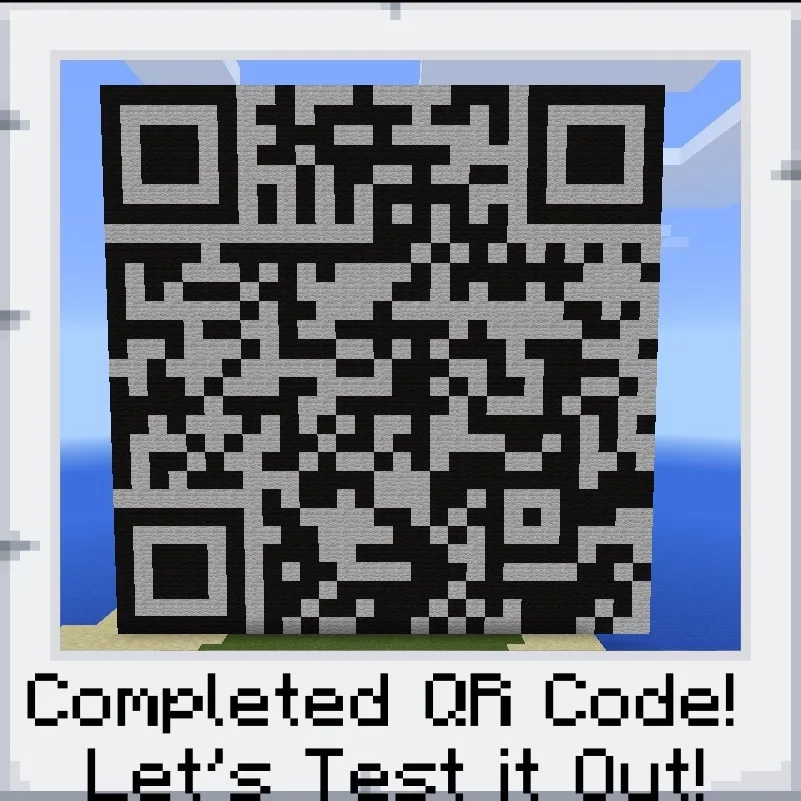
Students then convert their web link into a scannable QR code and translate digital data into physical and virtual coordinates. After plotting the code on graph paper, learners construct a functional, scannable QR code inside Minecraft using black and white wool blocks, surrounded by a themed setting.
Learning objectives
By the end of this lesson students will be able to:
- Conduct digital research and publish a web page or online resource reflecting a positive digital footprint.
- Generate and download a functional QR code from an online link.
- Plot the QR code grid onto graph paper using accurate square dimensions.
- Construct a scannable QR code in Minecraft using black and white wool blocks.
- Present the Minecraft build and scan the QR code using a barcode reader to display the website.
Blocks and items used in this lesson


Key vocabulary
- QR Code
- A two-dimensional barcode made of black and white squares that links directly to digital content when scanned.
- Digital Footprint
- The record of information and content left behind by a person through online activity.
- Graph Paper
- Grid-lined paper used to accurately plan and map coordinates before building in a block environment.
- Barcode Reader
- A tool or application used to scan and decode information stored in a QR code.
Before class
Lesson sequence
- Webpage Creation
Introduce the concept of a positive digital footprint and guide students to conduct research or gather material for an All About Me profile. Students build their web page using an authorized online tool or learning platform and obtain a shareable URL.
- QR Code Generation & Graphing
Students paste their link into a QR code generator and download the image file. Learners print out the code and manually plot the pattern onto graph paper, paying close attention to corner markers consisting of 7x7 black squares, 5x5 white squares, and 3x3 black centers.
- Minecraft Construction
Using black and white wool blocks, students transfer their graphed QR code into Minecraft block by block. Once the code is assembled, learners build a custom environmental setting around their structure that relates to their research or profile topic.
- Scanning & Presentation
Students showcase their Minecraft builds to the class. Peers or the teacher scan the in-game wool QR code using a barcode reader on a mobile device or tablet to load and view the live website.
Assessment: success criteria
- Student creates and links an appropriate webpage supporting a positive digital footprint.
- Student accurately plots the QR code onto graph paper, matching the required dimensions.
- Student correctly constructs the QR code in Minecraft using black and white wool blocks.
- The completed Minecraft QR code scans successfully with a barcode reader to launch the website.
Differentiation
Provide students with pre-marked graph paper showing the corner 7x7, 5x5, and 3x3 square outlines to help them align their grid.
Have students build an elaborate thematic scene around the QR code that visually reflects the research content on their website.
Knowledge check
5 questions to check understanding after the lesson. Tap an answer to see if it is right; the score appears at the end.
1Which Minecraft blocks are specified to construct the QR code in this lesson?
Answer: D. The lesson specifically instructs students to construct the QR code using black and white wool.
2What is the recommended intermediate step between downloading the QR code image and building it in Minecraft?
Answer: B. Students are instructed to print the QR code and map it onto graph paper before building.
3What are the dimensions of the corner alignment markers described in the lesson hint?
Answer: C. The lesson notes that the large corner squares are 7x7 black, followed by 5x5 white, and then 3x3 black.
4How do students test and demonstrate their completed Minecraft QR code during presentations?
Answer: A. Presenters scan the in-game wool QR code with a barcode reader to load their website.
5Which assignment framework does the lesson explicitly suggest for the website content?
Answer: C. The source notes teachers can use the lesson with an All About Me activity or research project.
Resources
- Lesson package (.zip)Everything the author attached to this lesson in one download.
- Sample Portfolio Picture 1Taken w/ Camera and Portfolio Tools. 1/2 done
- Sample Portfolio Picture 2Taken w/ Camera and Portfolio Tools. Complete.
- Sample World FileThis is an island seed with a giant QR code.
Frequently Asked Questions
Can video links or blog posts be used instead of a website?
Yes. Any online resource with a valid URL, such as a video, blog post, or profile page, can be turned into a QR code for this project.
Does this lesson require a specific downloadable world template?
No. The lesson does not provide or require a downloadable world, so students can complete their builds in standard creative worlds.
Adapted from QR Code Generation by Mark Grundel on Minecraft Education, last updated Jul 1, 2021. This classroom version, the timings and the quiz were written by 9Minecraft Education.










































