
- Type
- Lesson plan
- Topics
- Art and DesignLeadership
- Grade
- Early years (Pre-K to Grade 2)Primary (Grades 3-5)Middle school (Grades 6-8)High school (Grades 9-12)
- Ages
- All ages
- Duration
- 45 min
- Level
- Beginner
- Includes
- Quiz: 5 questions
How can members of a build team collaborate effectively to create a creative structure within a set timeframe?
Overview
Working collaboratively allows students to develop essential leadership, communication, and creative thinking skills. By sharing responsibilities and coordinating tasks under time constraints, teams learn how collective effort can produce imaginative structures faster and more efficiently than working in isolation.
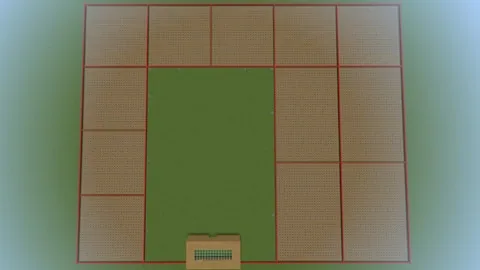
Using a dedicated Minecraft Education template world, the host assigns groups to partitioned spaces, featuring eight small zones and four large zones separated by red borders. Students interact with an NPC to reach their designated plots, complete their collaborative build challenge, and return to spawn to review group assessments on the chalkboard.
Learning objectives
By the end of this lesson students will be able to:
- Collaborate within an assigned build area to complete a creative team structure.
- Communicate and delegate tasks with team members to finish before time expires.
- Follow teacher-managed game settings and navigate the world using non-player characters.
Blocks and items used in this lesson


Key vocabulary
- Immutable World
- A host setting that preserves world structures and blocks from unauthorized alterations.
- World Builder
- A teacher privilege toggled with /wb that allows flying across restricted red border blocks.
- Portfolio
- An in-game documentation tool used to take photos of builds and export them.
Before class
Lesson sequence
Suggested timing: about 45 minutes in total.
- Briefing and Area Assignment10 min
Introduce the challenge goals, duration, and rubric. Hand out group area numbers and direct students to interact with the designated NPC to teleport to their build zone.
- Timed Teamwork Build25 min
Groups work together within their designated zones to construct their assigned scene, object, or machine. The host can type /wb into chat to enable world builder permissions, allowing flight across red borders to observe student progress.
- Regroup and Evaluation10 min
When the timer expires, students return to the starting area independently or via teacher teleportation. Review student achievements verbally or display final scores directly on the student chalkboard.
Assessment: success criteria
- The team completed a creative structure within the assigned plot and time frame.
- Students remained within their designated area and respected border boundaries.
- Group members communicated effectively and worked collaboratively with minimal disputes.
- Build performance is rated on the 1 to 4 rubric based on the level of independence and overall completion.
Differentiation
Place students needing extra guidance in smaller build plots of four with direct teacher monitoring.
Have students photograph their build using the portfolio, swap exports with peers to recreate designs under a timer, or build an intricate machine instead of a scene.
Knowledge check
5 questions to check understanding after the lesson. Tap an answer to see if it is right; the score appears at the end.
1Which chat command allows the teacher to fly through the red borders between student build areas?
Answer: B. Typing /wb sets world builder mode to true, enabling movement past red border blocks.
2How many build areas of each size are provided in the template world?
Answer: A. The template includes 8 small build spaces and 4 large build spaces for assigning groups.
3Which setting should be ENABLED according to the teacher prep recommendations?
Answer: D. Host recommendations specify enabling Immutable World, Always Day, and Perfect Weather.
4How do students reach their assigned build area at the start of the challenge?
Answer: B. Students are assigned an area number and speak to an NPC to be teleported to their designated plot.
5Where are the final challenge evaluation results shown to the class?
Answer: C. Teachers can post the final results on the student chalkboard or explain them verbally to the group.
Frequently Asked Questions
What are the recommended team sizes for this activity?
It is recommended to place up to 4 students in each small build area and up to 8 students in each large build area.
How is student performance evaluated using the provided rubric?
Teams are scored on a scale from 1 to 4: 1 indicates the team needed significant assistance, 2 means they achieved success with some help, 3 reflects successful completion, and 4 indicates they went above and beyond.
Can this world template be adapted for survival-based challenges?
Yes, chests are pre-placed in each build plot, allowing teachers to run survival-mode building challenges with limited resources.
Adapted from Teamwork Build Challenge by Jacob Radcliffe on Minecraft Education, last updated Jan 13, 2023. This classroom version, the timings and the quiz were written by 9Minecraft Education.








































