- Type
- Lesson plan
- Subject
- Science
- Topics
- Science
- Ages
- Ages 8-18
How can we model the way water changes over time throughout the water cycle using Minecraft?
Overview
The water cycle represents the continuous movement and state changes of water throughout Earth's systems. By examining how water circulates through various environmental phases, students deepen their understanding of essential Earth science processes.Learning objectives
By the end of this lesson students will be able to:
- Design a collaborative build plan for a water cycle model prior to entering the game.
- Construct a Minecraft model representing core water cycle stages alongside clear labels and definitions.
- Export a completed group build as a 3D model file using a Structure Block.
- Present the finished model to describe each step of the water cycle.
Blocks and items used in this lesson


Key vocabulary
- Evaporation
- The process where liquid water absorbs heat and turns into water vapor.
- Condensation
- The process where water vapor cools and transforms back into liquid water droplets.
- Precipitation
- Water falling from clouds to Earth's surface as rain, snow, sleet, or hail.
- Transpiration
- The release of water vapor from plants into the atmosphere.
- Infiltration
- The movement of surface water down into soil and rock layers.
- Structure Block
- A specialized block in Minecraft used to capture, save, and export 3D structures.
Before class
Lesson sequence
- Concept Review and Team Planning
Students watch a review of the water cycle to revisit essential vocabulary and natural processes. Working in teams of roughly five, students map out their build layout on paper and assign group roles before opening Minecraft.
- Model Construction and Labeling
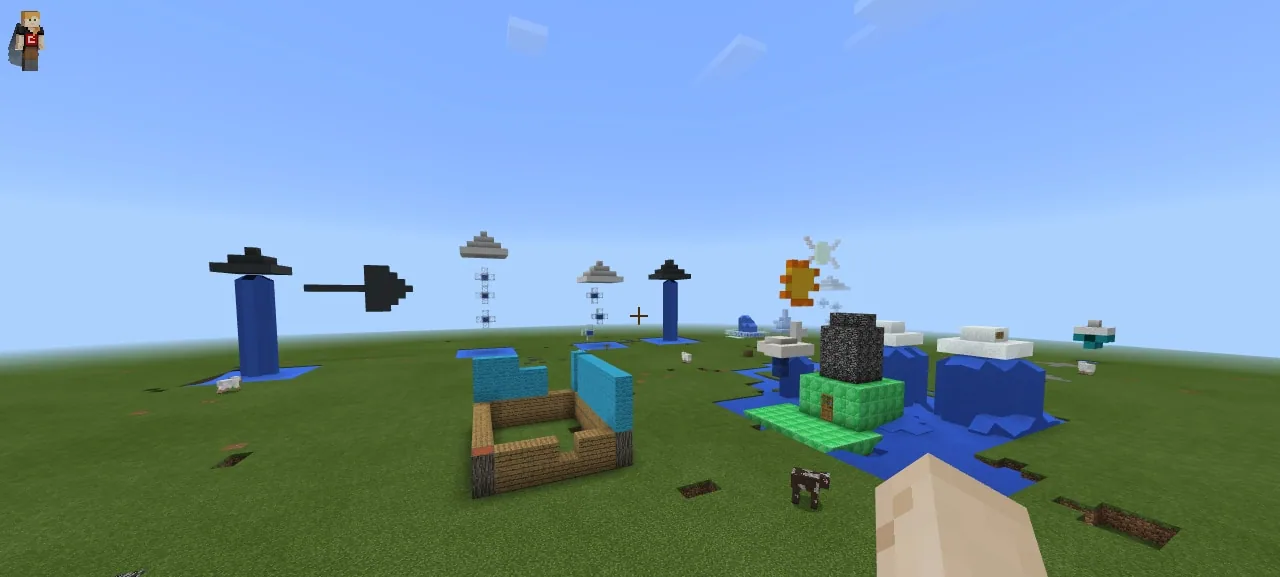
Teams enter their build space and place a sign identifying all group members. Students construct visual representations of evaporation, condensation, and precipitation, placing signs or markers with written definitions at each step.
- Adding Detail and 3D Export
Groups expand their builds to include optional stages such as transpiration, runoff, or percolation if time permits. Once the build meets all requirements, students use a Structure Block to frame the creation and export it as a 3D model file.
- Group Presentations and Review
Each team presents their 3D model to the class, walking through the modeled processes and explaining the scientific definitions they included. The teacher assesses the models using the lesson rubric.
Assessment: success criteria
- The build features a sign clearly listing each group member's name.
- Evaporation, condensation, and precipitation are clearly modeled with corresponding signs and definitions.
- The team successfully exports their build as a 3D model using a Structure Block.
- The group delivers a clear presentation explaining the components and functions of their model.
Differentiation
Allow groups requiring additional support to focus exclusively on modeling and defining the three mandatory stages: evaporation, condensation, and precipitation.
Encourage advanced teams to incorporate more complex stages such as transpiration, percolation, infiltration, sublimation, and surface runoff into their build.
Knowledge check
5 questions to check understanding after the lesson. Tap an answer to see if it is right; the score appears at the end.
1What in-game block is required to capture and export the finished build as a 3D file?
Answer: A. Students must use a Structure Block to export their completed water cycle build as a 3D model.
2Which three stages of the water cycle are required in every group's build?
Answer: B. The project guidelines state that all builds must include evaporation, condensation, and precipitation.
3What must students do before logging into Minecraft to start building?
Answer: C. The lesson directs students to watch a review of the water cycle and create a plan prior to logging in.
4What written information must accompany each stage in the Minecraft build?
Answer: B. Groups must provide labels or signs alongside definitions for each step of the water cycle they model.
5Which of the following is listed as an optional stage students can choose to include?
Answer: D. Transpiration is listed among the optional stages, whereas evaporation, condensation, and precipitation are mandatory.
Resources
- Lesson package (.zip)Everything the author attached to this lesson in one download.
- Requirements list for studentsA list of the requirements for the completed project. Used as a slide.
- Water Cycle RubricRubric for evaluation.
Frequently Asked Questions
Does this lesson include a downloadable Minecraft world file?
No, there is no downloadable world provided; students can build their models in a new standard or flat Minecraft world.
What is the recommended group size for this activity?
The activity is designed for collaborative groups of approximately five students working together on a single model.
How do students export their build outside the game?
Students place a Structure Block around their model in Minecraft Education and use its export function to generate a 3D model file.
Adapted from Minecraft Watercycle by Merry Hofmeister on Minecraft Education, last updated Feb 3, 2018. This classroom version, the timings and the quiz were written by 9Minecraft Education.