
- Type
- Lesson plan
- Subject
- Art, Music & Design
- Topics
- Art and Design
- Ages
- Ages 8-13
- Level
- Beginner
How can we translate the style, technique, and emotion of a famous artist into a collaborative digital gallery?
Overview
In this final installment of the Influential Artists unit, students apply their understanding of art history by selecting an influential artist of their own choice. Learners examine how artists communicate emotion and culture through specific techniques and visual styles, selecting an artwork that resonates with them to showcase in a shared virtual gallery space.
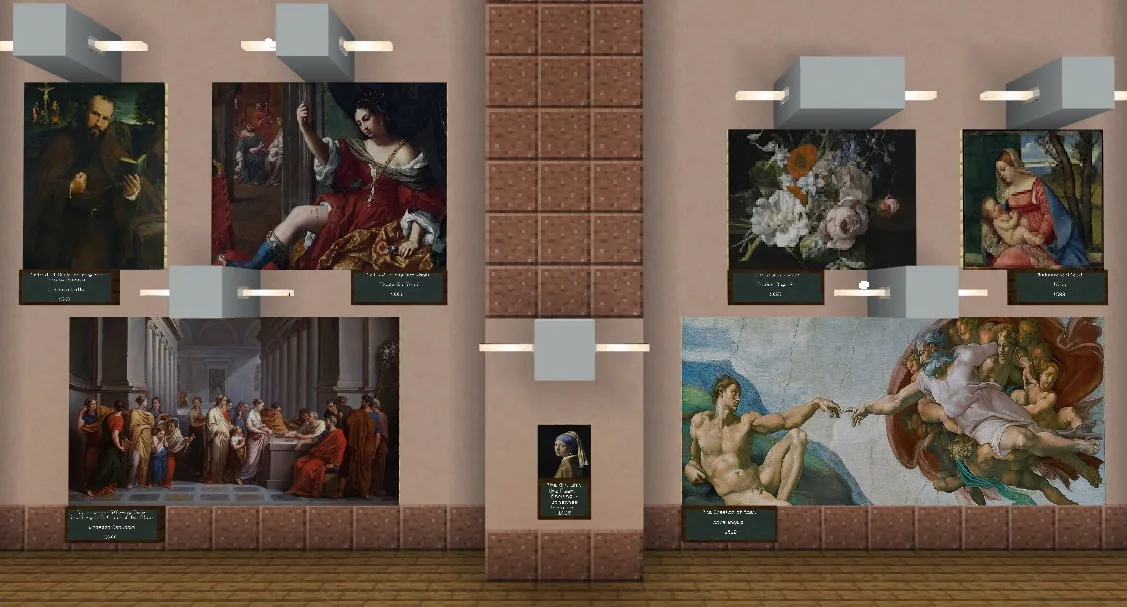
Using Minecraft Education, student pairs or small groups take ownership of the museum's main hall panels. Working from pixelated reference images generated from real-world masterpieces, learners translate color, scale, and emotion into in-game blocks like wool, concrete powder, and glass before presenting their work for classmates to identify.
Learning objectives
By the end of this lesson students will be able to:
- Select an influential artist and analyze the techniques and cultural influences behind their work.
- Convert an image of a famous artwork into a pixelated reference to plan scale and block placement.
- Construct a large-scale reproduction of the chosen artwork inside a designated museum wall panel.
- Evaluate peer artwork by identifying classmates' featured artists and discussing their material choices.
Blocks and items used in this lesson
 Glass
 White Wool
 White Concrete Powder
 White Concrete
Key vocabulary
- Pixel Art
- Visual artwork created by placing individual colored squares or blocks on a grid.
- Scale
- The relative size of an artwork or object compared to the original piece or surrounding space.
- Fresco
- A classic style of painting traditionally executed on wet plaster on a wall or ceiling.
- Abstract Art
- Art that uses shapes, colors, and forms to express feelings rather than depicting realistic objects.
Before class
Lesson sequence
- Artist Selection and Material Brainstorm
Introduce the project for Day 10: learners will choose an influential artist to represent on one of the 8 large wall panels in the museum's great hall. Allow time for students to explore artist choices based on prior knowledge.
Lead a class discussion on artistic medium: Which materials in the game best represent the color and emotion you wish to convey? Brainstorm in-game block palettes such as wool, glass, or concrete powder.
- Pixel Mapping and Planning
Have students import an image of their chosen artwork into a pixel art generator. Instruct them to convert the piece into a grid format, save the pixelated reference, and sketch out their design plan before placing blocks in the world.
- Gallery Construction
At the start of Day 11, direct teams to their assigned wall panels in the main hall. Students work collaboratively to place blocks to scale, referencing their pixel guides to replicate the original artwork's colors and details while the teacher provides support.
- Gallery Walk and Artist Guessing
Once builds are complete, students tour the completed museum hall. Classmates examine each panel and attempt to identify the featured artists and artworks based on the visual techniques and materials used.
Assessment: success criteria
- The digital artwork serves as an accurate, scaled pixel model of a published work of art.
- Block selection demonstrates deliberate choices of color and texture to convey the original piece.
- The completed installation fits cleanly within the designated main hall panel and is recognizable from a distance.
- Students actively participate in the gallery critique by analyzing and identifying peer builds.
Differentiation
Present instructions both verbally and visually, permit group collaboration, and adjust project timelines to give extra build time where needed.
Fast finishers can research additional artists, produce a second fresco or landscape, or design an original abstract artwork inspired by Piet Mondrian.
Knowledge check
5 questions to check understanding after the lesson. Tap an answer to see if it is right; the score appears at the end.
1How many wall panels are available to fill in the museum's main hall?
Answer: B. The source specifies that the main hall contains 8 panel sections for students to fill.
2What tool are students instructed to use before building their artwork in Minecraft?
Answer: A. Learners upload their selected artwork into a pixel art generator and save the pixelated image to use as a build reference.
3Which blocks are specifically suggested as options to convey color and emotion in the build?
Answer: C. The teacher prompt suggests brainstorming materials such as wool, glass, concrete powder, or other blocks to match color and emotion.
4What action should the teacher take prior to the lesson regarding the museum gallery?
Answer: A. The teacher notes explain that the gallery contains two classic nude artworks that can be removed or censored with replacement blocks if deemed inappropriate.
5What concluding activity do students participate in after finishing their builds?
Answer: D. At the end of Day 11, students share their work with classmates and attempt to guess each other's selected artwork and artists.
Resources
- Lesson package (.zip)Everything the author attached to this lesson in one download.
- Influential Artists RubricResource
- Influential Artists Student Self AssessmentResource
- Lesson worldOpens the world page in Minecraft Education (sign-in with a school account may be needed).
Frequently Asked Questions
How should I handle sensitive artwork already present in the gallery world?
The pre-built museum includes classic art pieces, two of which depict nudes. If these are unsuitable for your age group, review the gallery before class and either delete them or censor the figures by replacing blocks.
What group sizes work best for this activity?
Students can work in teams of 2, 4, or 8 to divide the 8 museum panels and collaborate on their large-scale builds.
How does this lesson incorporate cross-curricular subjects?
Learners connect to social studies by examining historical time periods linked to classic art, and they address language arts standards if they write reflections detailing their creative process.
Adapted from Influential Artists: 4 of 4 by Phygital Labs on Minecraft Education, last updated Jul 16, 2025. This classroom version, the timings and the quiz were written by 9Minecraft Education.







































