
- Type
- Lesson plan
- Subject
- Art, Music & Design
- Topics
- Art and Design
- Ages
- Ages 8-13
How do impressionist artists like Claude Monet use light and landscape to capture a moment in time?
Overview
In this lesson, students study the artistic contributions and techniques of Claude Monet. They examine the core tenets of impressionism, exploring how outdoor environments, light, and the passage of time influence the way landscapes are represented.
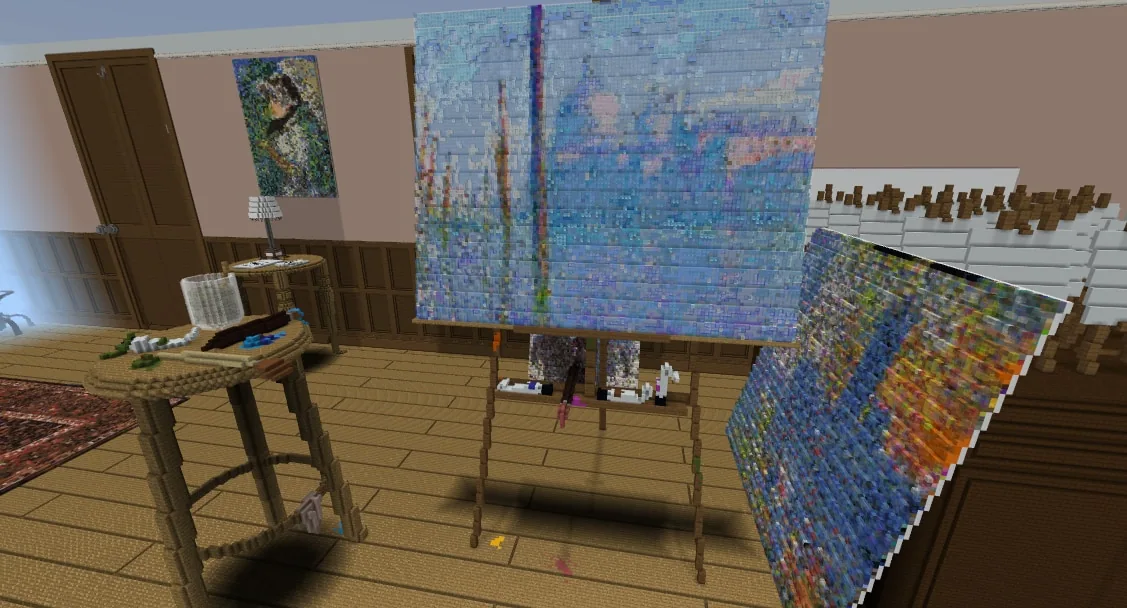
Using a dedicated Minecraft gallery and studio space, students interact with Monet, observe his techniques, and then plan and construct their own landscape. Students can build their project inside the Minecraft world or illustrate it in a traditional sketchbook before writing a final reflection.
Learning objectives
By the end of this lesson students will be able to:
- Analyze Claude Monet's impressionist style and use of natural lighting.
- Draft and create an original landscape using techniques inspired by impressionism.
- Explain artistic choices and the impact of lighting in a written reflection.
Blocks and items used in this lesson


Key vocabulary
- Impressionism
- An art style focused on capturing the visual feeling of a scene, especially the effects of light, rather than exact details.
- Landscape
- An artwork depicting outdoor natural scenery such as skies, water, trees, and land.
Before class
Lesson sequence
- Explore Monet's Studio (Day 7)
Direct students to enter the Monet area in Minecraft to meet Claude Monet and explore his landscape artworks. Have students locate the yellow paint drop on the sideboard easel and initiate a group discussion comparing impressionism to other artistic styles.
- Planning and Building the Landscape (Days 7-8)
Prompt students to begin their own impressionist landscape either in Minecraft or in their sketchbooks. Encourage students working in Minecraft to sketch their initial concept on paper first, paying close attention to their chosen time of day and how lighting influences colors and forms.
- Finalize, Document, and Reflect (Day 9)
Students finish their landscapes and take an in-game photo for their portfolio if building in Minecraft. Conclude with students presenting their work to peers and writing an artist reflection detailing what they learned about Monet and impressionist techniques.
Assessment: success criteria
- Student creates an original landscape demonstrating quality craftsmanship and impressionist inspiration.
- Student documents initial planning using a sketchbook or portfolio image.
- Student explains how lighting and the time of day influenced their design choices.
- Student writes an artist statement using appropriate art vocabulary to reflect on Monet's techniques.
Differentiation
Provide both verbal and visual directions, offer additional time, or allow students to work in collaborative groups.
Have advanced students create a second landscape or fresco, or design an original piece of abstract art inspired by Piet Mondrian.
Knowledge check
5 questions to check understanding after the lesson. Tap an answer to see if it is right; the score appears at the end.
1Which artistic style is Claude Monet best known for?
Answer: B. Monet is a central figure of the impressionist movement, which focuses on landscapes and lighting.
2What key environmental factor are students asked to focus on when designing their landscape?
Answer: A. Students are instructed to think about the time of day they are depicting and how lighting impacts their artwork.
3What video setting is recommended to be turned off while working in Monet's studio?
Answer: C. The teacher notes specifically suggest turning off Render clouds in the video settings for Lesson 3.
4What should students do before building their landscape in Minecraft?
Answer: A. The teacher instructions state that it is helpful for students to sketch their concept in a sketchbook first.
5What must students produce upon finishing their landscape artwork?
Answer: A. Students share their work and write an artist reflection explaining their landscape and impressionist methods.
Resources
- Lesson package (.zip)Everything the author attached to this lesson in one download.
- Influential Artists RubricResource
- Influential Artists Student Self AssessmentResource
- Lesson worldOpens the world page in Minecraft Education (sign-in with a school account may be needed).
Frequently Asked Questions
How can I handle classical nude art pieces in the gallery for younger students?
You can inspect the gallery ahead of time and either remove the two classical nude pieces completely or censor them by replacing their blocks.
Do students have to build their landscape inside Minecraft?
No, students have the choice to create their landscape in Minecraft or produce it using paint and colored pencils in their sketchbooks.
Adapted from Influential Artists: 3 of 4 by Phygital Labs on Minecraft Education, last updated Jul 16, 2025. This classroom version, the timings and the quiz were written by 9Minecraft Education.







































