
- Type
- Lesson plan
- Subject
- Art, Music & Design
- Topics
- Art and Design
- Ages
- Ages 8-13
- Level
- Beginner
How did Michelangelo create his famous masterpieces, and what techniques and challenges define fresco painting?
Overview
This unit introduces students to Renaissance master Michelangelo, his renowned work on the Sistine Chapel, and the historical techniques behind fresco painting. By examining classical art and the physical labor required to paint architectural surfaces, learners develop a deeper appreciation for how artists work through creative and physical constraints.
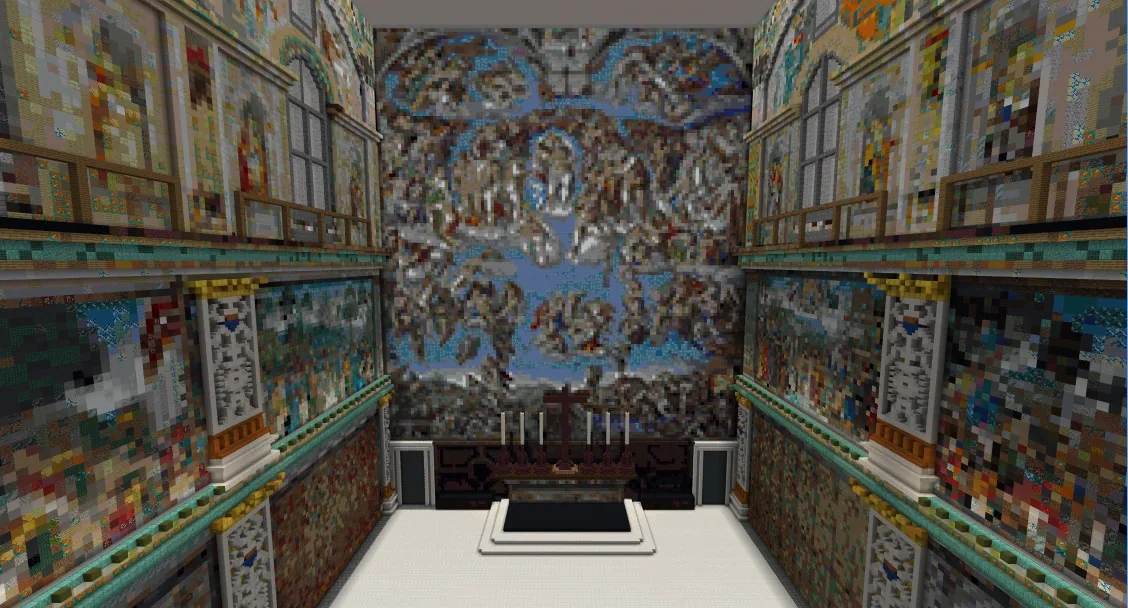
Students enter a dedicated Minecraft gallery to tour Michelangelo's work and speak with his character guide. After sketching concepts in their notebooks, learners construct digital fresco murals in-game, followed by an offline simulation where they paint on paper taped beneath their desks to experience the real-world challenge of ceiling painting.
Learning objectives
By the end of this lesson students will be able to:
- Identify Michelangelo and his major contributions to art history, including the Sistine Chapel.
- Draft a preliminary fresco concept in a sketchbook prior to building.
- Construct an original digital fresco design inside Minecraft.
- Simulate traditional ceiling fresco painting by painting onto paper taped beneath classroom tables.
- Compose an artist reflection using art vocabulary to explain design choices and creative influences.
Blocks and items used in this lesson


Key vocabulary
- Fresco
- A technique of painting murals on freshly laid wet plaster or directly on walls and ceilings.
- Sistine Chapel
- A famous papal chapel in Rome known for its elaborate ceiling and wall frescoes painted by Michelangelo.
- Artist Statement
- A written explanation where an artist describes their artwork, inspiration, and technical decisions.
Before class
Lesson sequence
- Explore Michelangelo in Minecraft
Students log into the world and head to the Michelangelo zone. They meet Michelangelo to learn about his background and examine the Sistine Chapel recreation. Afterward, students review reference images of his statues and ceiling work before sketching out an original fresco concept in their physical sketchbooks.
- Digital Fresco Construction
Working over Days 1 through 3, students translate their sketchbook concepts into block-based frescoes inside Minecraft. On the final digital work day, learners take in-game photographs of their finished frescoes and document their inspiration in their digital portfolios.
- Hands-On Ceiling Painting Challenge
Students step away from screens and position themselves lying on their backs beneath classroom tables. Using paints and brushes, each student paints an original design directly onto craft paper taped to the underside of the table to replicate the physical challenge of ceiling painting.
- Gallery Share and Reflection
Learners present both their digital Minecraft frescoes and their physical table paintings to peers, explaining their choices and visual themes. Each student completes a written artist reflection explaining what they learned about Michelangelo and the fresco process.
Assessment: success criteria
- The student completed a preliminary design sketch in their sketchbook before building.
- The finished Minecraft fresco communicates a clear subject and reflects intentional craftsmanship.
- The student actively participated in the physical under-table painting simulation.
- The written artist statement incorporates relevant art vocabulary to describe creative influences and technical choices.
Differentiation
Provide visual and verbal step-by-step instructions, allow extra working time, or let students collaborate in small groups on their frescoes.
Fast finishers can build a second fresco, design a landscape, or construct an abstract composition inspired by Piet Mondrian.
Knowledge check
5 questions to check understanding after the lesson. Tap an answer to see if it is right; the score appears at the end.
1Which famous artist and masterpiece do students investigate in this lesson?
Answer: B. The lesson centers on Michelangelo and his work on the Sistine Chapel.
2What should students do before building their fresco inside Minecraft?
Answer: A. The lesson instructions direct students to sketch their ideas in their sketchbooks before designing in Minecraft.
3What unique physical challenge do students complete on Day 4 of the lesson?
Answer: C. Students lie under tables and paint paper taped to the underside to simulate overhead fresco painting.
4What teacher preparation step is specifically noted regarding the in-game art gallery?
Answer: B. The teacher notes explain that two pieces include classical nudes that teachers may censor or remove if inappropriate for their classes.
5How do students document their finished Minecraft frescoes on Day 3?
Answer: C. Students are instructed to take a photo of their finished work and explain their inspiration in their portfolio.
Resources
- Lesson package (.zip)Everything the author attached to this lesson in one download.
- Influential Artists RubricResource
- Influential Artists Student Self AssessmentResource
- Lesson worldOpens the world page in Minecraft Education (sign-in with a school account may be needed).
Frequently Asked Questions
How can I handle the classical nude artworks featured in the gallery?
Review the gallery prior to class. If the two classical nude figures are unsuitable for your age group or school policy, you can remove the pieces or censor them by replacing specific blocks before students join the world.
What materials are required outside of Minecraft?
You will need sketchbooks, reference images of Michelangelo's work, craft paper, masking tape, paint, and paintbrushes for the physical painting activity on Day 4.
Adapted from Influential Artists: 1 of 4 by Phygital Labs on Minecraft Education, last updated Jul 16, 2025. This classroom version, the timings and the quiz were written by 9Minecraft Education.







































