
- Type
- Lesson plan
- Ages
- Ages 6-10
- Duration
- about 55 min (suggested)
- Includes
- Quiz: 5 questionsLesson files
How can we use musical note blocks and collaborative building to celebrate someone special?
Overview
Music and shared celebrations offer meaningful ways for young learners to build social connections and express creativity. In this lesson, students explore auditory recognition and musical sequencing by listening to a familiar melody and working together to celebrate a peer in a shared virtual space.
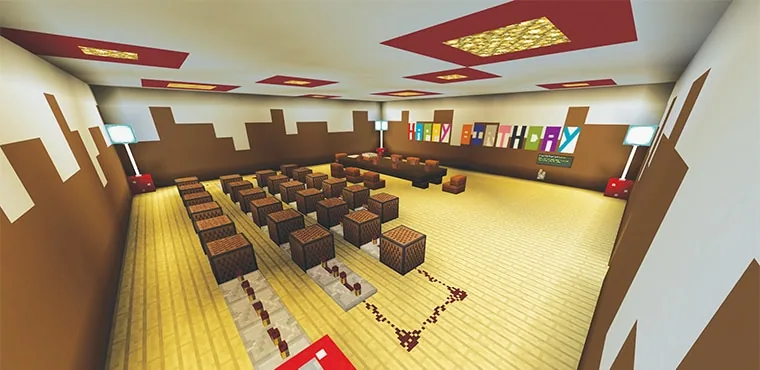
Using Minecraft note blocks, levers, and decorative items, learners interact with musical contraptions, identify pitch and sequence to repair broken tunes, and prepare an imaginative party space complete with gifts, food, and fireworks.
Learning objectives
By the end of this lesson students will be able to:
- Identify the melody and individual notes of a familiar song.
- Interact with levers and note blocks to trigger musical sequences and fireworks.
- Repair an interrupted melody by replacing missing note blocks with the correct pitch.
- Design and decorate a shared celebration space with gifts and food for a classmate.
Blocks and items used in this lesson


Key vocabulary
- Note Block
- A Minecraft block that plays a musical sound when struck or powered by redstone.
- Melody
- A sequence of musical notes played in an order that forms a recognizable tune.
- Lever
- A switch in Minecraft that can turn redstone contraptions on and off.
Before class
Lesson sequence
Suggested timing: about 55 minutes in total.
- Listen and Identify10 min
Gather students around the music mechanism. Players press the lever to listen to the melody, observe the fireworks, and identify the song title and musical sounds.
- Melody Repair Challenge15 min
Challenge learners to examine the melody after removing certain note blocks. Students test different block pitches to restore the missing parts of the song or attempt to replicate the sequence.
- Party Preparation and Building20 min
Invite students to decorate the world for a classmate's birthday. Learners can construct party areas, craft food and gifts, or experiment with creating their own original note block melodies.
- Celebration and Reflection10 min
Walk through the decorated celebration space as a group, listen to any student-created melodies, and discuss how music helps people celebrate together.
Assessment: success criteria
- Student accurately identifies the song and recognizes when notes are missing.
- Student successfully operates levers and note block mechanisms.
- Student adjusts note blocks to repair or compose a musical sequence.
- Student contributes decorations, food items, or gifts to the group celebration space.
Differentiation
Pair students together to test note block pitches and provide visual guides for the notes needed in the song.
Encourage learners to design an entirely original melody or set up a multi-note accompaniment using redstone.
Knowledge check
5 questions to check understanding after the lesson. Tap an answer to see if it is right; the score appears at the end.
1Which block in Minecraft is used to play musical notes?
Answer: A. Note blocks emit musical pitches when struck or activated by a redstone signal.
2What song do students listen to and identify in this lesson?
Answer: C. The source identifies the song studied and replicated in this lesson as Happy Birthday.
3What mechanism do students toggle to hear the song and trigger fireworks?
Answer: B. The lesson activities specify pressing the lever to hear the song and watch fireworks.
4How can the teacher create a problem-solving challenge with the music?
Answer: D. The guiding ideas explain that the teacher can remove some note blocks for students to fix.
5What do students build to celebrate together in the world?
Answer: C. The student activities describe decorating the world with gifts and food to celebrate a classmate.
Resources
Frequently Asked Questions
Do I need a pre-made world file to run this lesson?
No special world download is required. Teachers can quickly construct a simple line of note blocks wired with redstone repeaters in any flat or standard world.
How do students change the pitch of a note block?
Students interact with or right-click the note block to cycle through its available pitches until they match the target musical note.
Adapted from Happy Birthday by Leticia Ahumada on Minecraft Education, last updated Oct 13, 2017. This classroom version, the timings and the quiz were written by 9Minecraft Education.








































