
- Type
- Lesson plan
- Ages
- Ages 8-13
- Duration
- 45 min
- Level
- Beginner
How does the datacenter underpin our digital society, and how can understanding its role empower students with essential cyber safety and citizenship skills?
Overview
Datacenters serve as the operational backbone of modern digital life, storing information, facilitating communication, and protecting personal data while interacting with the surrounding community and environment. By examining the roles that sustain these facilities, students gain foundational digital literacy and cyber safety skills needed for responsible citizenship.
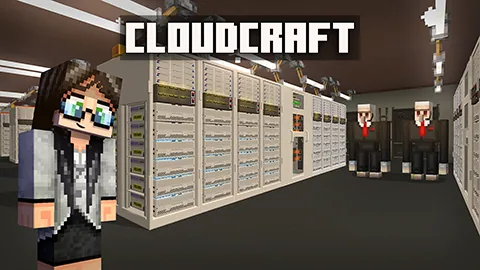
Inside the CloudCraft Minecraft world, learners take on five non-linear missions alongside facility staff. Players assist with physical hardware recycling, environmental tree replanting, digital virus defense, perimeter camera surveillance, and server rack installation, seeing the neighboring village modernize as each task is resolved.
Learning objectives
By the end of this lesson students will be able to:
- Describe the physical hardware and daily functions required to keep a datacenter connected to the cloud.
- Explain how datacenters defend digital security and protect personal user information from cyber threats.
- Demonstrate responsible digital citizenship by balancing technology requirements with community recycling and tree replanting.
- Complete five maintenance and security missions to help modernize the adjacent village.
Blocks and items used in this lesson


Key vocabulary
- Datacenter
- A dedicated facility containing computer systems and equipment that store, protect, and process digital data.
- The Cloud
- A network of remote servers accessed through the internet to store, manage, and process data.
- JBOD
- Storage hardware components installed into datacenter racks to hold and process large amounts of data.
- Hardware
- The physical parts and equipment that make up computer servers, wiring, and network machinery.
Before class
Lesson sequence
Suggested timing: about 45 minutes in total.
- Warm-up and Cloud Concepts10 min
Introduce the driving question through a Think-Pair-Share discussion. Ask students what the cloud is, where they think their data is stored, and why dedicated datacenters are necessary to keep everyday digital tools running safely.
- CloudCraft Missions25 min
Students log into the CloudCraft world and receive their first debrief animation before teleporting to a team member in need. Learners tackle five randomized missions: fixing red cabling to recycle old hardware, replanting trees with saplings and bone meal, defending the network from ATM virus bugs with a creator hammer, monitoring camera feeds to alert Iron Golems of intruders, and installing blue server racks with JBODs.
- Village Modernization and Reflection10 min
After completing their missions, students observe how their work modernized the village and review information points inside the facility. Lead a concluding group discussion on how datacenters affect local employment, global communication, and environmental stewardship.
Video
Assessment: success criteria
- Student successfully finishes all five datacenter missions within the Minecraft world.
- Student explains how physical security and cyber defense protect personal data inside a datacenter.
- Student identifies environmental initiatives used by datacenters, including hardware recycling and planting two trees for every tree cleared.
Differentiation
Pair students together and have them follow the mission worksheets to identify specific target items, such as broken red wiring or designated sapling markers.
Direct students to inspect the datacenter information points and the modernized village to analyze local employment options and global services.
Knowledge check
5 questions to check understanding after the lesson. Tap an answer to see if it is right; the score appears at the end.
1What must students repair before the hardware recycling machine can receive power?
Answer: B. Students must locate and select the break in the red cabling to restore power to the recycling machine.
2How many trees must students replant for every single tree cleared to build the datacenter?
Answer: A. The architect explains that two new trees must be planted for every tree removed during construction.
3Where does the criminal attempt to introduce a virus in the Engineering mission?
Answer: C. The animation shows a criminal attempting to insert a virus through the village ATM.
4How do students notify the Iron Golem security team when they spot suspicious activity on the monitors?
Answer: D. Students watch the nine security screens and must select to crouch to notify the Iron Golems.
5Which tool is provided to students to tap server racks and fight incoming virus bugs?
Answer: B. The chief engineer and technician equip players with a creator hammer to eliminate virus bugs and mount light blue server racks.
Resources
- Lesson package (.zip)Everything the author attached to this lesson in one download.
- Educator GuideEducator Guide
- Presentation SlidesTeacher slide deck
- Teacher Lesson PlanScripted lesson plan
- CloudCraft Facilitator DeckTraining others to deliver? This facilitator guide is your tool.
- Student ActivitiesExtend your learning about the Cloud and Datacenters with these five class activities
Frequently Asked Questions
Do all students complete the five missions in the exact same sequence?
No, the missions are non-linear and are presented to each student in a random order upon returning to headquarters.
How do students know that a mission has been successfully resolved?
A follow-up animation plays after each completed mission showing how the solution helped the villagers, and the nearby village visibly modernizes.
Adapted from CloudCraft by Minecraft Education on Minecraft Education, last updated Oct 20, 2026. This classroom version, the timings and the quiz were written by 9Minecraft Education.










































