- Type
- Lesson plan
- Grade
- Early years (Pre-K to Grade 2)Primary (Grades 3-5)Middle school (Grades 6-8)High school (Grades 9-12)
- Ages
- All ages
- Duration
- 30 min
- Level
- Beginner
How can we visually communicate our understanding of a topic within a shared creative workspace?
Overview
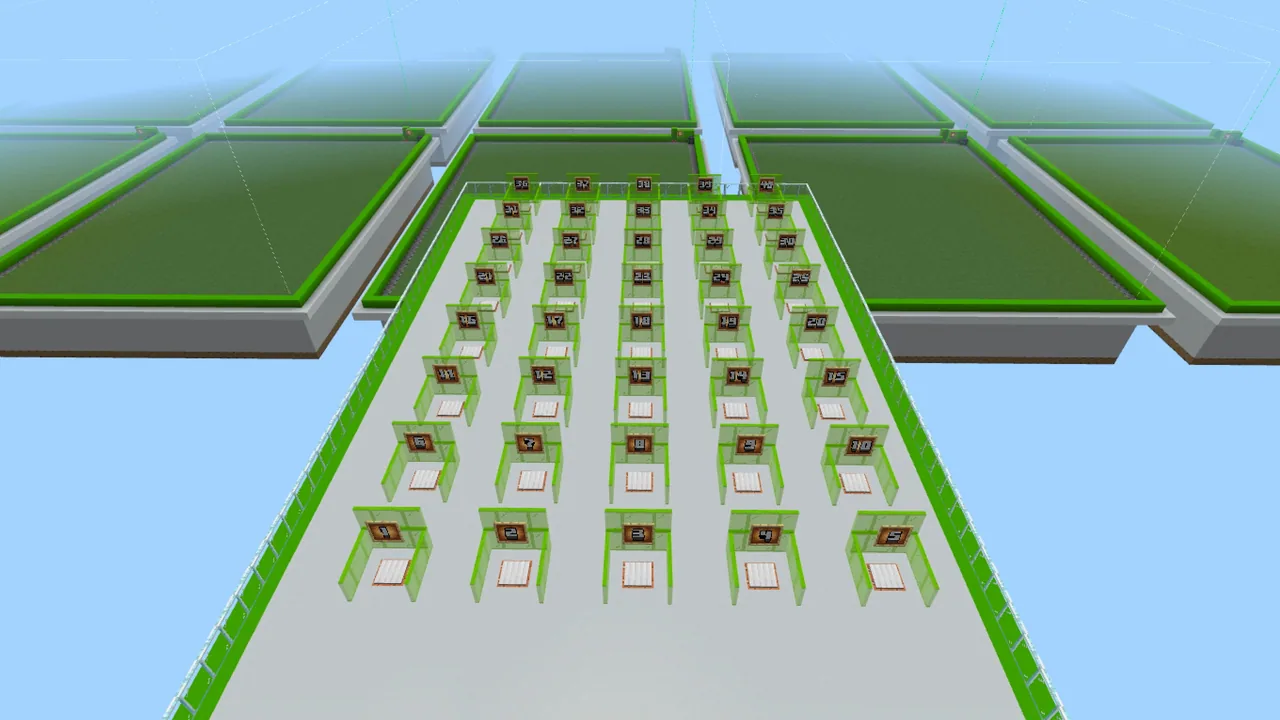
The Class Build Plates resource provides a structured multi-user framework that allows an entire class to collaborate simultaneously inside a single Minecraft world. Designed around the design thinking process, this environment lets educators across subject areas assess student comprehension by having learners build concrete representations of concepts in Creative mode.Learning objectives
By the end of this lesson students will be able to:
- Plan a build using brainstorming, mud map, or storytelling templates before entering the digital space.
- Navigate from the central allocating pad to a designated build area numbered between 1 and 40.
- Construct a 3D model in Creative mode that demonstrates understanding of the assigned topic.
- Work respectfully alongside peers within a shared multi-player classroom environment.
Blocks and items used in this lesson


Key vocabulary
- Allocating Pad
- The central spawn platform where all students start before moving to their individual build zones.
- Build Plate
- One of forty distinct numbered areas provided in the world for an individual or group to construct their model.
- Mud Map
- A rough visual outline or planning sketch created on paper before building in Minecraft.
- Design Thinking
- A structured problem-solving approach used to brainstorm, prototype, and refine ideas.
Before class
Lesson sequence
Suggested timing: about 30 minutes in total.
- Topic Briefing and Planning7 min
Introduce the subject prompt and discuss the learning objectives. Distribute supporting resources such as brainstorming sheets, mud maps, or storytelling templates so learners can draft their concepts prior to entering the world.
- World Entry and Pad Allocation3 min
Host the world and have students join. All learners spawn on the central allocating pad. Instruct each student or group to travel directly to their pre-assigned plate number between 1 and 40.
- Creative Construction15 min
Students work within their designated plot boundaries in Creative mode, translating their planning templates into 3D Minecraft models that represent their understanding of the topic.
- Review and Gallery Walk5 min
Learners tour the forty individual build plates to observe peer interpretations of the prompt, comparing different structural ideas and creative representations across the shared world.
Assessment: success criteria
- The student found and stayed within their assigned build plate numbered 1 through 40.
- The 3D model accurately represents the topic or learning objectives established by the teacher.
- The completed construction aligns with the student's preparatory mud map or brainstorming template.
- The learner interacted appropriately and respectfully inside the shared multi-user world.
Differentiation
Supply an item lists template alongside a pre-sketched mud map so learners can gather specific blocks quickly without feeling overwhelmed.
Have advanced learners use the storytelling template to document an in-depth narrative explaining the features of their completed model.
Knowledge check
5 questions to check understanding after the lesson. Tap an answer to see if it is right; the score appears at the end.
1How many individual build areas are available in each Class Build Plates world?
Answer: C. The source states that each version of the world contains 40 separate areas for students to work within.
2Where do students appear when they first join any version of this world?
Answer: A. According to the guiding ideas, students will always start on the allocating pad in every version of these worlds.
3What must the teacher assign to each student or group before launching the activity?
Answer: B. The teacher prep guidelines instruct educators to provide students with a number between 1 and 40 before hosting.
4Which instructional framework was Class Build Plates designed and tested against?
Answer: C. The teacher notes explain that the world was specifically designed and tested against the design thinking model.
5Which of the following is an official supporting template provided with this resource?
Answer: B. The supporting files explicitly include a mud map template alongside brainstorming and storytelling resources.
Resources
- Lesson package (.zip)Everything the author attached to this lesson in one download.
- Class Build Plates - Concrete
- Class Build Plates - Badlands
- Class Build Plates - Desert
- Class Build Plates - Forest
- Class Build Plates - Ice Plains
- Class Build Plates - Jungles
- Class Build Plates - Mountains
- Class Build Plates - Rivers
- Class Build Plates - Savanna
- Class Build Plates - Swamp Land
- Class Build Worlds - Educator Toolkit
- 3D Draw Template
- Brainstorming Template
- Item lists Template
- Mud Map Template
- Story Telling Template
- Class Build Plates - Changeable Surface
- Class Build Plates - Mushroom Island
- Class Build Plates - Ocean
- Class Build Plates - Taiga
- Class Build Plates - Warm Ocean
- Class Build Plates -Netherworld
Frequently Asked Questions
Can these worlds be used for subjects outside of art and design?
Yes. The build plates are adaptable across any subject area, including science, math, and economics, provided you define clear learning objectives prior to the lesson.
What environment options are available for the build plates?
A wide selection of biomes is available, including Forest, Desert, Badlands, Jungles, Mountains, Ocean, Netherworld, Taiga, Ice Plains, and Changeable Surface worlds.
Do students need their building instructions before logging into the world?
Yes. The guide advises that students should already know what they are building based on your prior instruction before you host and enter the world.
Adapted from Class Build Plates by Nathan Richards on Minecraft Education, last updated Nov 29, 2022. This classroom version, the timings and the quiz were written by 9Minecraft Education.