
- Type
- Lesson plan
- Subject
- Computer Science & Coding
- Topics
- Computer Science
- Ages
- Ages 8-13
- Includes
- Quiz: 5 questions
How can 3D coordinates and coding variables be used to generate a balanced, automated multiplayer mini-game?
Overview
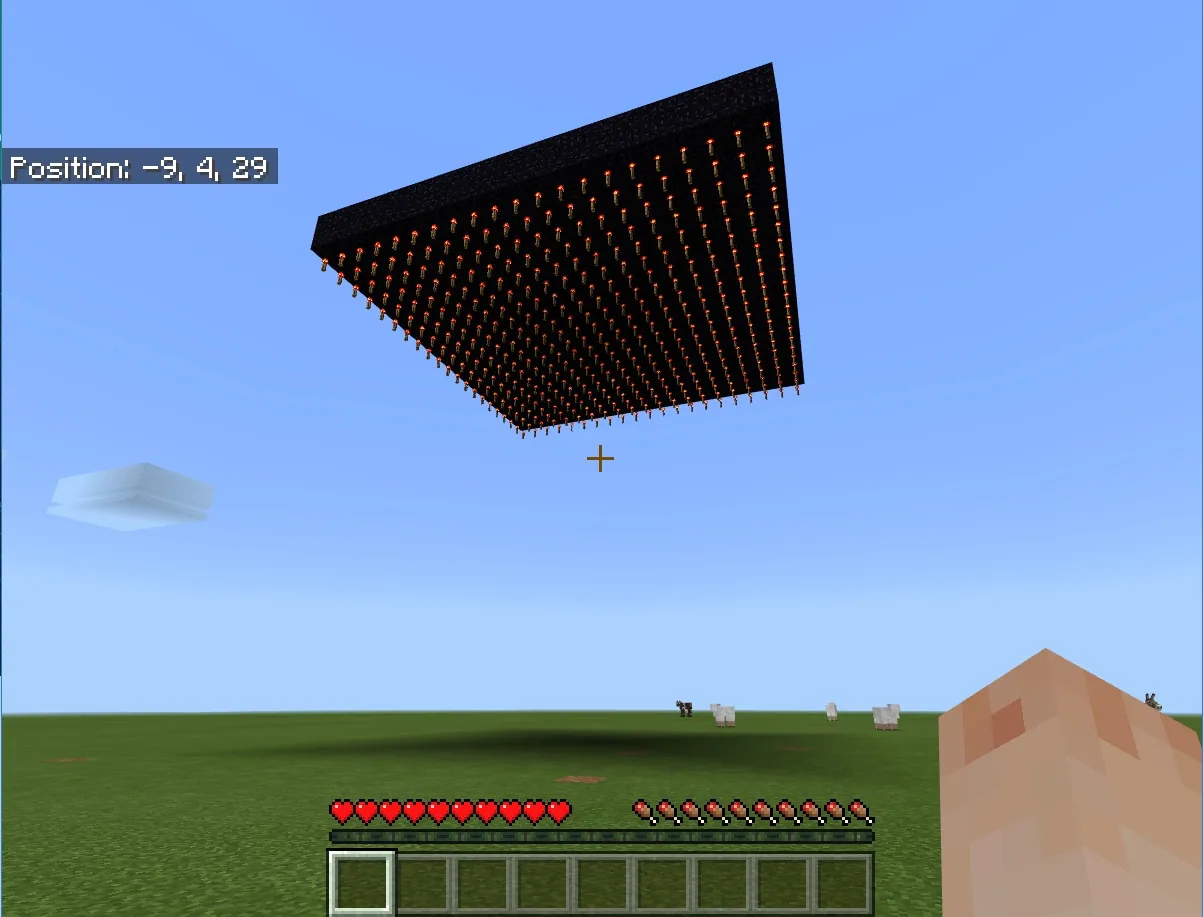
In this computer science lesson, students design and program a multiplayer battle arena inspired by the arcade classic Bomberman. Working in a flat Blocks of Grass world, learners use MakeCode to manipulate three-dimensional coordinates and build an elevated, walled bedrock platform lined with redstone torches.
Students automate the match mechanics through code, including wiping inventories, distributing TNT, configuring survival settings, and disabling player-versus-player combat. Along the way, they analyze how variables simplify coordinate geometry and reflect on how clear coding rules support fair digital citizenship.
Learning objectives
By the end of this lesson students will be able to:
- Construct an elevated multiplayer arena using 3D coordinate fills and a hollowing technique in MakeCode.
- Apply redstone torch placement beneath bedrock to trigger TNT detonations.
- Implement game rules through code by clearing inventories, toggling player-versus-player damage, and granting TNT.
- Evaluate how variables for width and height streamline code reading and adjustments.
Blocks and items used in this lesson

Key vocabulary
- 3D Coordinates
- Numbers representing position in three dimensions: width, height, and depth.
- Variables
- Named values stored in code that can be referenced, updated, or supplied as parameters.
- Hollowing
- A building technique where an inner section of blocks is replaced with air to leave outer walls.
Before class
Lesson sequence
- Arena Dimensions and Coordinate Planning
Introduce the project goals and discuss arena dimensions. Prompt students to consider why the arena must be elevated at least 21 blocks above the ground to stop players from surviving a fall, and how arena width relates to the blast radius of TNT.
- Coding the Platform and Activation Layer
Students open a Blocks of Grass world, launch the MakeCode editor, and write code to generate the arena structure. They code a bedrock platform that is 20 blocks by 20 blocks and two blocks deep, elevated at least 21 blocks high, followed by a matching 20 by 20 layer of redstone torches immediately underneath it.
- Hollowing Walls and Match Automation
Students program an 18 by 18 layer of air one block deep directly above the platform to hollow out the bedrock walls. Next, they add commands to clear inventories, distribute 64 TNT to all players, turn off player-versus-player damage, set survival mode, and teleport everyone to the center.
- Multiplayer Testing and Variable Optimization
Learners host classmates to test their arena mechanics in a last-survivor battle. Following the matches, students examine where variables could replace hard-coded numbers for arena width and height to make future modifications faster.
Assessment: success criteria
- The arena correctly generates elevated at least 21 blocks with bedrock walls and a redstone torch base.
- Code commands successfully clear player inventories, grant 64 TNT, and disable direct player-versus-player damage.
- The student can explain how coordinate patterns were determined to create the walls and hollow inner space.
- The student identifies how adding width and height variables makes the code easier to modify.
Differentiation
Provide students with a visual diagram of the Y-levels showing the torch layer, bedrock base, and air layer before they begin scripting.
Have students experiment with blast-resistant block alternatives such as obsidian, or add arena obstacles, rule signs, and custom parameters for width and height.
Knowledge check
5 questions to check understanding after the lesson. Tap an answer to see if it is right; the score appears at the end.
1Why is an array of redstone torches placed directly under the arena floor?
Answer: B. The proximity of the redstone torches causes placed TNT to detonate without destroying the bedrock.
2How do students create the arena walls using MakeCode?
Answer: B. Filling an 18 by 18 square of air above the 20 by 20 platform hollows out the bedrock, leaving a perimeter wall.
3Why must player-versus-player damage be turned off for this mini-game?
Answer: A. Turning off direct player-versus-player damage ensures fair rules centered on explosive survival rather than punching.
4What is one main advantage of using variables for arena height and width?
Answer: C. Variables allow programmers to easily read the script and change dimensions across multiple layers without editing every coordinate manually.
5What starting items are given to players once their inventories are cleared?
Answer: B. The code clears all personal items and provides each player with exactly 64 blocks of TNT.
Frequently Asked Questions
What should I do if the explosive theme is not suitable for my classroom?
You can adapt the mini-game to run in creative mode on a destructible platform where explosions create holes, turning the objective into avoiding falling through gaps.
Which materials can be tested as alternatives to bedrock?
Students can experiment with other blast-resistant materials such as obsidian or test the behavior of diamond blocks when exposed to detonated TNT.
Adapted from Blast Off by Philip Golden on Minecraft Education, last updated Apr 2, 2018. This classroom version, the timings and the quiz were written by 9Minecraft Education.










































