
- Type
- Lesson plan
- Subject
- Computer Science & Coding
- Ages
- Ages 8-13
- Duration
- 45 min
- Level
- Beginner
- Includes
- Quiz: 5 questions
Why is it important to keep road users notified of events on the road ahead?
Overview
Road management requires rapid communication and clear signaling to protect drivers from unexpected hazards. In this lesson, developed alongside highway engineers, learners discover how highway workers coordinate safety operations during roadside incidents on the A27 Arundel road scheme.
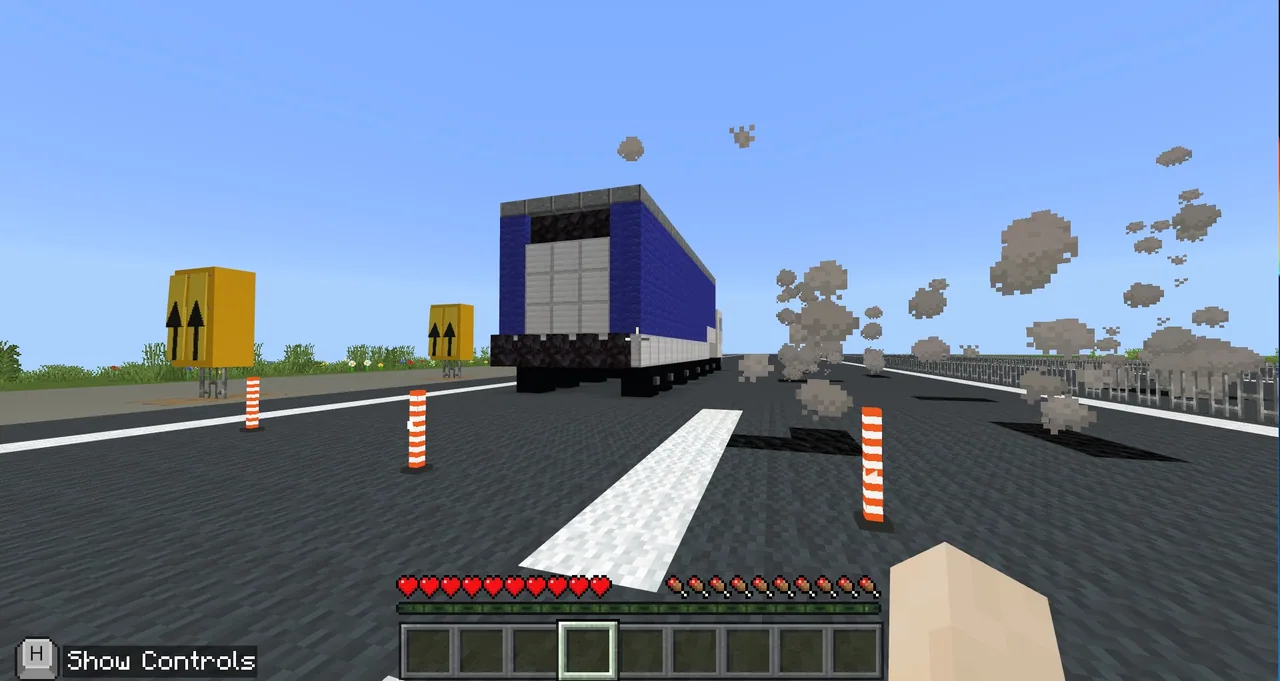
Inside Minecraft, students tour a virtual National Highways office to research career roles before transitioning to an active road scheme. Working through either a banner-crafting route or a MakeCode programming route, learners update overhead gantry signs to redirect traffic around disabled cars and burning vehicles.
Learning objectives
By the end of this lesson students will be able to:
- Identify different career roles that help keep major roads operating safely.
- Produce appropriate lane warning signs using banner patterns or code commands.
- Sequence traffic notifications accurately to respond to car breakdowns and emergency lane closures.
Key vocabulary
- Loom
- A Minecraft workstation used to apply patterns and dyes to fabric banners.
- MakeCode
- A block and text programming environment used to manipulate elements within Minecraft.
- NPC
- A non-player character that provides guidance, career facts, or teleportation options.
Before class
Lesson sequence
Suggested timing: about 45 minutes in total.
- Office Induction and Exploration5 min
Students log in and spawn into the National Highways office building. Direct them to explore the rooms and speak with informational NPCs to gather introductory facts, then gather at the corner office near the NPC named Andy without clicking him yet.
- Field Site Briefing10 min
Instruct students to click Andy and select their designated level: Key Stage 2 for the Junior Game or Key Stage 3 for the Senior Game. Once teleported to the road scheme, learners interview career NPCs around the site and inside the portacabin to discover various highway professions.
- Road Incident Sign Management25 min
Learners activate scenario buttons outside the portacabin. For the broken-down car, Junior students craft banners at the loom and Senior students program MakeCode to show the left lane closed and right lane open. For the burning lorry scenario, students update the road signs to mark both lanes closed.
- Debrief and Career Reflection5 min
Gather the class to discuss their responses to road hazards. Invite students to share which highway career role they found most interesting and explain why clear incident signage is vital for driver safety.
Assessment: success criteria
- Student accurately describes at least one job role involved in highway safety.
- Road signs correctly show the left lane closed and right lane open during the car scenario.
- Road signs clearly display both lanes closed during the hazardous lorry scenario.
Differentiation
Allow students struggling with banner crafting or coding to consult the provided video guide or partner with a peer.
Challenge confident learners to complete both the Junior banner-crafting task and the Senior MakeCode automation challenge within the same session.
Knowledge check
5 questions to check understanding after the lesson. Tap an answer to see if it is right; the score appears at the end.
1Which NPC teleports players from the National Highways office to the virtual road scheme?
Answer: B. The source specifies that students find Andy in the corner office to select their level and teleport.
2What happens on the road when the car scenario button is pressed?
Answer: A. Pressing the car scenario button spawns a broken-down car on the road.
3How must the signs be updated for the broken-down car scenario?
Answer: C. The instructions direct players to change the signs to left lane closed and right lane open for the car scenario.
4What visual hazard appears during the lorry scenario?
Answer: D. The source states that pressing the lorry button causes a lorry to appear with fire and smoke.
5What tool do Junior (Key Stage 2) players use to produce the warning signs?
Answer: A. Junior players make signs using a loom and items found in the chest, whereas Senior players use MakeCode.
Frequently Asked Questions
Do I need separate world files for primary and secondary classes?
No. Both the Junior (Key Stage 2) and Senior (Key Stage 3) learning pathways are contained within the same downloadable world file.
What is the primary technical difference between the Junior and Senior games?
Junior players craft physical banner signs using a loom and chest materials, while Senior players automate sign updates using MakeCode programming.
Adapted from A27 Road Signs by Block Builders on Minecraft Education, last updated Feb 27, 2023. This classroom version, the timings and the quiz were written by 9Minecraft Education.










































