
- Type
- Lesson plan
- Ages
- Ages 8-18
- Includes
- Quiz: 5 questions
Why do societies need bridges and tunnels, and how do engineers choose the right methods and materials to connect two sides safely?
Overview
Bridges and tunnels are critical engineering achievements that make everyday life easier by connecting separated geographic areas. In this lesson, students investigate why societies need these structures, examining how communities functioned before such connections existed and how engineers approach large-scale infrastructure challenges.
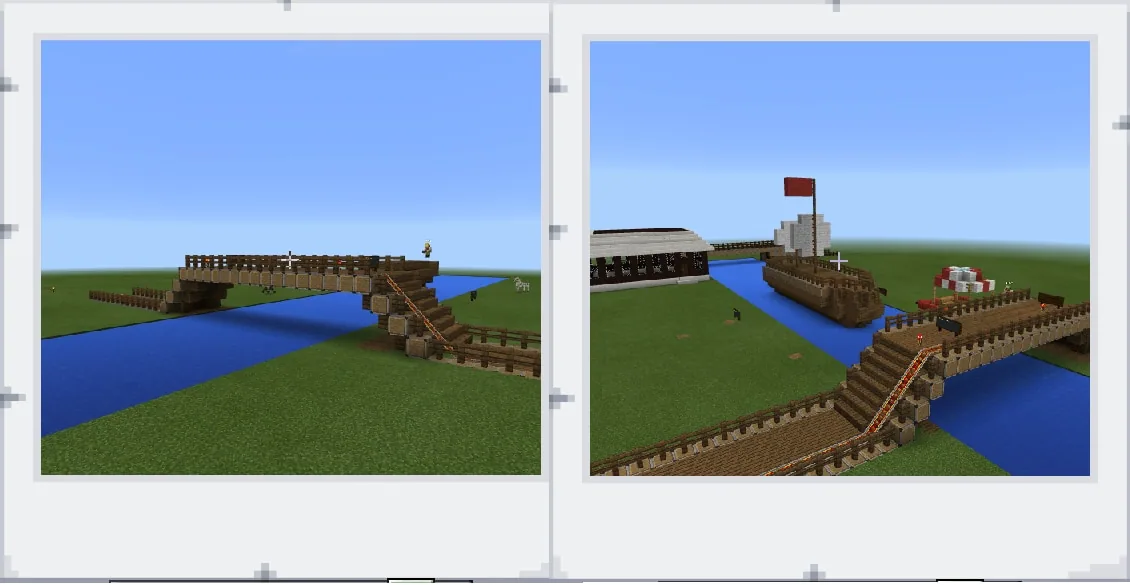
Using Minecraft, students put engineering and project management concepts into practice. Learners select either a bridge or a tunnel project, select appropriate construction materials to avoid structural collapse, and document their completed build using the in-game camera tool.
Learning objectives
By the end of this lesson students will be able to:
- Explain the practical and societal reasons for constructing bridges and tunnels.
- Select either a bridge or a tunnel to design, maintaining a focused project scope.
- Choose appropriate building materials to ensure structural integrity and prevent collapse.
- Document the completed engineering project using the in-game camera tool.
Blocks and items used in this lesson


Key vocabulary
- Infrastructure
- Public structures and systems, such as bridges and tunnels, that help a society function and connect.
- Project Management
- The practice of initiating, planning, and executing work to achieve specific project goals within set limits.
- Engineering Process
- A structured series of steps that engineers follow to research, design, and build solutions to problems.
Before class
Lesson sequence
- Introduction and Inquiry
Lead a class discussion on how people live without bridges and tunnels, exploring why communities historically needed to build them. Introduce the television series Extreme Engineering as a reference point for large infrastructure projects.
- Project Planning and Research
Instruct students to choose one project type: either a bridge or a tunnel. Emphasize that taking on both can cause distraction and reduce quality. Students research structural materials, noting that excessive or improper material usage can cause collapses.
- Minecraft Construction
Students collaborate in Minecraft to construct their chosen bridge or tunnel. They apply basic engineering and project management principles, monitoring material choices carefully to ensure a stable, well-proportioned structure.
- Documentation and Reflection
Students capture images of their finished structure using the in-game camera tool. They compile these images into a digital portfolio and create an Office Mix presentation explaining their material choices and engineering process.
Assessment: success criteria
- Student identifies valid societal and practical reasons for building bridges or tunnels.
- Student maintains focus on a single project type rather than attempting both simultaneously.
- Student selects suitable building materials while avoiding excessive usage that risks structural failure.
- Student produces a digital portfolio using the camera tool and explains their project clearly.
Differentiation
Help students narrow their design to a short, straightforward crossing and provide a limited palette of sturdy construction materials.
Challenge students to produce a detailed Office Mix presentation analyzing the structural load and engineering trade-offs of their design.
Knowledge check
5 questions to check understanding after the lesson. Tap an answer to see if it is right; the score appears at the end.
1Why does the lesson advise students to focus on building either a bridge or a tunnel, rather than both?
Answer: B. The source explicitly states that focusing on both types causes distraction and may lower product quality.
2Which television series is suggested as a helpful reference before starting this lesson?
Answer: A. The source suggests having students watch the television series Extreme Engineering.
3What problem does the lesson state can happen if excessive materials are used in the build?
Answer: C. The lesson notes that excessive material usage may cause the bridge or tunnel to fall or collapse.
4Which in-game tool are students expected to use to assemble a digital portfolio of their work?
Answer: D. The performance expectations state that students use the camera tool in Minecraft to create their digital portfolio.
5Along with Science and Technology, which subject area does this lesson integrate?
Answer: B. The source lists Science, Government and Politics, and Technology as the subjects for this lesson.
Frequently Asked Questions
Is there a required world file to download for this activity?
No custom world download is required. Students can build in any standard Minecraft world that features terrain obstacles, such as bodies of water or mountain ridges, requiring a bridge or tunnel connection.
How do students share and present their finished engineering designs?
Students use the in-game camera tool to take photos of their build, compile a digital portfolio, and present their work through Office Mix to explain their material choices and engineering process in detail.
Adapted from Make 2 Sides connect by Yunus Emre Calik on Minecraft Education, last updated Dec 21, 2016. This classroom version, the timings and the quiz were written by 9Minecraft Education.







































