- Type
- Lesson plan
- Ages
- Ages 8-13
How can we design an interactive Minecraft maze game that teaches players how to stay safe online?
Overview
In this integrated unit of work, students explore fundamental digital safety issues and investigate how interactive games can be used to communicate critical information. Learners examine online safety concepts, determining what risks young people encounter on the internet and how responsible digital citizenship habits can be shared with others.
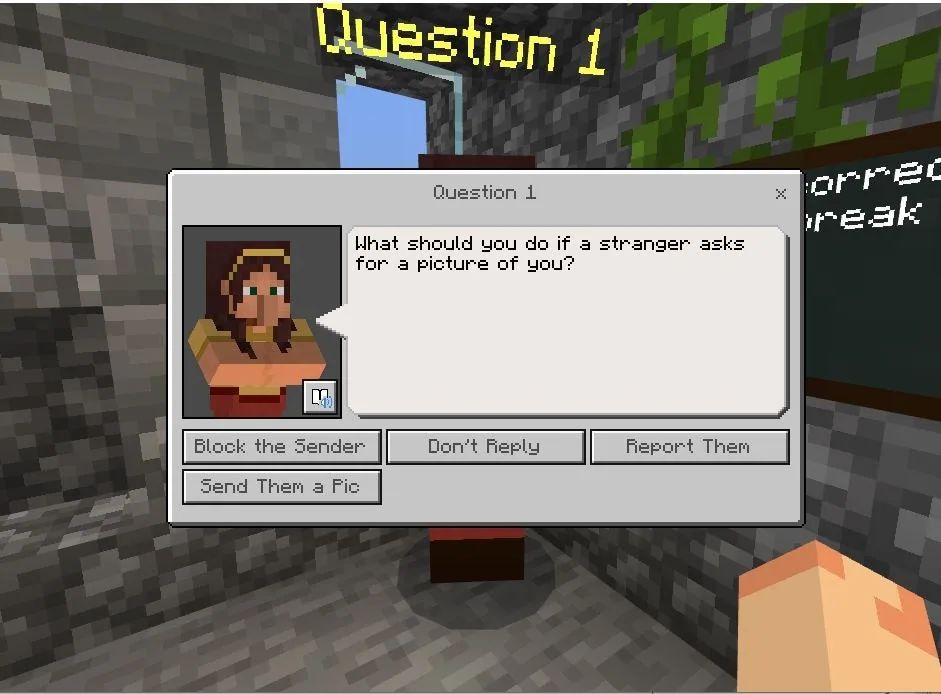
Students transform their research findings into an interactive 3D Minecraft maze. After planning their questions and mapping their layouts to scale on grid paper, learners construct their mazes and program Non-Player Characters (NPCs) with commands to quiz visitors, granting progress-granting resources to players who answer correctly.
Learning objectives
By the end of this lesson students will be able to:
- Research core e-safety concepts and draft multiple-choice quiz questions.
- Design a maze to scale on grid paper prior to constructing it in three dimensions.
- Program Non-Player Characters (NPCs) using commands to question players and award resources.
- Evaluate peer-created mazes and exchange constructive feedback.
Blocks and items used in this lesson


Key vocabulary
- E-Safety
- The practice of staying safe, secure, and responsible when using the internet and digital technology.
- Non-Player Character (NPC)
- A character inside Minecraft that is controlled by the game rather than a player, used here to talk to players and run commands.
- Command
- A text-based code instruction given to Minecraft or programmed into an NPC to perform a specific action, such as awarding items.
- Scale
- The proportional ratio used to transfer a 2D drawing on grid paper accurately into a 3D block-built environment.
Before class
Lesson sequence
- Research and Safety Concepts
Introduce the guiding ideas of online safety. Have students explore maze structures and research e-safety topics to understand what digital hazards users face and how to stay protected online.
- Quiz Formulation and Planning
Guide students through writing e-safety questions with multiple-choice options using the Guess the Question materials. Students organize their questions and intended answers on the Maze Planning Template.
- Grid Paper Layout
Students translate their ideas into a scaled 2D maze diagram on grid paper, determining the corridors, dead ends, and encounter locations where interactive characters will be placed.
- 3D Construction and NPC Coding
Using their grid plans, students construct the maze walls in Minecraft. They set up Non-Player Characters (NPCs) and program commands so that correct answers to e-safety questions award the resources needed to advance.
- Playtesting and Peer Feedback
Learners play each other's mazes, answering the e-safety questions along the way. Each student gathers constructive feedback on their build and provides thoughtful critiques to their classmates.
Assessment: success criteria
- Student research yields well-formed, accurate questions and answers addressing online safety.
- The 3D Minecraft build accurately follows the scaled 2D plan drafted on grid paper.
- NPCs are programmed with functioning commands that reward players who answer questions correctly.
- Constructive, specific feedback is shared with peers during playtesting.
Differentiation
Allow students to consult the example completed maze plan to guide their 2D grid drawings and NPC question structure.
Prompt learners to code multi-step command sequences into their NPCs to handle varied resource rewards or intricate branching paths.
Knowledge check
5 questions to check understanding after the lesson. Tap an answer to see if it is right; the score appears at the end.
1What role do Non-Player Characters (NPCs) serve inside the student-built mazes?
Answer: B. NPCs are programmed to present e-safety questions and award items to players who give correct answers.
2What planning step takes place before students build their 3D maze in Minecraft?
Answer: A. Learners design their maze layout to scale on grid paper and prepare their questions using planning templates prior to 3D construction.
3What do players receive when they successfully answer an NPC's e-safety question?
Answer: C. Correct responses trigger NPC commands that grant resources needed for the player to continue through the maze.
4Which activity occurs during the concluding stage of the project?
Answer: D. The final stage involves sharing finished game mazes with classmates and offering constructive feedback.
5Which group of subjects is integrated into this maze project?
Answer: A. The unit directly integrates Digital Literacy, Social and Emotional Health, and Computer Science.
Resources
- Lesson package (.zip)Everything the author attached to this lesson in one download.
- The Grade 5 E Safety Maze Term Plan
- Guess the Question ppt for creating questions
- Maze Planning Template
- Example Completed Maze Planning File
- Example Maze Plan
- Example Maze World File
Frequently Asked Questions
Is a pre-made downloadable world required for this project?
No, there is no downloadable world required. Students create their own worlds from scratch based on their scaled grid paper blueprints.
How long is this unit designed to last?
The lesson plan outlines a term-long unit spanning approximately ten weeks of activity within an integrated digital technology curriculum.
Adapted from E-Safety Mazes by Victorian Minecraft Innovators on Minecraft Education, last updated Apr 27, 2021. This classroom version, the timings and the quiz were written by 9Minecraft Education.