- Type
- Lesson plan
- Grade
- Early years (Pre-K to Grade 2)Primary (Grades 3-5)Middle school (Grades 6-8)High school (Grades 9-12)
- Ages
- All ages
- Duration
- 30 min
- Level
- Beginner
- Includes
- Quiz: 5 questionsMinecraft world
How can teams communicate and collaborate effectively under time limits during a head-to-head creative challenge?
Overview
Competitive esports provides a structured environment where students can develop digital literacy, leadership, and communication skills. In this lesson, learners collaborate in teams to tackle creative build challenges while navigating real-time event rules and team dynamics.
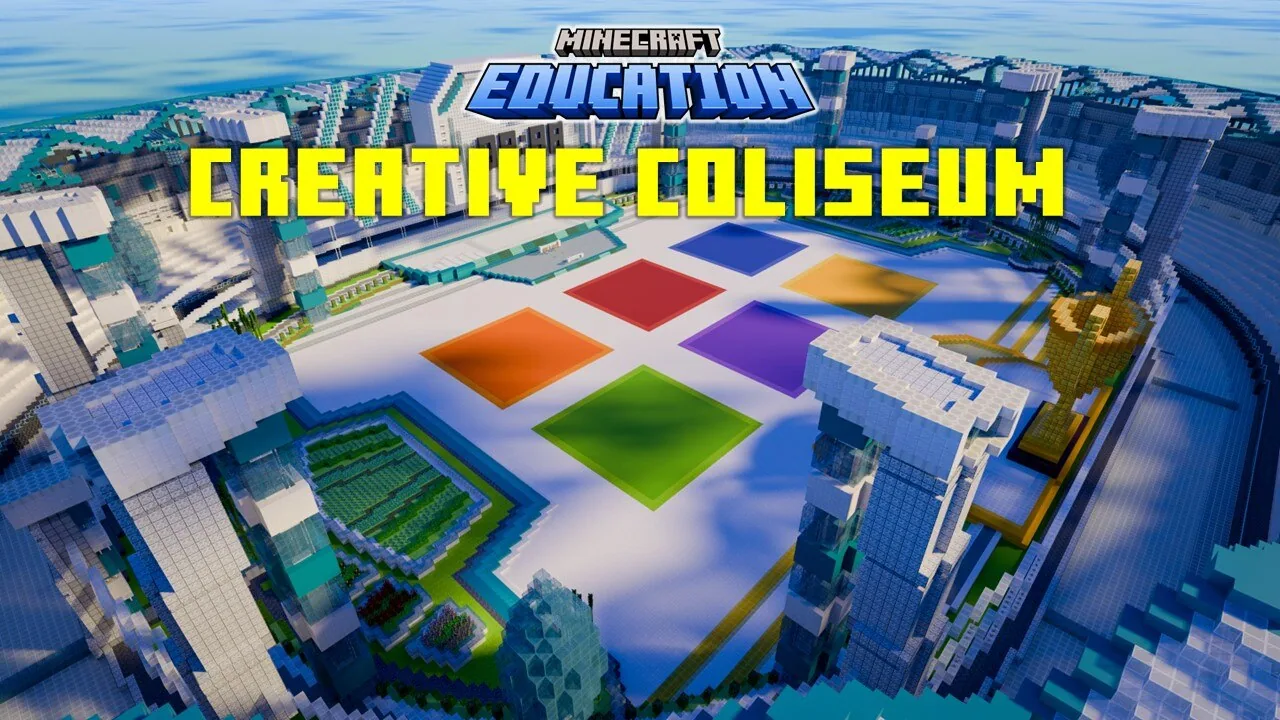
Using the Creative Coliseum world, students participate in a head-to-head build competition featuring dedicated arena spaces. Built-in host controls, team controls, and spectator settings allow students and educators to run, build, referee, and shoutcast the event smoothly.
Learning objectives
By the end of this lesson students will be able to:
- Collaborate in small groups to design and build a creative model within the arena.
- Communicate effectively with teammates under competitive time constraints.
- Demonstrate leadership skills while managing roles or utilizing host and team controls.
- Apply guidelines from the Esports Playbook to support teamwork and fair competition.
Blocks and items used in this lesson


Key vocabulary
- Shoutcasting
- Providing live running commentary during an esports match for spectators to follow.
- Refereeing
- Observing matches to ensure all competitors follow the rules and maintain fair play.
- Spectator Mode
- A game setting that allows players or observers to view the competition without building or interfering.
- Host Controls
- In-game administrative settings used to organize, start, and manage the competition.
Before class
Lesson sequence
Suggested timing: about 30 minutes in total.
- Introduction and Rules5 min
Introduce the build battle format, review guidelines from the Esports Playbook, and divide students into up to six teams while assigning any spectator or referee roles.
- Arena Setup and Controls5 min
Have students join the Creative Coliseum world. Review host controls for managing the arena and ensure teams know how to access their assigned building areas and team controls.
- Head-to-Head Build Battle15 min
Teams compete in the build battle, using creativity and communication to construct their entries within the arena while hosts, referees, and shoutcasters monitor progress in spectator mode.
- Spectate and Review5 min
Use spectator mode to view all team builds across the arena. Provide brief feedback on creativity, teamwork, and leadership displayed during the match.
Assessment: success criteria
- Students communicate productively with team members during the build phase.
- Teams successfully navigate arena spaces using host or team controls.
- Students follow fair play principles as outlined in the Esports Playbook.
- Teams complete a creative build within the allocated arena space and time.
Differentiation
Pair students who need extra assistance with experienced peers within a team to share building and navigation duties.
Assign confident learners to act as referees or shoutcasters using spectator mode to analyze strategy and commentate on matches.
Knowledge check
5 questions to check understanding after the lesson. Tap an answer to see if it is right; the score appears at the end.
1How many teams can compete at the same time in the Creative Coliseum?
Answer: C. The source states that up to six teams can clash in head-to-head build challenges.
2What feature allows individuals to observe the match for shoutcasting and refereeing?
Answer: A. The source mentions that spectator mode makes shoutcasting and refereeing easier.
3Which guide is recommended to help lead teams toward success during the competition?
Answer: B. The lesson material explicitly advises using the Esports Playbook to guide teams to victory.
4What are the two subject areas emphasized in this lesson?
Answer: D. The source specifies Digital Literacy and Leadership as the primary subjects.
5What features are provided in the world to ensure efficient match management and smooth gameplay?
Answer: B. The world includes host controls for management and team controls for interactive gameplay.
Resources
Frequently Asked Questions
How many teams can participate in an arena match?
The arena is designed to support head-to-head competitions for up to six teams at a time, along with spectators observing the action.
What roles can non-building students take during the challenge?
Students not actively building can use spectator mode to take on leadership roles as match hosts, shoutcasters, or referees.
Adapted from Creative Coliseum by Minecraft Education on Minecraft Education, last updated Jun 21, 2024. This classroom version, the timings and the quiz were written by 9Minecraft Education.