- Type
- Lesson plan
- Grade
- Middle school (Grades 6-8)High school (Grades 9-12)Adults & educators (Higher education and teacher learning)
- Ages
- Ages 11+
- Duration
- 1 hour
- Level
- Intermediate
- Includes
- Quiz: 5 questions
How can coding and spatial design help us understand chess movements and strategic decision-making?
Overview
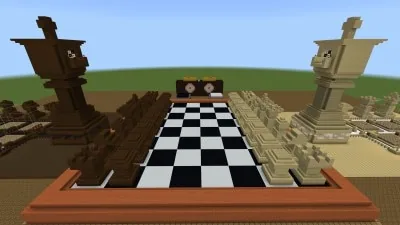
In this lesson, students explore the strategic rules of chess through an interactive Minecraft environment. By examining movement patterns and testing openings, learners strengthen their critical thinking and spatial awareness while engaging with a classic strategy game.
Students use a specialized world containing multiple learning zones. In the practice area, they write code to navigate the Agent across practice boards. On the main board, paired opponents operate control panels to select and move pieces, while an exterior workshop lets them craft, clone, and export custom piece designs.
Learning objectives
By the end of this lesson students will be able to:
- Program the Agent using basic code to demonstrate standard chess piece movements.
- Redesign custom chess pieces and deploy them to the main board using structure blocks.
- Execute legal moves in a two-player chess game using dual-station board controls.
- Document board tactics and piece creations using the camera and portfolio.
Blocks and items used in this lesson


Key vocabulary
- Agent
- A programmable in-game character used to practice movement patterns and test tactics.
- Structure Block
- A utility block used to clone custom piece models onto the board or export them for 3D printing.
- Queening
- Promoting a pawn to a queen upon reaching the opposite side of the board, which this board does not support.
- Control Panel
- The player station interface where the left side chooses a piece and the right side chooses its destination square.
Before class
Lesson sequence
Suggested timing: about 60 minutes in total.
- Introduction and Rules Briefing10 min
Review basic chess rules, piece movements, and turn structure. Clarify main board constraints, such as the inability to queen a pawn and the lack of automatic tracking for captured pieces.
- Agent Practice and Movement Coding15 min
Direct students to the Practice area. Learners use basic coding to direct the Agent across individual boards, practicing how each piece navigates squares and placing blocks to simulate tactical board setups.
- Piece Redesign Workshop15 min
Students visit the design space outside their team side to remodel chess pieces. They can clone their new builds directly onto the main board, export them with structure blocks for 3D printing, or reset them to default.
- Main Board Match Play15 min
Students pair up on the White and Dark stations. Using the selection controls, players pick a piece on the left and choose its destination on the right, taking turns to play a match while photographing key plays.
- Reflection and Design Showcase5 min
Conclude with a brief portfolio review or a design showcase where students share their custom pieces and reflect on tactical moves made during match play.
Assessment: success criteria
- Code the Agent to follow proper movement paths on practice chessboards.
- Construct and successfully clone custom piece designs onto the game board.
- Operate the selection interface correctly to complete valid turns against a partner.
- Record gameplay decisions and custom models using the camera and portfolio.
Differentiation
Allow learners to place visual marker blocks on practice boards to map paths before writing movement code for the Agent.
Have advanced students export their custom piece models via structure blocks for 3D printing and diagram multi-move tactics in the practice zone.
Knowledge check
5 questions to check understanding after the lesson. Tap an answer to see if it is right; the score appears at the end.
1Where can students write code for the Agent to test tactics and piece movements?
Answer: B. The Practice area contains dedicated boards where students code the Agent to simulate piece movements.
2Which rule is explicitly identified as an unsupported limitation on the main board?
Answer: B. The teacher notes state that queening a pawn is not an available option on the main board.
3How do players move a piece during a game on the main board?
Answer: A. Players use the left area of the control station to select the piece and the right area to select where it moves.
4What feature allows students to export their custom chess piece designs out of Minecraft?
Answer: C. Structure blocks in the redesign area allow students to 3D export their designs for printing.
5How does the main board handle captured pieces during play?
Answer: D. The source notes that defeated pieces cannot be accounted for during the game.
Frequently Asked Questions
Does the world include automated chess tutorials for beginners?
No. The world deliberately excludes gameplay instructions so teachers can introduce the rules and terminology using their preferred instructional style.
Can students restore the original piece designs if they do not like their changes?
Yes. The redesign area includes a feature that resets the pieces back to their normal default appearance.
How much coding knowledge do students need before starting?
Students only need basic coding familiarity to command the Agent to navigate and place blocks across the practice boards.
Adapted from Chess game by Leticia Ahumada on Minecraft Education, last updated Feb 18, 2022. This classroom version, the timings and the quiz were written by 9Minecraft Education.