
How do logic gates use input conditions to control outputs in computer science and redstone circuits?
Overview
Logic gates serve as the foundational building blocks of digital computing, determining how systems process information and make decisions. In this lesson, students explore logical reasoning through sequencing tasks and truth tables before examining how inputs dictate outputs across four essential gates: AND, OR, NOT, and XOR.
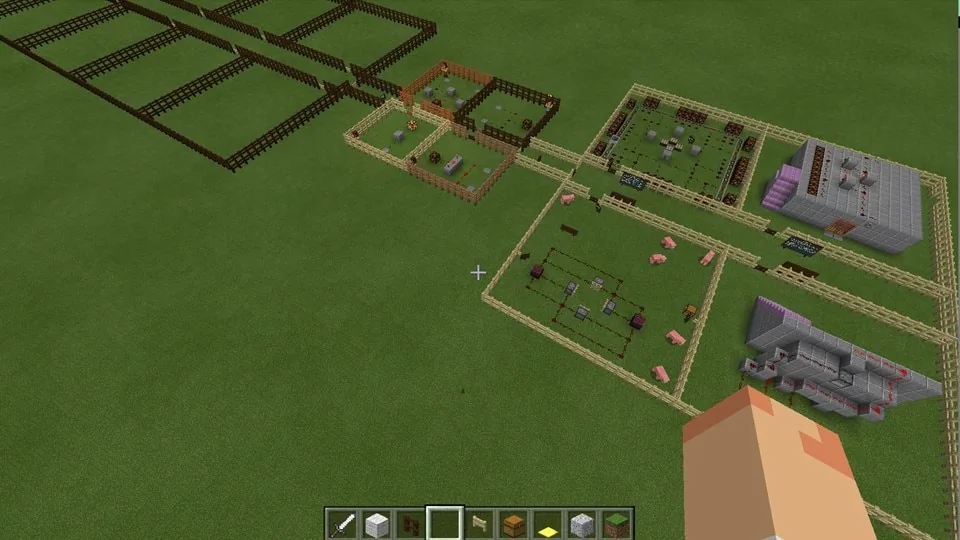
Using the Logic Gate Learning Centre World, students test interactive logic gates at the spawn point, work with partners to trigger multi-input circuits, and examine real-world mechanism examples. Students then apply what they have learned by constructing their own functional redstone mechanisms within protected classroom build zones.
Learning objectives
By the end of this lesson students will be able to:
- Identify and describe four fundamental logic gates: AND, OR, NOT, and XOR.
- Complete truth tables that accurately represent gate inputs and outputs.
- Build a functioning redstone circuit that incorporates at least one logic gate.
- Discuss how logic gates function within computer science mechanisms.
Blocks and items used in this lesson


Key vocabulary
- Logic Gate
- A digital circuit component that processes one or more inputs to produce a single output.
- Truth Table
- A table setting out all possible input combinations and their resulting outputs for a logic circuit.
- AND Gate
- A logic gate that outputs an active signal only when all of its inputs are active.
- OR Gate
- A logic gate that outputs an active signal when at least one input is active.
- NOT Gate
- A logic gate that inverts the input signal, turning on when the input is off.
- XOR Gate
- An exclusive OR gate that outputs an active signal only when inputs differ from one another.
Before class
Lesson sequence
Suggested timing: about 60 minutes in total.
- Logical Sequencing Warm-Up10 min
Introduce the idea of logical thinking by writing a set of out-of-order instructions on the board for a simple task, such as writing an essay. Invite students to reorganize the steps into the correct sequence and discuss why order and conditions matter in computing.
- Direct Instruction and Truth Tables15 min
Present the lesson slides to introduce logic gates, truth tables, and the four target gates: AND, OR, NOT, and XOR. Have students complete the printed slide 9 worksheet during the explanation, followed by the brief check-for-understanding quiz on slides 10 through 13.
- Worksheet and Simulation Practice10 min
Provide the logic gate worksheets to reinforce student understanding of inputs and outputs. Teachers may also direct students to test virtual circuits with lights and buzzers in the logic lab game or complete the Scratch quiz.
- Minecraft Exploration and Redstone Build20 min
Guide students into the Logic Gate Learning Centre World to examine basic gates at the spawn area, having them pair up to activate the dual inputs of the AND gate. After inspecting pre-built working mechanisms, students construct their own working redstone circuit inside designated areas.
- Lesson Review and Exit Quiz5 min
Gather the class to summarize how each gate handles signals and relate their Minecraft mechanisms back to computer science. Distribute the printed slide 20 quiz as a quick concluding assessment.
Assessment: success criteria
- Student accurately identifies the AND, OR, NOT, and XOR logic gates.
- Student correctly completes truth tables demonstrating the relationship between inputs and outputs.
- Student constructs a working redstone circuit that successfully demonstrates logic gate behavior.
- Student explains how their circuit processes input signals to trigger an output mechanism.
Differentiation
Allow learners to explore working circuit examples in a guided group and focus on replicating a simple spawn circuit rather than a complete mechanism.
Challenge advanced students to research additional logic gates, complete extended truth tables, or combine multiple gates into a complex system like a lighthouse.
Knowledge check
5 questions to check understanding after the lesson. Tap an answer to see if it is right; the score appears at the end.
1Which logic gate requires all of its inputs to be active in order to produce an output?
Answer: B. An AND gate only produces an active output when every one of its inputs is turned on.
2What is the primary function of a truth table in computer science?
Answer: A. A truth table maps out all possible combinations of inputs and shows what the output will be for each.
3Why is a partner needed to test the basic AND gate circuit at the spawn area in the lesson world?
Answer: B. Because an AND gate requires multiple active inputs to function, two students cooperate to trigger them simultaneously.
4How does a NOT gate change an input signal?
Answer: C. A NOT gate acts as an inverter, outputting the exact opposite state of its input.
5What safety feature is incorporated into the Logic Gate Learning Centre World to manage student areas?
Answer: D. Allow/deny blocks protect pre-built structures from being destroyed, while border blocks keep students within their assigned areas.
Resources
- Lesson package (.zip)Everything the author attached to this lesson in one download.
- Prior Binary Lesson PPTThis is the lesson I teach before this one.
- Prior Binary Lesson WorksheetsThis is the lesson I teach before this one.
- Lesson PPTThis is the lesson PPT - some slides need printing (see Student Activities).
- Logic Gates WokrsheetsThese are the sheets for step 3 in students activities.
- Logic Gate Learning Centre WorldThis zip file contains the pre-built world for the lesson.
Frequently Asked Questions
What background knowledge should students have before starting this lesson?
The author recommends delivering an introductory lesson covering binary and denary numbers prior to this lesson, using the provided prior learning slides and worksheets.
Do students need to construct an entire structure such as a lighthouse for their task?
No, students only need to engineer the working redstone mechanism itself; complete structures like the lighthouse exist in the world as reference examples.
Adapted from Beginners Logic Gates by Hannah Mills on Minecraft Education, last updated Mar 29, 2017. This classroom version, the timings and the quiz were written by 9Minecraft Education.









































