
- Type
- Lesson plan
- Ages
- Ages 6-13
- Includes
- Quiz: 5 questionsLesson files
How can mathematical jump limits and concise coding be used to generate a functional, randomized parkour course?
Overview
In this lesson, students combine mathematics and computer programming to design an automated parkour course. By investigating player movement mechanics, learners determine feasible jumping distances and use mathematical limits to randomize platform placement.
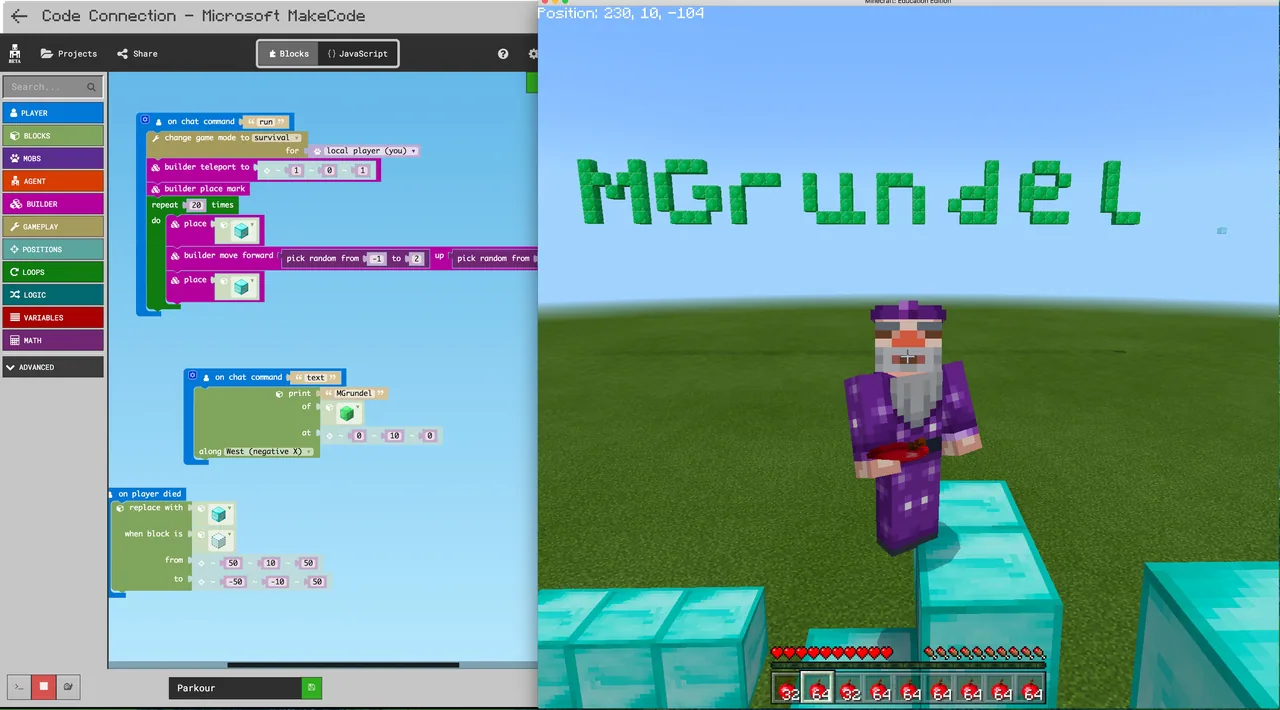
Using Minecraft Education, learners open Code Builder to script their courses with concise logic. After generating their maps, students playtest each other's layouts, capture their code with the camera and portfolio, and program advanced features such as automatic respawns and block clearing.
Learning objectives
By the end of this lesson students will be able to:
- Program a randomized parkour track using Code Builder.
- Calculate the viable range of distances a player can jump between platforms.
- Write concise code using as few lines as possible.
- Playtest peer courses and provide constructive feedback.
- Document code and builds using the in-game camera and portfolio.
Blocks and items used in this lesson


Key vocabulary
- Code Builder
- The integrated programming interface in Minecraft Education used to write and execute code.
- Parkour
- A style of gameplay focused on jumping across obstacles and platforms to reach a goal.
- Randomize
- Generating values or positions unpredictably within defined numerical boundaries.
- Jump Range
- The minimum and maximum horizontal distance a player can successfully leap.
- Portfolio
- An in-game book that stores and displays photographs taken with the camera.
Before class
Lesson sequence
- Investigating Jump Distances
Introduce the design challenge. Have students test player jump limits manually to discover the maximum and minimum horizontal distance a player can jump across empty space.
- Coding the Parkour Generator
Students launch Code Builder and write a script to spawn randomized parkour platforms. Challenge learners to keep their code efficient by using as few commands as possible while keeping platforms within reachable jump ranges.
- Playtesting and Peer Feedback
Learners swap seats or join worlds to test each other's generated courses. They evaluate whether the randomized jumps are achievable and provide constructive feedback on map pacing.
- Code Iteration and Advanced Features
Students refine their scripts based on peer feedback. Students who complete the core task can code extra features, such as resetting the player to spawn upon falling, clearing old blocks, or altering difficulty settings.
- Portfolio Documentation
Students record their finished work by taking screenshots of their scripts and capturing in-game photos of their completed course using the camera and portfolio.
Assessment: success criteria
- The student creates a functioning script in Code Builder that generates parkour platforms.
- The generated platforms stay within the calculated limits of achievable player jump distances.
- The student actively tests peer maps and communicates actionable feedback.
- The student compiles code screenshots and build photos inside the camera and portfolio.
Differentiation
Provide sample code snippets of basic loops so students can focus primarily on setting workable jump distance variables.
Challenge advanced coders to program automatic block clearing and fail-safe teleportation that returns fallen players to a spawn point.
Knowledge check
5 questions to check understanding after the lesson. Tap an answer to see if it is right; the score appears at the end.
1Which tool inside Minecraft Education do students open to program their parkour courses?
Answer: A. The student activities explicitly direct learners to launch Code Builder to create their parkour maps.
2What mathematical measurement must students determine before randomizing their platforms?
Answer: A. The learning objectives require students to find the range of distances a player can successfully jump.
3What coding constraint are students challenged to follow when writing their program?
Answer: B. The source specifies that students should develop their random parkour map with as few lines of code as possible.
4How are students expected to document their code and course progress?
Answer: C. The activity instructions state that students should document their learning with code screenshots and images using the camera and portfolio.
5Which advanced feature does the lesson suggest adding to handle player failure?
Answer: D. The lesson lists teleporting back to a spawn point upon dying as an optional advanced enhancement.
Resources
Frequently Asked Questions
Does this lesson require a specific custom world download?
No, there is no downloadable world required. Students can build and execute their code in any standard flat or open world using Code Builder.
How do students ensure their randomized courses are possible to beat?
Students must determine the maximum jump distance for a player through in-game testing, then set their code's randomized spacing values to never exceed that limit.
What extensions can fast finishers work on?
Learners who finish early can code spawn point resets upon falling, automated scripts that clear out old blocks, or options that adjust difficulty levels.
Adapted from Parkour w/ Code! by Mark Grundel on Minecraft Education, last updated Aug 23, 2017. This classroom version, the timings and the quiz were written by 9Minecraft Education.







































