- Type
- Lesson plan
- Topics
- GeographyClimate Science
- Grade
- Primary (Grades 3-5)
- Ages
- Ages 8-10
How do climate and natural resources influence living things and the design of human shelters?
Overview
Environmental conditions shape the living world, determining which plants flourish, which animals survive, and how humans must adapt to secure food and shelter. In this unit, students examine the links between regional climate, natural resources, and the challenges of creating a liveable home.
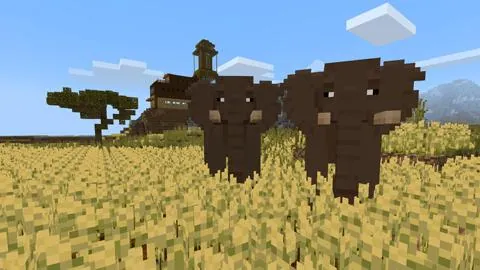
Working in small teams within Minecraft, learners visit four distinct biomes using set world seeds: snow, desert, jungle, and mesa. They record ecological findings using the camera and portfolio tools, cross-reference their discoveries with real-world research sheets, and subsequently apply their knowledge in survival mode to construct a shelter and establish a sustainable food supply.
Learning objectives
By the end of this lesson students will be able to:
- Identify native plants, animals, and geological resources across multiple Minecraft biomes.
- Compare and contrast the environmental features of Minecraft biomes with real-world habitats.
- Document in-game ecological observations using the camera and portfolio items.
- Design and build a functional shelter in survival mode using locally harvested materials and sustainable crops.
Blocks and items used in this lesson


Key vocabulary
- Biome
- A large community of vegetation and wildlife adapted to a specific climate.
- Vegetation
- The plant life and trees that grow naturally in a particular area.
- Portfolio
- An in-game book used to compile, organize, and view photos taken with the camera.
- Survival Mode
- A Minecraft game mode requiring players to gather materials, maintain health, and withstand hazards.
Before class
Lesson sequence
- Biome Exploration & Field Research
In groups of three, students load the assigned seed for the week (Snow in week 1, Desert in week 2, Jungle in week 3, Mesa in week 4). Teams explore the landscape to examine native vegetation, terrain features, and animal populations.
Learners open their world in Creative Mode to place a camera and portfolio into their inventories, then enter the command /gamemode S to resume Survival Mode while documenting their discoveries.
- Comparative Analysis
Students complete the research tables on their supporting worksheets, recording details about local flora, wildlife, and natural materials found in the Minecraft biome alongside data from the corresponding real-world habitat.
- Survival House Construction
Teams select a biome seed based on their chosen difficulty level: Normal Plains (Easy), Mesa or Jungle (Medium), Snow (Hard), or Desert (Very Hard). In Survival Mode, students must harvest local materials to construct a secure home.
- Harvest and craft building blocks native to the chosen biome.
- Craft tools and equipment needed to maintain survival.
- Fortify the structure against hostile mobs, wildlife, and weather hazards.
- Establish a farm with crops suitable to the environment to replenish health.
- Portfolio Review and Reflection
Student groups present their completed portfolios and shelter designs, explaining how their choice of building supplies and farm crops reflects the natural constraints of their selected biome.
Assessment: success criteria
- Completed research worksheets comparing Minecraft biomes with real-world environments.
- Exported portfolio files containing photos documenting native plants, animals, and resources.
- A functional house constructed in survival mode using locally harvested blocks.
- An established agricultural plot growing food suitable for health recovery.
- Demonstrated collaboration and communication within a three-person team.
Differentiation
Assign the Normal Plains seed (654775433) for the building task to provide accessible resources and lower environmental difficulty.
Have advanced groups complete their survival build in the Desert seed (961601796), which offers the most challenging survival conditions.
Knowledge check
5 questions to check understanding after the lesson. Tap an answer to see if it is right; the score appears at the end.
1Which biome seed is classified as 'very hard' for the survival house task?
Answer: C. The lesson identifies the desert seed (961601796) as the very hard difficulty option for shelter design.
2Which in-game tools are used to document plants and animals during biome exploration?
Answer: A. Students are instructed to equip the camera and portfolio to capture and compile their ecological observations.
3Which command switches players back to survival mode after collecting camera equipment in creative mode?
Answer: D. The activity instructions specifically direct students to type the command /gamemode S to switch back to survival mode.
4What is the recommended group size for both the research and house-building tasks?
Answer: B. Both Task 1 and Task 2 explicitly state that students work in groups of 3.
5What must students include at their survival base to restore their health bar?
Answer: C. The task guidelines require students to farm appropriate crops that grow in their biome to sustain health and healing.
Resources
- Lesson package (.zip)Everything the author attached to this lesson in one download.
- Supporting student guideA guide for students to use
- Supporting Worksheet templateWorksheet for students to complete
Frequently Asked Questions
How do students acquire the camera and portfolio while working in survival mode?
Students generate the world in Creative Mode to place the camera and portfolio into their character inventories, then execute the command /gamemode S to enter Survival Mode.
Do I need to download custom world files to run these activities?
No custom world downloads are needed because every biome is generated by entering the specific numeric seeds provided in the lesson plan.
What order should the exploration biomes follow across the unit?
The unit plan arranges the research across four weeks, starting with the Snow biome in week one, Desert in week two, Jungle in week three, and Mesa in week four.
Adapted from Biome Explore & House De by Carmel Aiello on Minecraft Education, last updated Jul 10, 2018. This classroom version, the timings and the quiz were written by 9Minecraft Education.