- Type
- Build challenge
- Subject
- Computer Science & Coding
- Topics
- Computer Science
- Duration
- about 60 min (suggested)
- Includes
- Quiz: 5 questionsMinecraft world
How can we use code logic to ensure an arcade counter awards the correct prize for a specific number of emeralds?
Overview
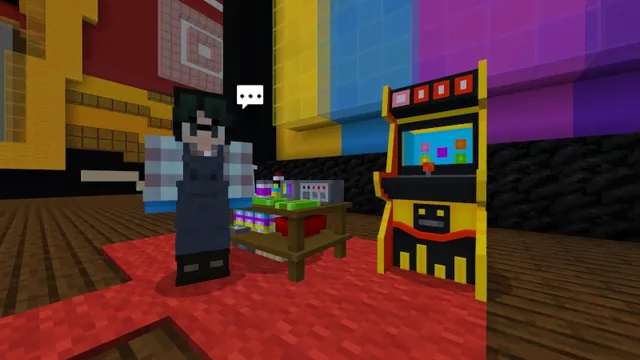
In this computer science build challenge, students explore the mechanics of an arcade redemption counter. They investigate how programmed logic connects in-game currency to specific reward outputs, sharpening their computational thinking through real-world simulation.
Using Minecraft Education alongside MakeCode, learners follow instructions from in-game characters and video tutorials to repair a malfunctioning prize counter function. They then apply their creative building skills to construct arcade-themed prizes that match specific emerald costs.
Learning objectives
By the end of this activity students will be able to:
- Repair an arcade prize counter function using MakeCode.
- Program conditional rewards based on specific emerald amounts.
- Build arcade-themed physical prizes inside the Minecraft world.
- Apply critical thinking to troubleshoot and test coding solutions.
Blocks and items used in this lesson


Key vocabulary
- MakeCode
- A block and text-based coding platform used to program actions and mechanics within Minecraft.
- Prize Counter
- An arcade station where players redeem earned currency for selected physical prizes.
- Function
- A named section of code designed to perform a specific task when called.
- Emeralds
- The specific in-game item used as the currency value to redeem arcade prizes.
Before class
Lesson sequence
Suggested timing: about 60 minutes in total.
- Introduction and Orientation10 min
Introduce the challenge scenario: the arcade prize counter is broken and not dispensing correct items. Direct students to speak with in-game characters and watch the provided video tutorials to understand the task.
- Code the Prize Counter20 min
Students open MakeCode to inspect the prize counter function. Working independently or in pairs, they fix the code so that specific numbers of emeralds reliably trigger the correct prize output.
- Build Arcade Prizes20 min
Once the code functions properly, learners design and build their own custom arcade-themed prizes to display at the prize counter, tailoring each build to its designated emerald cost tier.
- Testing and Review10 min
Learners test each other's redemption systems to verify that submitting the required emeralds awards the proper prize. Conclude with a brief discussion on how code functions automate reward systems.
Assessment: success criteria
- The student successfully uses MakeCode to repair the prize counter function.
- The program accurately dispenses the correct prize for a specified count of emeralds.
- The student constructs recognizable arcade-themed prizes to accompany their redemption counter.
- The student demonstrates problem-solving by using the in-game guides and tutorials to debug their work.
Differentiation
Allow students to refer directly to the completed code solutions in the educator guide or pair them with a peer while watching the in-game video tutorials.
Direct students to explore the GameCode curriculum extension to design their own arcade-style mini-games.
Knowledge check
5 questions to check understanding after the lesson. Tap an answer to see if it is right; the score appears at the end.
1What coding environment is used to repair the prize counter in this challenge?
Answer: B. The challenge specifies using MakeCode to fix the function of the prize counter.
2Which in-game item serves as the currency for claiming arcade prizes?
Answer: C. The source explicitly states that prizes are awarded for a specific number of emeralds.
3What two resources guide students through the challenge inside the game?
Answer: A. The source explains that in-game characters and video tutorials will guide students to success.
4What component of the arcade requires repair through programming?
Answer: D. Students are tasked with repairing the function of the arcade prize counter so correct prizes are awarded.
5Which curriculum is suggested as an extension for students to build arcade-style mini-games?
Answer: A. The source highlights GameCode as the extension curriculum where students create arcade mini-games.
Resources
Frequently Asked Questions
Where can teachers find answer keys for the programming tasks?
Completed code solutions and step-by-step section walkthroughs are provided in the Earning Emeralds Educator Guide.
What additional coding curriculum can be used after this lesson?
Teachers can transition students into GameCode, an extension curriculum where learners design and code their own arcade-style mini-games.
Adapted from Prize Problems by Minecraft Education on Minecraft Education, last updated Nov 21, 2025. This classroom version, the timings and the quiz were written by 9Minecraft Education.