- Type
- Build challenge
- Duration
- about 75 min (suggested)
- Includes
- Quiz: 5 questionsMinecraft world
How can we accurately represent the relative sizes of planets using Minecraft blocks?
Overview
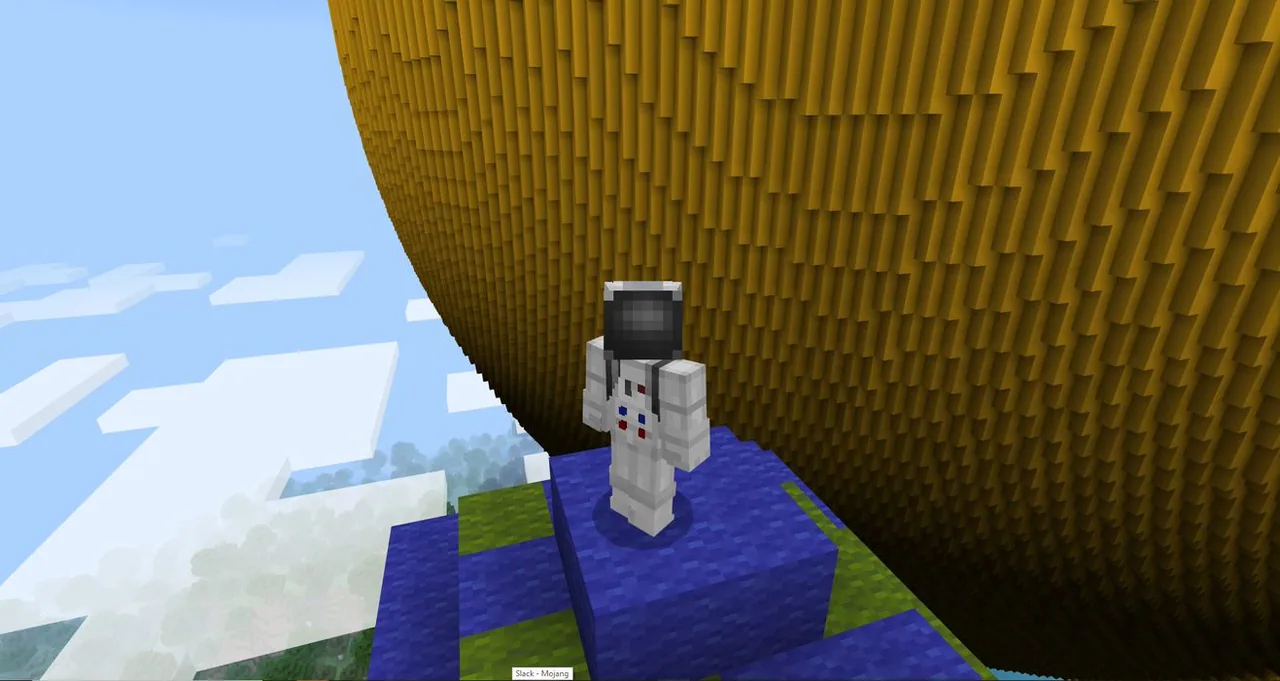
Understanding the sheer scale of the solar system is difficult without direct visual comparisons. This challenge frames planetary proportions through a concrete baseline: if Mercury is represented by a single Minecraft block, students must calculate and build the remaining planets to match that relative scale alongside a massive model Sun.Learning objectives
By the end of this activity students will be able to:
- Calculate proportional planet sizes based on a one-block Mercury baseline.
- Build three-dimensional scale models of the planets within Minecraft.
- Use Code Builder commands to generate spherical planet models efficiently.
- Identify and label specific solar regions including the corona and convection zone.
Blocks and items used in this lesson


Key vocabulary
- Scale Model
- A physical or digital representation that maintains proportional sizing to the real object.
- Mercury
- The smallest planet in our solar system, used as the one-block unit in this activity.
- Radius
- The distance from the center point of a sphere to any point on its outer surface.
- Corona
- The outermost layer of the Sun's atmosphere.
- Convection Zone
- An internal layer of the Sun where energy circulates in boiling plasma currents.
Before class
Lesson sequence
Suggested timing: about 75 minutes in total.
- Introduction and Scale Concept10 min
Introduce the scale ratio: Mercury equals one block, and the Sun is 286 times its size. Tour the pre-built scale Sun in the challenge world to help students grasp the visual scale.
- Calculations and Planning15 min
Students work in pairs or groups to determine the relative sizes of the remaining planets. Because block values must be whole numbers, students decide where to round numbers up or down.
- Scale Construction25 min
Learners build each planet using their calculated block sizes. Students can place blocks manually or open Code Builder, find the sphere command, and set the radius and location to generate planetary bodies.
- Extensions and Labeling15 min
- Label solar features such as the corona and convection zone.
- Research individual planets and construct representative builds beside them.
- Review and Discussion10 min
Have groups compare their planetary models, explaining how they handled rounding decisions and how Code Builder assisted their building process.
Assessment: success criteria
- Planetary models demonstrate correct relative sizes based on a one-block Mercury.
- Rounding decisions for block dimensions are logical and consistent.
- Code Builder sphere commands are correctly configured with appropriate radius and coordinates.
- Sun labels accurately pinpoint the corona and convection zone.
Differentiation
Provide learners with a reference sheet containing pre-rounded block counts for each planet so they can focus on building.
Challenge students to use Code Builder commands exclusively to position and generate all planets with precise radius values.
Knowledge check
5 questions to check understanding after the lesson. Tap an answer to see if it is right; the score appears at the end.
1Which planet is defined as one block in this scale model?
Answer: A. The prompt establishes that Mercury, the smallest planet, equals one Minecraft block.
2According to the challenge, how many times larger than Mercury is the Sun?
Answer: C. The lesson text states that the Sun is 286 times the size of Mercury.
3What should students do when converting planetary dimensions into Minecraft block counts?
Answer: D. The challenge notes that students may have to round up or down to find the correct number of blocks.
4Which Code Builder command is suggested to help construct spherical planets?
Answer: B. The extension recommends searching for the sphere command in Code Builder to set radius and location.
5Which two parts of the Sun does the extension suggest labeling?
Answer: A. The extension explicitly names the corona and convection zone as parts of the Sun to label.
Resources
Frequently Asked Questions
Do students need to build the Sun themselves?
No, the challenge includes a pre-built world that already contains a scale model of the Sun to serve as the visual starting point.
How does Code Builder assist with planetary builds?
Students can search for the sphere command in Code Builder, define the desired radius, and select build coordinates to quickly generate spherical shapes.
What subjects does this build challenge address?
This activity covers Science, Computer Science, and Earth and Space, while reinforcing critical thinking and collaboration skills.
Adapted from Solar Model by Minecraft Education on Minecraft Education, last updated Jul 21, 2025. This classroom version, the timings and the quiz were written by 9Minecraft Education.