- Type
- Build challenge
- Subject
- Art, Music & Design
- Topics
- Art and Design
- Duration
- about 65 min (suggested)
- Includes
- Quiz: 5 questionsMinecraft world
How can planning on a 2D grid help you sculpt an expressive face in a 3D block environment?
Overview
This Art and Design challenge encourages learners to combine physical drafting with digital sculpture. Students practice spatial reasoning and creative expression by translating two-dimensional pixel sketches into a large-scale three-dimensional carving.
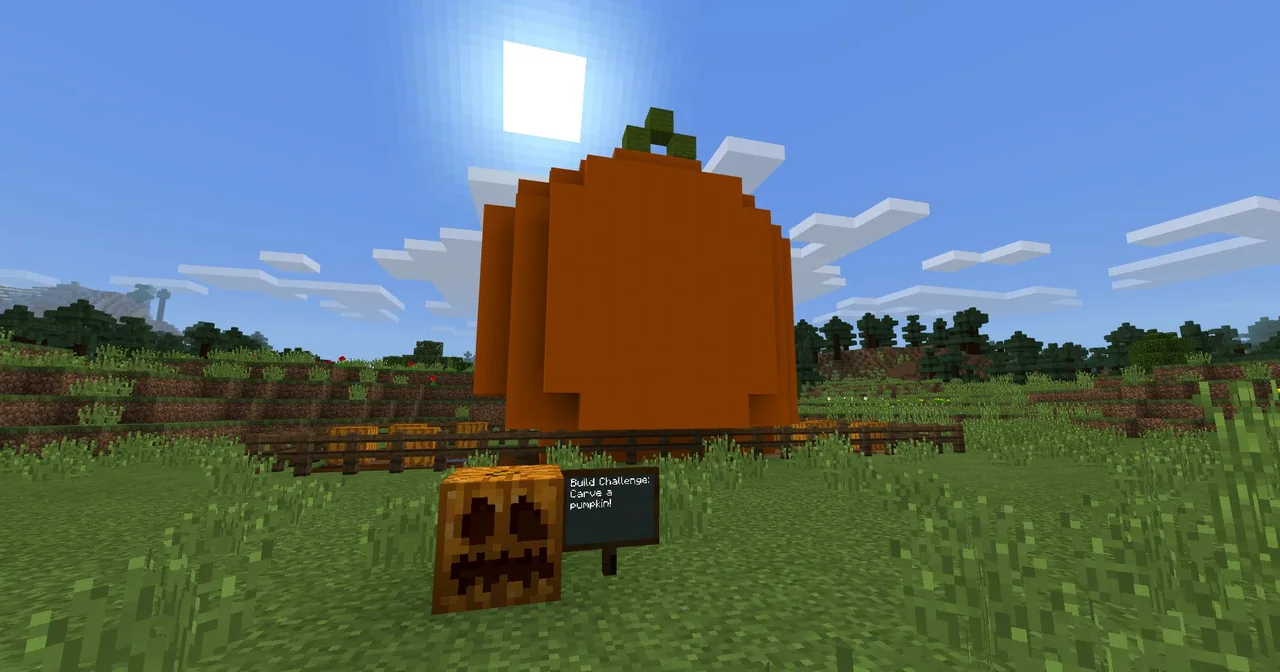
Using Minecraft, students either start with a pre-built giant pumpkin structure in the challenge world or construct their own from scratch. They remove and rearrange blocks to carve facial features, with options to integrate redstone illumination and automated Agent effects.
Learning objectives
By the end of this activity students will be able to:
- Draft a planned pumpkin face layout using grid paper before constructing.
- Carve or build a customized pumpkin face inside Minecraft matching the initial design.
- Apply critical thinking to modify facial proportions using block-based geometry.
- Implement optional technical features such as redstone illumination or coded Agent effects.
Blocks and items used in this lesson


Key vocabulary
- Grid Paper
- Paper printed with a network of fine squares used for planning scale drawings and pixel art.
- Carving
- The act of shaping an object by cutting away or removing material from a solid form.
- Redstone
- A Minecraft material used to build electrical circuits that power lights and mechanisms.
- Agent
- A programmable helper in Minecraft Education that can execute block-placing and visual commands.
Before class
Lesson sequence
Suggested timing: about 65 minutes in total.
- Drafting on Grid Paper10 min
Introduce the design task and hand out grid paper. Have students sketch out their pumpkin face square by square, treating each square as an individual Minecraft block.
- Base Selection and Preparation10 min
Direct students to load the challenge world. Students can choose to use the giant pumpkin provided in the world or lay out the orange frame for their own custom base structure.
- Carving the Face20 min
Students remove blocks from the pumpkin structure according to their grid plans to carve out eyes, noses, and mouths, making adjustments as needed for symmetry or expression.
- Extensions and Illumination15 min
- Wire a redstone lighting mechanism inside the pumpkin to make it glow when night falls.
- Program the Agent to display decorative effects around the carving.
- Showcase and Reflection10 min
Conduct a gallery walk where learners view each other's carved pumpkins. Ask students to compare their finished 3D builds with their original 2D grid paper plans.
Assessment: success criteria
- Student produced a completed 2D layout on grid paper prior to building.
- The in-game pumpkin structure features a clearly defined carved face.
- The digital carving reflects the spatial planning worked out on the grid sketch.
- Student can describe how they adapted their design when transferring it into the block world.
Differentiation
Allow students to carve directly into the provided world pumpkin using simple high-contrast blocks to mark cut-out areas.
Challenge students to code the Agent to trigger special visual effects or design a real-world pumpkin based on their digital model.
Knowledge check
5 questions to check understanding after the lesson. Tap an answer to see if it is right; the score appears at the end.
1What should students use to plan their pumpkin face before building in Minecraft?
Answer: B. The source specifies using grid paper to plan out the face before carving in the game.
2Which primary subject area does the Pumpkin Carving challenge address?
Answer: A. The challenge source categorizes the lesson under Art and Design.
3Where can students get the pumpkin base to carve inside the game?
Answer: C. The instructions note students can use the pumpkin in the provided world or construct their own.
4What can students create with Redstone as an extension to this challenge?
Answer: D. The source suggests using Redstone to build a lighting system that makes the pumpkin glow at night.
5According to the challenge extensions, what can students do with the Agent?
Answer: B. An extension in the source directs students to code the Agent to add effects to their display.
Resources
Frequently Asked Questions
Do students have to build their own giant pumpkin from scratch?
No, students may use the pre-built pumpkin available in the provided challenge world to begin carving immediately, though they are free to construct their own if preferred.
How does grid paper support the building process?
Grid squares translate directly into individual Minecraft blocks, helping students plan proportions, symmetry, and cutouts before removing or placing blocks in the 3D space.
What real-world connection can be made from this challenge?
Students can use their completed grid plan or digital Minecraft carving as a template to carve an actual real-world pumpkin.
Adapted from Pumpkin Carving by Minecraft Education on Minecraft Education, last updated Jun 12, 2025. This classroom version, the timings and the quiz were written by 9Minecraft Education.