- Type
- Build challenge
- Subject
- Art, Music & Design
- Topics
- Art and Design
- Duration
- about 60 min (suggested)
- Skills
- Creativity
- Includes
- Quiz: 5 questionsMinecraft world
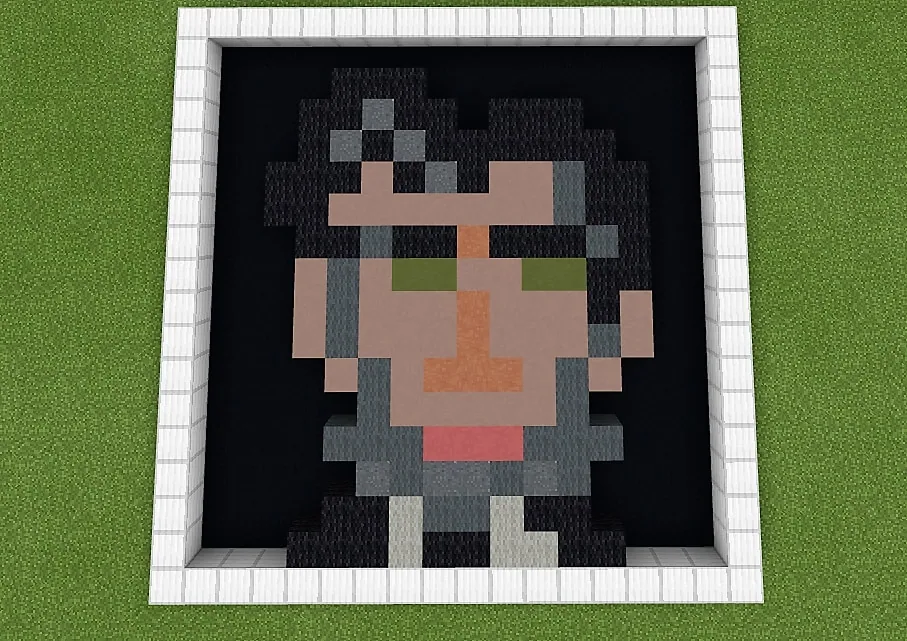
How can you translate your personal features into a recognizable self-portrait using a limited block grid?
Overview
Students explore how visual information can be simplified into low-resolution digital artwork. By studying pixel art styles found in retro video games and Minecraft, learners discover how small square units combine to depict complex facial features and expressions.Learning objectives
By the end of this activity students will be able to:
- Analyze pixel art styles in classic video games and Minecraft.
- Capture a reference selfie using a laptop or phone camera.
- Build a 16x16 or 32x32 self-portrait using colored blocks in Minecraft.
Blocks and items used in this lesson
 White Terracotta
 Terracotta
 Black Wool
 Brown Wool
 White Wool
 Yellow Wool
 Light Blue Wool
Key vocabulary
- Pixel Art
- A form of digital art where images are built using individual colored square units on a grid.
- Self-Portrait
- An artistic representation created by an artist depicting their own face or likeness.
- Grid Method
- A technique using aligned squares to help map, transfer, or scale visual artwork.
Before class
Lesson sequence
Suggested timing: about 60 minutes in total.
- Warm-up and Inspiration10 min
Introduce the project by showing examples of pixel art from retro games alongside Minecraft character art. Discuss how artists use limited squares and colors to suggest recognizable faces.
- Photo Reference10 min
Instruct students to use a laptop or phone camera to take a clear selfie. Have them identify key visual elements to replicate, such as hair color, eye spacing, and skin tones.
- Build Phase30 min
Students enter the challenge world and begin placing blocks to represent their facial features. Learners choose either a 16x16 or 32x32 area for their portrait.
- Reflect and Share10 min
Students review their peers' portraits and discuss the artistic challenges of working within a constrained grid resolution.
Assessment: success criteria
- The student captured and used a photographic reference for their build.
- The completed portrait fits within the assigned 16x16 or 32x32 boundary.
- Block selection demonstrates intentional color matching for facial features.
Differentiation
Have students work on the smaller 16x16 canvas to focus on basic color blocks and overall shape without overwhelming detail.
Challenge students to build at the 32x32 resolution and document the specific difficulties encountered when shifting between small and large scales.
Knowledge check
5 questions to check understanding after the lesson. Tap an answer to see if it is right; the score appears at the end.
1What canvas dimensions are specified for the Minecraft self-portrait challenge?
Answer: B. The challenge directions ask students to translate their selfie into a 16x16 or 32x32 portrait.
2What tool do students use to create a visual reference of themselves?
Answer: D. The source instructs students to capture a selfie using a phone or laptop camera.
3Besides Minecraft, where do students look for historical examples of pixel art?
Answer: A. Students are asked to review pixel art examples from classic video games and Minecraft.
4Which artistic approach is suggested as an extension to enlarge images for drawing?
Answer: C. The extension recommends using the grid method to scale an image for physical drawings or paintings.
5How can this challenge be adapted for an interdisciplinary biography assignment?
Answer: B. An extension suggests building portraits of famous people for book reports or biography projects.
Resources
Frequently Asked Questions
What should students use as their reference image?
Students should capture a personal selfie using either a phone camera or their laptop's built-in webcam before building.
How can early finishers extend their learning?
Students who complete their portrait early can build at the larger 32x32 scale, reflect on scale differences, or create a portrait of a notable historical figure for a biography project.
Adapted from Pixel Portraits by Minecraft Education on Minecraft Education, last updated Jun 12, 2025. This classroom version, the timings and the quiz were written by 9Minecraft Education.