
- Type
- Lesson plan
- Includes
- Quiz: 5 questions
How can we use historical research and virtual construction to tell the story of Juazeiro do Norte and the statue of Father Cícero?
Overview
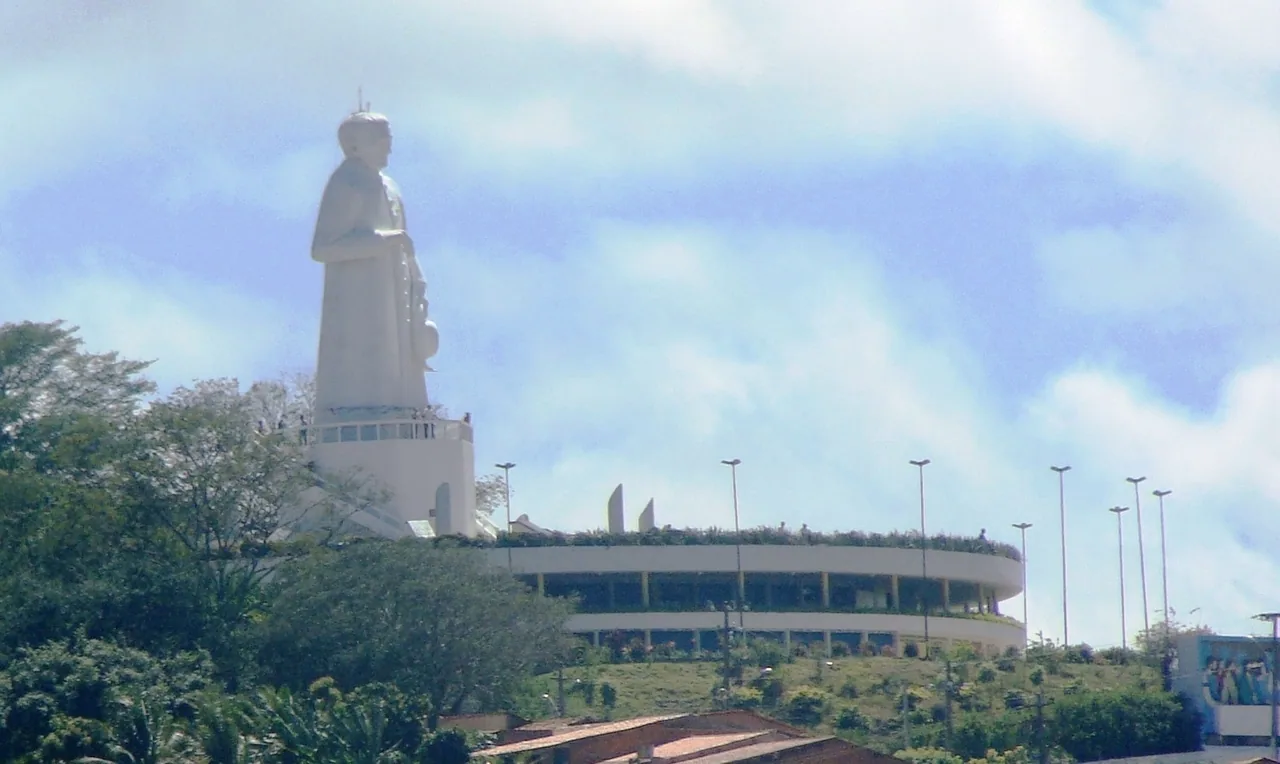
Juazeiro do Norte is a historic tourist destination renowned for the Geossítio Hill of the Horto and the monumental statue of Father Cícero, recognized as the third largest statue in the world. This project invites students to explore the heritage of the city, examine the history behind the monument's construction, and reflect on how these historical events impacted the daily lives of local citizens.
Over a sequence of ten lessons, students begin by conducting individual historical research and assembling digital Sway presentations. Working in pairs within Minecraft Creative mode, learners then sculpt the terrain of the hill and recreate the colossal statue, using the in-game camera to photograph their build and compare their virtual monument with archival images.
Learning objectives
By the end of this lesson students will be able to:
- Investigate the history of Juazeiro do Norte and the construction of the Father Cícero statue.
- Compile archival photos and a sequential narrative into a digital Sway presentation.
- Construct a collaborative scale representation of the Hill of the Horto and the Father Cícero statue in Creative mode.
- Document the virtual build using the in-game camera and evaluate its accuracy against historical research.
Blocks and items used in this lesson


Key vocabulary
- Padre Cícero
- A key religious and civic figure in the history of Juazeiro do Norte whose likeness was commemorated in a monumental statue.
- Hill of the Horto
- A geological site located three kilometers from Juazeiro do Norte that houses the famous statue of Father Cícero.
- Sway
- A digital storytelling presentation tool used to assemble research, images, and historical narratives.
- Creative Mode
- A Minecraft game setting that provides unlimited access to blocks and materials, allowing students to focus entirely on building.
Before class
Lesson sequence
- Historical Research and Sway Creation
During the first two lessons, students work individually to research the history of Juazeiro do Norte and gather photos documenting the construction of the Father Cícero statue. Each student designs a Sway presentation detailing the step-by-step history and explaining the monument's influence on the community before sharing it with peers.
- Landscape and Terrain Planning
Students form pairs and join a Minecraft world set to Creative mode. Using their Sway research for reference, teams lay out the dimensions and elevation of the Hill of the Horto to establish the foundation for their build.
- Monument Construction
Partners collaborate using Creative mode materials to erect the statue of Father Cícero atop their recreated hill. Students work together to represent key details, scale, and recognizable features identified during their initial historical research.
- Documentation, Comparison, and Sharing
Using the in-game camera, pairs take photos and selfies of their completed site. Students compare their virtual structures to the archival photos in their Sway presentations, recount their historical narrative based on the build, and share their creations with the wider community.
Assessment: success criteria
- The student's Sway presentation documents the history of Juazeiro do Norte and the construction steps of the statue using collected photos.
- The Minecraft build clearly represents both the Hill of the Horto landscape and the Father Cícero statue.
- The pair uses the in-game camera to capture photos and selfies of their finished project.
- Students accurately evaluate their virtual model by comparing it with archival images and telling the story behind the construction.
Differentiation
Provide a curated set of historical photographs and an outline checklist to assist students in organizing their Sway presentation and planning their build.
Ask advanced pairs to add surrounding environmental features of the geosite and deliver an oral historical walkthrough using their in-game photos.
Knowledge check
5 questions to check understanding after the lesson. Tap an answer to see if it is right; the score appears at the end.
1How far is the Geossítio Hill of the Horto located from the city of Juazeiro do Norte?
Answer: B. The source notes that the geosite Hill of the Horto is situated 3 kilometers from the town.
2According to the lesson details, what notable global ranking does the statue of Father Cícero hold?
Answer: D. The guiding questions highlight that the statue of Father Cícero is the third largest in the world.
3What is the total planned duration for the entire learning activity?
Answer: C. The activity explicitly specifies that the project will last 10 lessons in total.
4Which digital tool do students use to organize their individual research and construction photos?
Answer: A. Students are instructed to gather photos and create a Sway presentation during the first two lessons.
5Which Minecraft tool are students instructed to use to record and share photos of their completed build?
Answer: B. The activity emphasizes allowing the use of the camera to take and share photos and selfies of the completed site.
Frequently Asked Questions
How are the ten lessons divided across the project phases?
The unit allocates the first two lessons to individual research, photo collection, and Sway presentation creation. The remaining eight lessons are reserved for collaborative building, photo documentation, and comparative evaluation in Minecraft.
What Minecraft mode should students use for building?
Students build in Creative mode so that pairs have access to all necessary blocks and materials without survival constraints.
How does the teacher evaluate student work at the end of the unit?
The teacher checks the virtual build against the historical photos gathered in the student's Sway presentation, evaluating whether key elements are present, how closely the build matches the photos, and how effectively students tell the story of the landmark.
Adapted from Exploring the Garden Mountain by Raniere Candido on Minecraft Education, last updated Aug 20, 2018. This classroom version, the timings and the quiz were written by 9Minecraft Education.